Lighting / Stage Lighting
Wash & Beam 24 x 3W LED Wall Bar 151.598UK
Quick guide for the AVSL 151.598UK Wash & Beam LED Wall Bar. Includes setup, DMX channel modes, menu navigation, and troubleshooting steps.
Table of contents
Manual images
Click an image to enlargeQuick guide from the manual
This document provides essential operating instructions for the AVSL 151.598UK Wash & Beam LED Wall Bar. It covers installation, DMX configuration, menu navigation, and troubleshooting. Always ensure the unit is used in a dry environment and is properly ventilated.
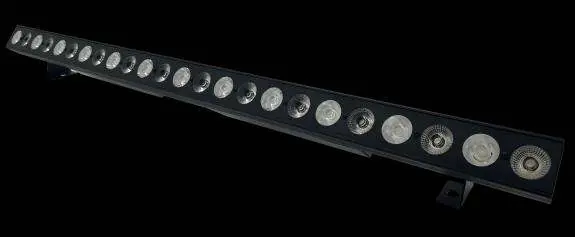
Placement and safety
- Use the included mounting brackets to fix the unit to a stand or lighting truss.
- If mounting overhead, always use secondary safety fixings.
- Ensure there is adequate airflow around the fixture housings.
- Keep the unit away from damp or dusty environments.
- Do not aim the LED or laser output directly into the line of sight to avoid eye injury.
Rear panel controls
The rear panel contains the following interfaces:
- Power input and output (twist and lock connectors).
- DMX input and output (3-pin XLR).
- Internal microphone.
- Control panel with LED display.
Menu navigation
Use the control panel buttons to adjust settings:
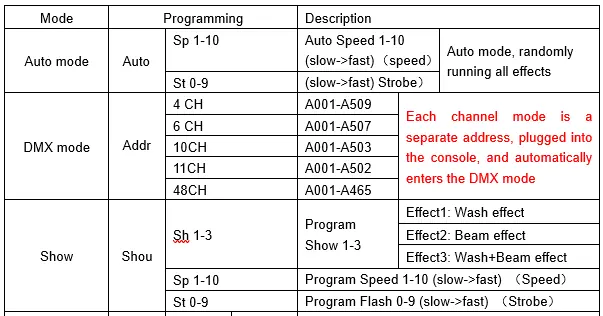
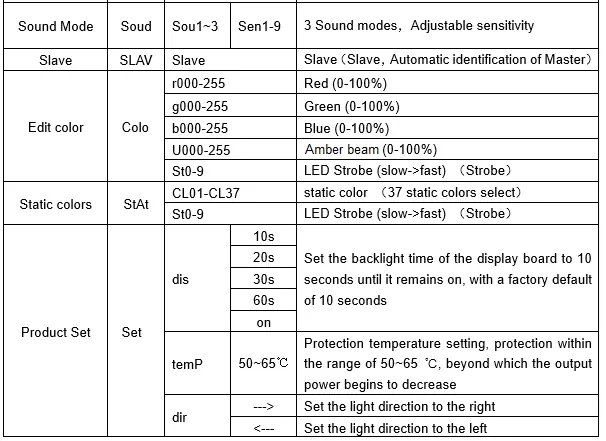
- MENU: Enter the settings menu.
- UP / DOWN: Navigate through functions.
- ENTER: Confirm the desired setting.
The menu allows you to select Auto mode, DMX mode, and Show mode. In Auto mode, you can adjust speed and strobe. In Show mode, you can select from 3 preset programs with adjustable speed and strobe.
DMX operation
The unit can be controlled via DMX signal. Connect the DMX source to the DMX input using a balanced XLR lead. You can daisy-chain extra fixtures by looping through the DMX output.
To enter DMX mode, select the desired DMX address (d001) from the menu. The unit supports 4, 6, 11, 48, and 54 channel modes. The 'd' on the LED display will flash when a valid DMX signal is received.
Cleaning and maintenance
- Clean the casing as required using a soft cloth and a neutral detergent.
- Do not use strong solvents for cleaning.
- The unit is not serviceable by the end user; refer to qualified personnel for repairs.
Troubleshooting
- No power: Check that the mains voltage is correct, the outlet is switched on, and the twist and lock power lead is connected properly.
- No light output: Check control panel mode settings and DMX settings from the controller (dimmer levels, blackout).
- Unresponsive to DMX: Ensure the unit is in DMX mode and the 'A' on the DMX address flashes. Check that the controller is not set to blackout, is on the correct fixture/page, and that the master dimmer is up. Verify DMX connections and leads.
- Overheating: Ensure adequate ventilation and that the unit is not placed too close to a heat source.
Practical help
Common problems
No power
Check mains voltage, ensure outlet is on, and verify the twist and lock power lead is securely connected.
No light output
Check control panel mode settings and verify DMX controller settings (dimmer levels, blackout).
Unresponsive to DMX
Ensure unit is in DMX mode (check for flashing 'A' on display), verify DMX address, check controller blackout status, and inspect DMX cables.
Overheating/Cutting out
Ensure adequate ventilation around the unit and move away from heat sources.
Before use
- Verify package contents: main unit, 2 fixing brackets with thumbscrews, and twist and lock UK mains lead.
- Ensure adequate airflow around the fixture.
- Use secondary safety fixings if mounting overhead.
- Do not expose the unit to rain or damp environments.
- Ensure the unit is dry before use if spillage occurs.
Specs in practice
- Power supply
- 110-240Vac, 50/60Hz
- Power consumption
- 80W
- DMX channels
- Supports 4, 6, 11, 48, or 54 channel modes.
Images and diagrams
- Rear panel features power in/out, DMX in/out, internal microphone, and control panel with LED display.
Model compatibility
- Compatible with DMX512 controllers.
- Supports Master/Slave daisy-chaining for multiple units.

Manual page author
Emily Carter
User documentation editor
Prepares concise manual descriptions and highlights the most useful setup, operation, and maintenance information for readers.