Plumbing / Sinks Faucets
AXOR Starck Electronic Basin Mixer User Manual
User manual for the AXOR Starck electronic basin mixer, including installation, electrical connection, adjustment, and maintenance instructions.
Table of contents
Manual images
Jump to the sectionProduct Overview
The AXOR Starck electronic basin mixer is a high-quality, sensor-operated faucet designed for bathroom hygiene. It features an integrated infrared sensor that automatically adjusts to local conditions, such as washbasin size, ambient light, and reflections, eliminating the need for manual sensor calibration.
Safety Information
Installation must be performed by a qualified electrician in accordance with DIN VDE 0100 Part 701 / IEC 60364-7-701 standards. Always wear gloves during installation to prevent injury. The transformer must not be installed in protection zones 0, 1, or 2. Ensure that hot and cold water supplies are balanced.
Installation and Setup
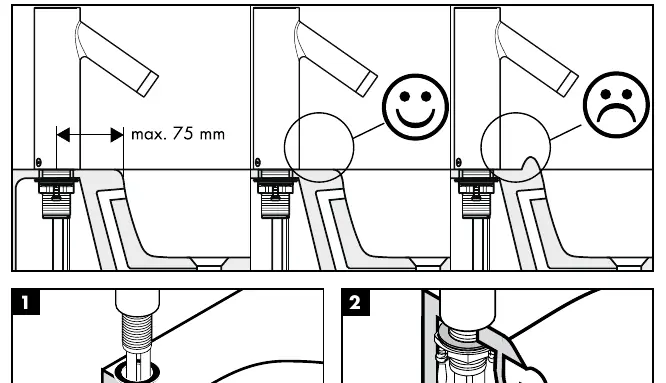
The mixer must be installed, flushed, and tested according to valid norms. Mesh washers must be installed to protect against debris from the pipework, which can impair function. The faucet is not compatible with continuous flow water heaters and should not be installed on washstands with raised edges. During initial startup, the sensor will automatically calibrate itself over 10-15 minutes. Air in the system may cause an irregular jet pattern initially, which will stabilize after approximately 15 activations.
Operation and Adjustment
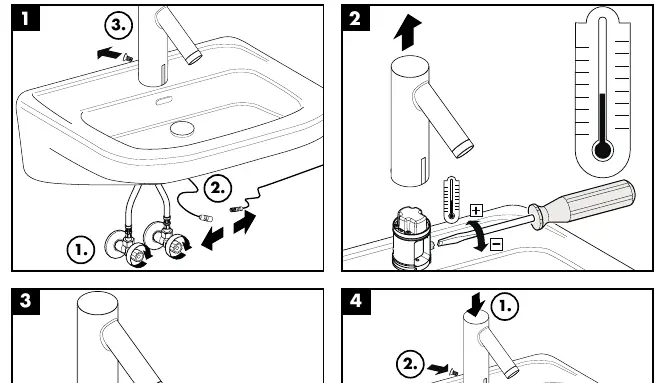
The mixer can be powered by a battery (CR-P2 / 6V Lithium) or a power supply unit. A low battery is signaled by the LED in the sensor window. If the battery voltage is ≤ 5.5V, the LED blinks during operation; if ≤ 5.3V, the LED lights continuously and the battery must be replaced. After inserting a new battery, do not activate the faucet for 30 seconds to allow for self-adjustment. The detection range can be manually switched between 'maximum' and 'reduced' settings if necessary for small or highly reflective washbasins.
Maintenance
Non-return valves must be checked regularly according to DIN EN 1717 and national/regional regulations, at least once a year. Do not use silicone containing acetic acid for sealing. Clean the faucet and washbasin regularly as described in the provided cleaning instructions.
Manufacturer information
AXOR
Practical help
Common problems
Irregular jet pattern after installation or maintenance
Air in the fitting; the jet pattern will stabilize after approximately 15 activations.
Delayed functionality or sensor issues
The sensor may need to recalibrate to ambient light or reflections; it will perform an automatic calibration after 10-15 minutes.
LED lights continuously in sensor window
Battery voltage is too low (≤ 5.3V); replace the battery.
Unintended water flow
Water drops or condensation on the sensor window; wipe the sensor window clean.
Before use
- Ensure hot and cold water pressures are balanced.
- Install mesh washers to prevent debris damage.
- Verify electrical installation is performed by a qualified electrician.
- Ensure the transformer is not installed in protection zones 0, 1, or 2.
- Wait 30 seconds after battery insertion before activating the faucet.
Specs in practice
- Operating Pressure
- Maximum 0.8 MPa (Recommended 0.1 - 0.5 MPa).
- Hot Water Temperature
- Maximum 80°C (Recommended 65°C).
- Protection Class
- IP X5.
- Automatic Switch-off
- After 1 minute of continuous flow.
Images and diagrams
- The flow diagram shows performance with and without the EcoSmart flow limiter.
- Dimensions are provided for installation planning.
- Spare parts diagram identifies components for maintenance.
- The electrical connection diagram shows the transformer and battery housing setup.
Model compatibility
- Not compatible with continuous flow water heaters.
- Do not install on washstands with raised edges.
- Use only Hansgrohe-supplied battery housing or power pack.

Manual page author
Michael Turner
Technical manual editor
Reviews PDF manuals for structure, safety notes, and practical product details so readers can find the right information quickly.