Computers / Cooling Systems
User Manual for AZZA PRO FAN Addressable RGB Fan 120mm
Quick guide for the AZZA PRO FAN Addressable RGB Fan 120mm. Learn how to correctly connect the fan to your motherboard, understand the pinout configurations, and follow daisy-chaining safety guidelines.
Table of contents
Manual images
Click an image to enlargeQuick guide from the manual
This document provides essential installation and connection instructions for the AZZA PRO FAN Addressable RGB Fan. The most critical requirement is ensuring compatibility with your motherboard's RGB headers. This fan is designed for 5V addressable headers only. Connecting it to a 12V non-addressable header will cause damage to the LED strip.
Installation and Connection
The fan includes specific pinout configurations for motherboard connection. Refer to the diagrams provided in the manual to identify the correct header type on your motherboard:
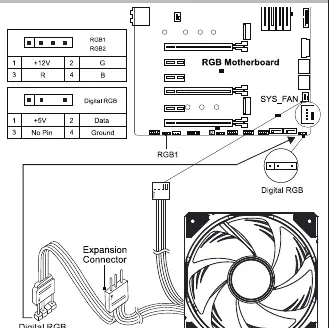
- RGB1/RGB2: Follow the pinout sequence provided in the diagram (e.g., +12V, R, G, B).
- Digital RGB: Follow the specific pinout for digital headers (+5V, Data, Ground).
Ensure the motherboard is powered off before making any connections. Always verify the pinout on your motherboard manual matches the fan connector.
Daisy-Chaining
You can connect multiple fans in a series (daisy-chaining) to simplify cable management. However, you must adhere to the following safety limits:
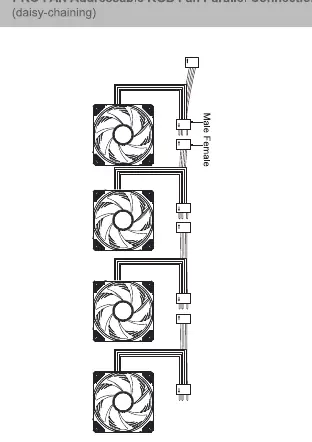
- Maximum Limit: Do not daisy-chain more than 5 digital RGB fans together on a single header.
- Power Ratings: Always check your motherboard's specifications regarding power ratings and LED count limits before connecting multiple fans or LED strips.
Safety and Compatibility
This product is compatible with 5V addressable headers from major manufacturers, including MSI, ASUS, Gigabyte, and ASROCK. Do not attempt to connect this fan to 12V non-addressable headers, as this will result in permanent damage to the product.
Practical help
Common problems
Fan LEDs not lighting up or damaged
Ensure the fan is connected to a 5V addressable header. Connecting to a 12V non-addressable header will damage the LED strip.
System instability or LED failure when daisy-chaining
Verify that you have not exceeded the maximum limit of 5 daisy-chained fans on a single header.
Before use
- Verify your motherboard has a 5V addressable RGB header.
- Identify the correct pinout for your motherboard (RGB1, RGB2, or Digital RGB).
- Ensure the power supply is turned off before installation.
- Check motherboard specifications for power ratings and LED count limits.
Specs in practice
- 5V Addressable Header
- The required connection type for this fan; do not connect to 12V headers.
- Daisy-chaining
- Connecting multiple fans in a series; limited to 5 fans maximum per header.
Model compatibility
- Compatible with 5V addressable headers from MSI, ASUS, Gigabyte, and ASROCK.
- Do not connect to 12V non-addressable headers.

Manual page author
Michael Turner
Technical manual editor
Reviews PDF manuals for structure, safety notes, and practical product details so readers can find the right information quickly.