Power / Car Chargers
User Manual for Baseus MagPro Series 15W Magnetic Wireless Charging Car Mount
Quick guide for the Baseus MagPro Series 15W Magnetic Wireless Charging Car Mount. Learn how to install the mount, attach your phone, and ensure optimal wireless charging performance.
Table of contents
Manual images
Click an image to enlargeQuick guide from the manual
The Baseus MagPro Series 15W Magnetic Wireless Charging Car Mount is designed for convenient in-car charging. For optimal performance, ensure your phone is an iPhone 12 or newer, or use a metal plate for other models. Do not use phone cases thicker than 6mm, as this will reduce charging efficiency. To achieve the maximum 15W output, ensure you are using a 3A USB-C to USB-C cable.
Product Overview
The device consists of the following components:
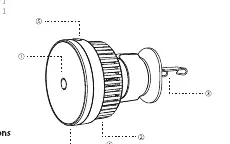
- Wireless charging area: The surface where the phone attaches.
- Cooling fan: Integrated to manage heat during charging.
- Tail clamp: Used to secure the mount to the car's air vent.
- USB-C port: For power input.
- Wireless charging switch: Controls the charging function.
Installation
Follow these steps to install the mount in your vehicle:
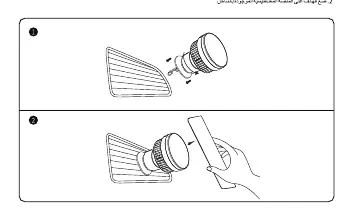
- Clip the tail clamp onto the most suitable spot of your car's air vent.
- Ensure the mount is securely attached before placing your phone.
- Place your phone with the magnet plate (if required) onto the mount.
Magnet Plate Installation
If your phone does not have built-in magnetic alignment (e.g., older iPhones or Android devices), follow these steps:
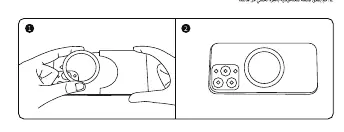
- Align the positioning liner with the back of your phone to find the optimal spot for wireless charging.
- Stick the magnet plate onto the back of your phone.
Safety and Compatibility
- Compatibility: Suitable for iPhone 12 and above. Older iPhone models and Android phones require the use of a metal plate.
- Cases: Compatible with MagSafe phone cases. Do not use cases thicker than 6mm.
- Power: Supports 15W wireless output. Use a 3A USB-C to USB-C cable for best results.
- Temperature: Operating temperature range is 0°C to 35°C.
Technical Specifications
- Model No.: BS-CW02
- Input: 5V/2.4A (Max), 9V/2.23A (Max)
- Wireless Charging Output: 5W / 7.5W / 10W / 15W
- Total Power: 15W
Manufacturer information
Baseus
Practical help
Common problems
Slow or inefficient charging
Ensure the phone case is not thicker than 6mm and use a 3A USB-C to USB-C cable.
Phone does not attach magnetically
If using an older iPhone or Android device, you must attach the included metal plate to the back of the phone.
Before use
- Verify your phone model (iPhone 12+ or Android with metal plate).
- Check that your phone case is 6mm thick or less.
- Ensure you have a 3A USB-C to USB-C cable for 15W charging.
- Identify a suitable air vent for the tail clamp.
Specs in practice
- Wireless Output
- Supports variable power (5W/7.5W/10W/15W) based on device compatibility.
- Working Temperature
- Device should be used in environments between 0°C and 35°C.
Images and diagrams
- 1: Wireless charging area
- 2: Cooling fan
- 3: Tail clamp
- 4: USB-C port
- 5: Wireless charging switch
Model compatibility
- Compatible with MagSafe cases.
- iPhone 12 and newer models do not require a metal plate.
- Older iPhones and Android phones require a metal plate.

Manual page author
Michael Turner
Technical manual editor
Reviews PDF manuals for structure, safety notes, and practical product details so readers can find the right information quickly.