Lighting / Stage Lighting
User Manual for Beamz Pro Cobra 100 Spot Moving Head
Quick guide for the Beamz Pro Cobra 100 Spot moving head. Includes installation, DMX control, maintenance, and troubleshooting steps.
Table of contents
Manual images
Click an image to enlargeQuick guide from the manual
The Beamz Pro Cobra 100 Spot is a professional moving head light designed for indoor use. This manual provides essential information for safe installation, operation, and maintenance. Always ensure the unit is installed in a well-ventilated area and never connect it to a dimmer pack.
Safety Instructions
- Indoor Use Only: This unit is designed exclusively for indoor use. Do not use in the immediate vicinity of fluids.
- Ventilation: Ensure at least 50 cm of free air space around the unit. Do not block ventilation slots.
- Temperature: Ambient temperature must be between -5°C and +45°C. If exposed to drastic temperature fluctuations, allow the unit to reach room temperature before switching on to avoid condensation damage.
- Eye Safety: Never look directly into the light beam.
- Electrical Safety: Always connect to a protected circuit (circuit breaker or fuse) with appropriate grounding.
Installation and Rigging
The unit can be set up on a stable surface or mounted upside down on a truss. When mounting on a truss:
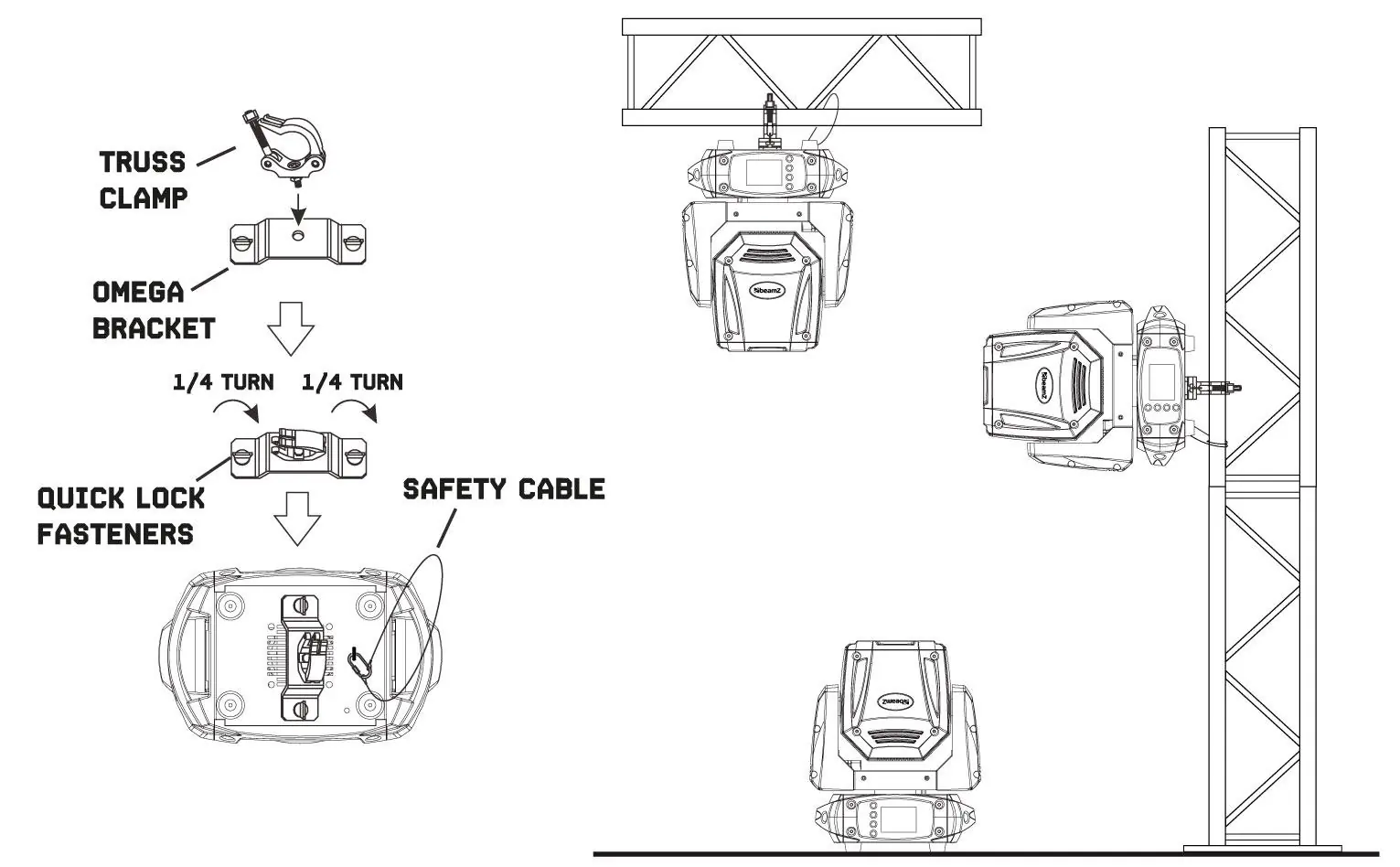

- Use certified clamps with the correct safe working load.
- Secure the unit with a safety cable so it cannot fall.
- The mounting place must be able to support 10 times the weight of the unit.
- Use the quick-lock bolts on the omega brackets to attach the unit to the baseplate.
DMX512 Control
To control the unit via DMX:
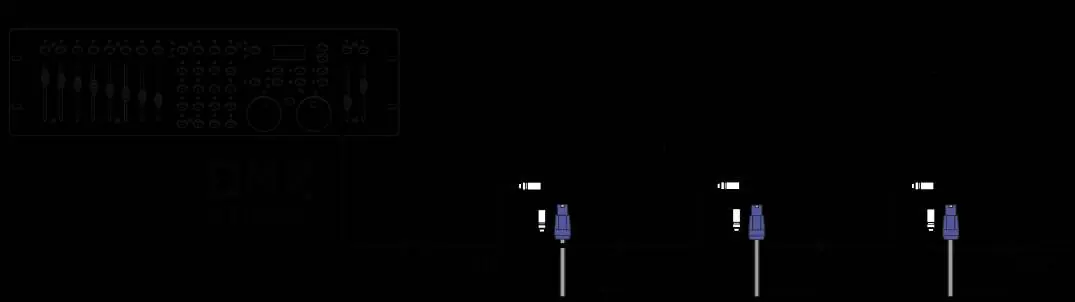
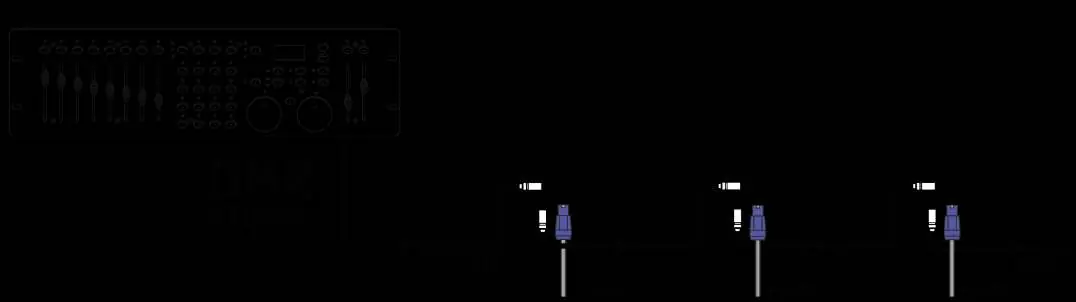
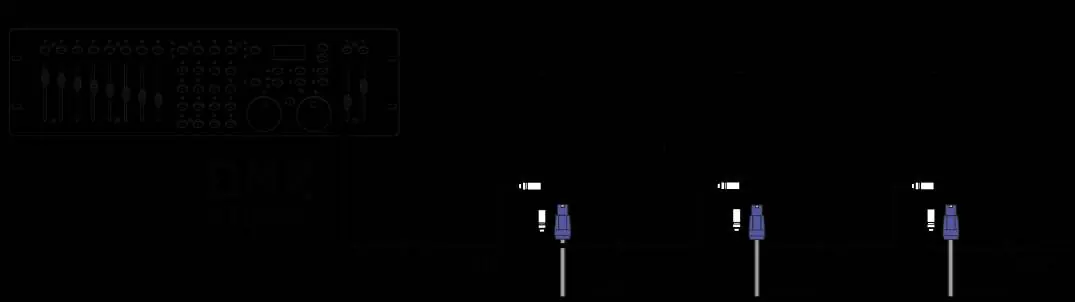
- Connect the DMX output of the controller to the DMX input of the first unit.
- Daisy-chain units by connecting the output of one unit to the input of the next.
- Termination: At the last unit in the chain, you must close the DMX line with a terminating resistor (120 Ohm resistor between signal (-) and signal (+)).
Maintenance and Cleaning
Regular maintenance is required to ensure optimal performance and longevity:
- Cleaning: Inspect the unit regularly for dust and dirt buildup. Use a vacuum or low-pressure compressed air to clean vents. Clean glass components with a soft, lint-free cloth and a weak detergent solution.
- Inspection: Regularly check screws, bolts, housing, and cables for signs of wear, fatigue, or corrosion.
- Cooling: Ensure fans are clean and functioning to prevent overheating.
Replacing the Fuse
If the fuse is defective, replace it with a fuse of the same type and rating:
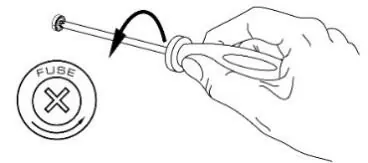
- Disconnect the unit from the power supply.
- Open the fuse holder on the rear panel using a screwdriver.
- Remove the old fuse.
- Install the new fuse and replace the fuse holder.
Troubleshooting
If you encounter issues, consult the following:
- No response: Check power connection, cables, and the main fuse.
- No DMX response: Check controller connection, DMX line integrity, DMX address settings, and ensure the line is terminated.
- Intermittent light output: The unit may be overheating. Ensure proper ventilation and check ambient temperature.
Technical Specifications
- Light Source: 100W White LED
- DMX Channels: 14
- Pan/Tilt: 540° Pan, 190° Tilt
- IP Rating: IP20
- Power Supply: 100-240VAC 50/60Hz
Manufacturer information
beamZ
Practical help
Common problems
No response from unit
Check that power is turned on, inspect cables and connections, and check if the fuse is blown.
Unit resets but does not respond to controller
Check controller connection, inspect DMX cables, ensure DMX line is terminated, and verify DMX address/mode settings.
Light output cuts out intermittently
Unit may be too hot. Allow it to cool, reduce ambient temperature, and ensure free airflow around the unit.
Before use
- Check for transportation damage.
- Verify mains voltage matches unit specifications.
- Ensure ventilation slots are not blocked.
- Install safety cable for mounting heights >100cm.
- Ensure DMX line is terminated with a 120 Ohm resistor.
Specs in practice
- DMX Channels
- 14 channels for full control of pan, tilt, dimmer, strobe, color, gobo, and focus.
Images and diagrams
- Rigging diagram shows how to attach the omega bracket and safety cable to the baseplate.
- DMX connection diagram illustrates daisy-chaining units and using a terminator.
Model compatibility
- Indoor use only.
- Do not connect to a dimmer pack.
- Requires 120 Ohm resistor for DMX termination.

Manual page author
Michael Turner
Technical manual editor
Reviews PDF manuals for structure, safety notes, and practical product details so readers can find the right information quickly.