Lighting / Stage Lighting
User Manual for beamZ Strobe Moon 2-in-1 Party Effect
Quick guide for the beamZ Strobe Moon 2-in-1 party effect. Learn how to install, operate, use the remote control, and maintain your lighting fixture.
Quick answers from the manual
Quick answer
- The beamZ Strobe Moon is a 2-in-1 party effect light. It can be operated via the included remote control or set to automatic/sound-active modes. It must be installed in a well-ventilated area and connected to a protected circuit. p. 3, 4, 5
Key actions
- Mounting the unit p. 4
- Using the remote p. 5
First start
- Remove the insulating foil from the remote battery compartment before first use. p. 5
Problems and fixes
Remote range decreased
Replace the 3V CR 2025 button cell battery.
p. 5Technical specifications
| Parameter | Value | Meaning | Pages |
|---|---|---|---|
| Voltage | 100-240VAC, 50-60Hz | Power input requirements | p. 21 |
| Weight | 1.15 kg | Unit weight | p. 21 |
Where to find it in the PDF
- Safety Instructions p. 3
- Remote Controller p. 5
- Technical Specifications p. 21
Table of contents
Manual images
Click an image to enlargeQuick guide from the manual
The beamZ Strobe Moon is a 2-in-1 party lighting effect. This manual provides essential instructions for safe installation, operation, and maintenance. Always ensure the unit is connected to a protected circuit and never connect it to a dimmer pack.
Installation and Rigging
The unit can be placed on a stable surface or mounted to a truss. When mounting to a truss:
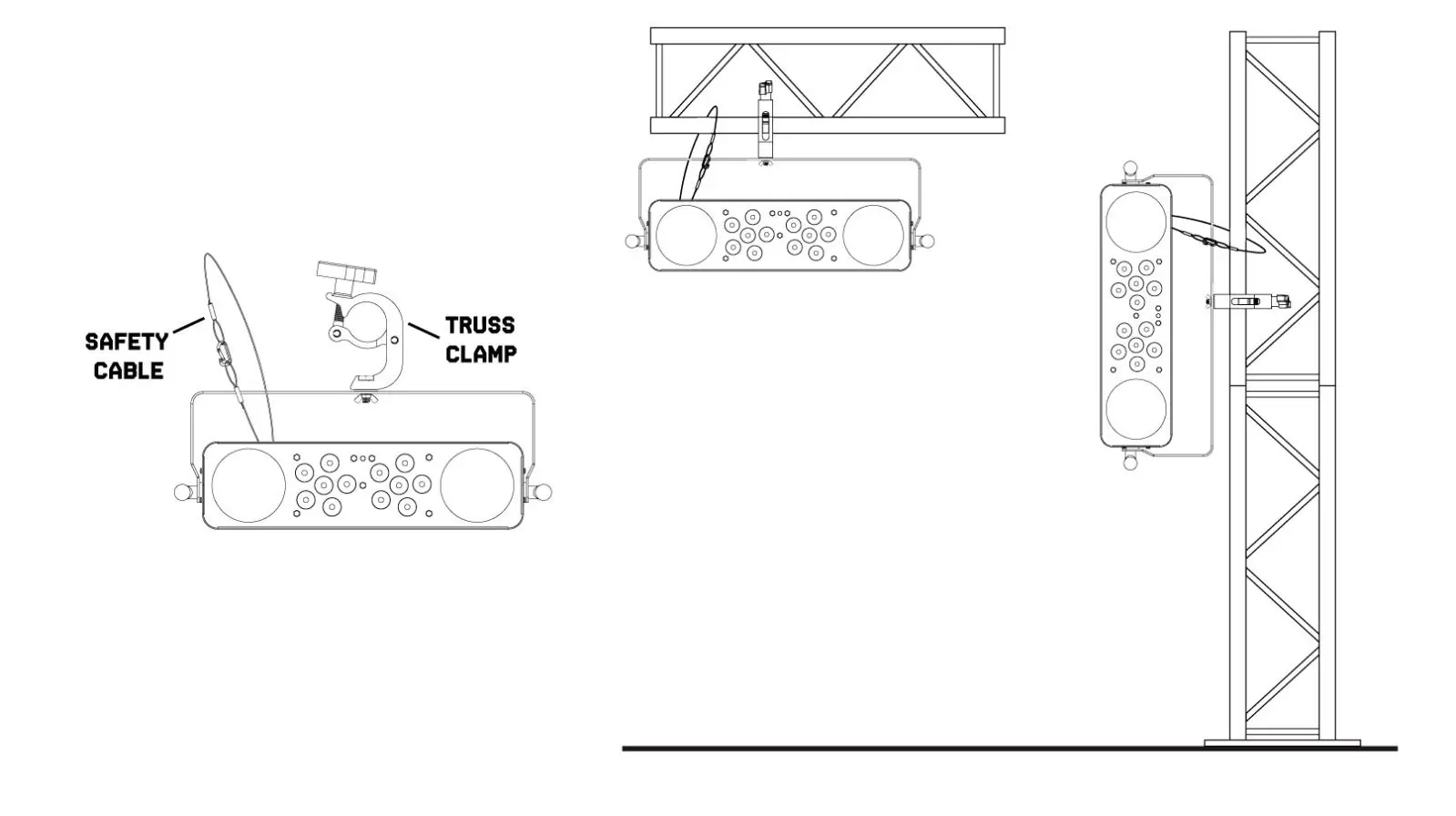
- Use certified clamps with the correct working load.
- The mounting structure must be able to support 10 times the weight of the unit.
- Always secure the unit with a safety cable to prevent it from falling.
- Ensure the area below the installation is blocked off during rigging.
Remote Control Operation
The included remote control allows you to manage various modes:
- Auto Mode: Runs pre-programmed light shows.
- Sound Mode: Responds to music.
- Speed: Adjusts the speed of Auto and Sound programs.
- Flash: Controls the strobe rate.
- Black Out: Turns off existing modes.
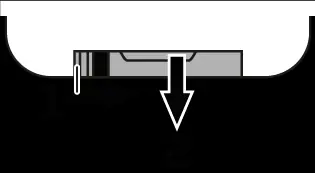
Note: Before first use, remove the insulating foil from the battery compartment on the rear of the remote. If the range decreases, replace the battery with a 3V CR 2025 button cell.
Cleaning and Maintenance
Regular cleaning is required to maintain light output and cooling efficiency:
- Disconnect from power and allow the unit to cool completely.
- Use a dry cloth or low-pressure compressed air to remove dust from vents and surfaces.
- Clean glass components with a soft, lint-free cloth and a mild detergent solution.
- Do not use solvents or abrasive products.
Control Menu
The unit features a control menu for settings such as static color (STAT), auto programs (AUTO), sound programs (SOUN), speed adjustment (SPEE), microphone sensitivity (SENS), master dimmer (DIMM), strobe program (STRO), silent scene (SILE), and IR remote control (INFR).
Manufacturer information
beamZ
Practical help
Common problems
Remote control not working
Remove the insulating foil from the battery compartment on the rear of the remote.
Unit overheating
Ensure ventilation slots are not blocked and maintain at least 50 cm of free space around the unit.
Light output reduced
Clean the unit regularly; dust buildup on lenses and fans reduces performance and cooling.
Before use
- Check for transportation damage
- Verify mains voltage matches unit specifications
- Ensure proper ventilation
- Remove battery insulating foil from remote
Images and diagrams
- Rigging diagram shows mounting on a truss using a clamp and safety cable.
- Remote battery replacement diagram shows sliding the bar to the right to remove the tray.
Model compatibility
- Indoor use only
- Do not connect to a dimmer pack

Manual page author
Emily Carter
User documentation editor
Prepares concise manual descriptions and highlights the most useful setup, operation, and maintenance information for readers.