Lighting / Stage Lighting
User Manual for Beamz Cobra 720 Moving Head
Quick guide for the Beamz Cobra 720 moving head. Includes installation, DMX setup, maintenance, troubleshooting, and technical specifications.
Table of contents
Manual images
Click an image to enlargeQuick guide from the manual
The Beamz Cobra 720 is a moving head lighting fixture designed for indoor use. Before operation, ensure the unit is free from transport damage, verify that the mains voltage matches the unit's specifications, and ensure adequate ventilation (at least 50 cm of free space). Always use a safety cable when mounting the unit above 100 cm.
Installation and Rigging
The unit can be set up on a stable surface or mounted upside down on a truss. To mount on a truss:
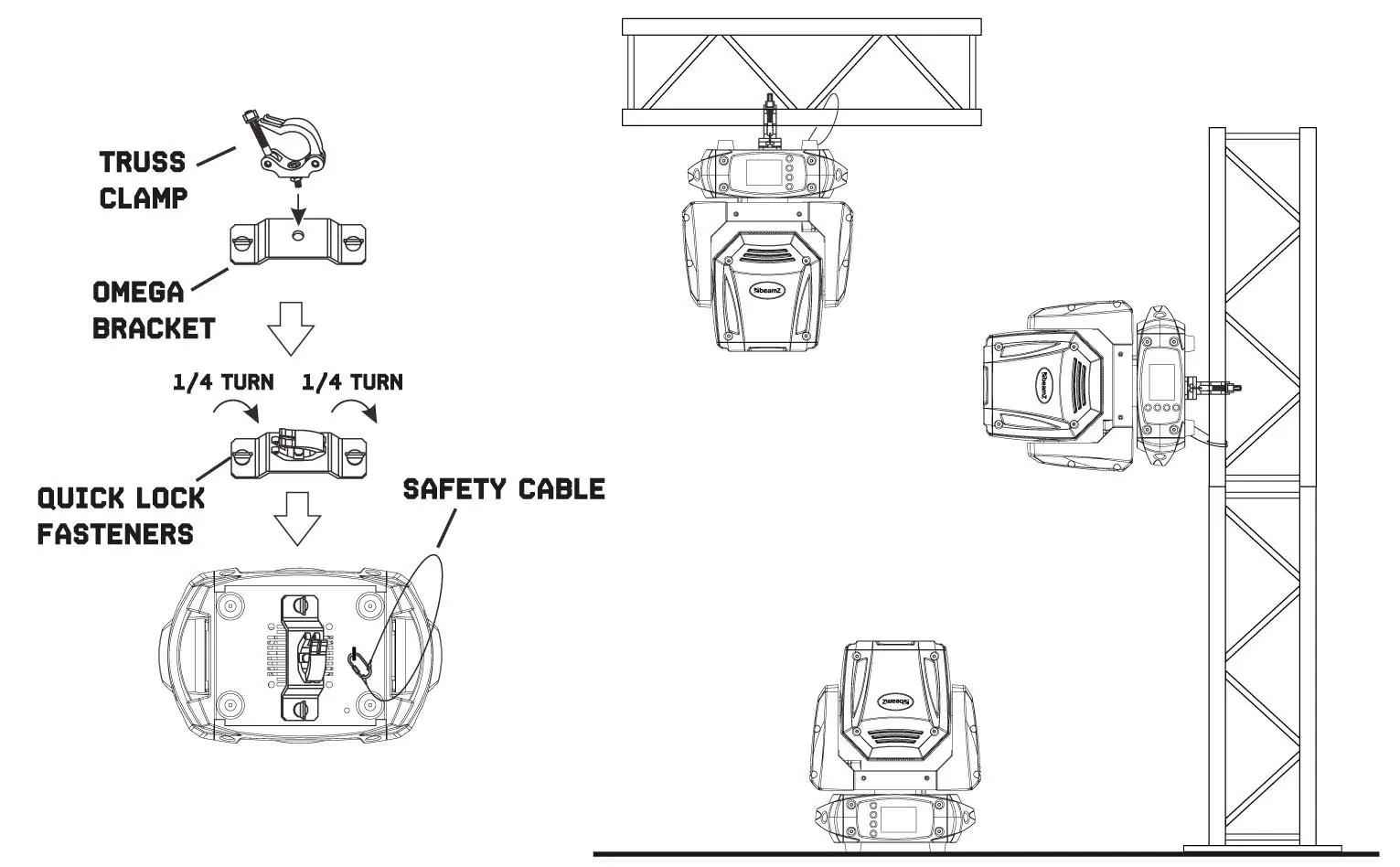

- Use certified clamps with the correct load capacity.
- Attach the omega brackets to the base plate using the quick-lock fasteners.
- Turn the fasteners clockwise until they lock.
- Always secure the unit with a safety cable attached to the designated fixation points, never to the transport handles.
Power Supply
Check the label on the back of the unit for the required voltage. The unit must be connected directly to the mains; do not use a dimmer pack. Multiple units can be linked using the power connector input and output. Connect a maximum of four units in a row when using 230V/16A. Use an approved three-core cable with a cross-section of at least 1.5 mm².
DMX512 Control
To control the unit via DMX:
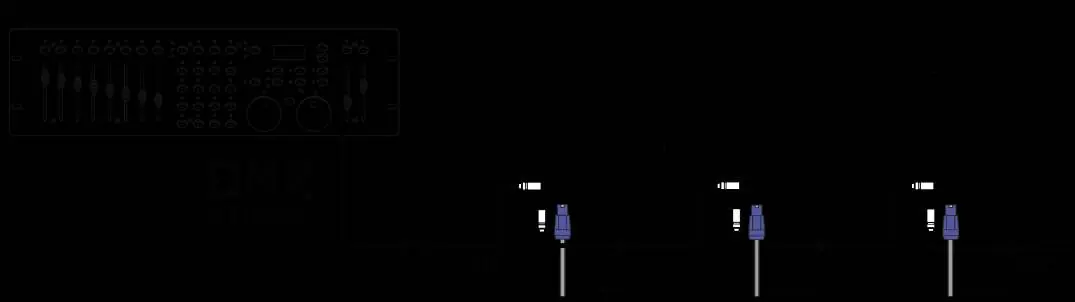
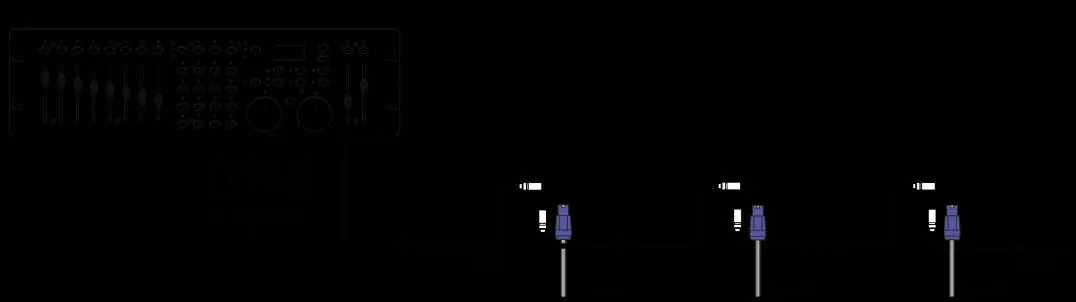
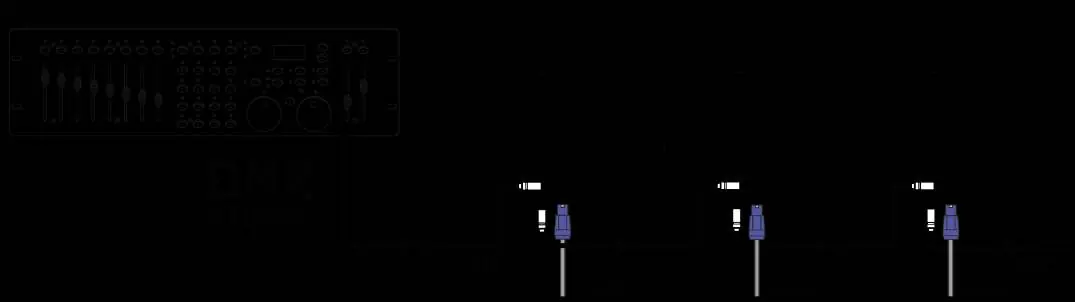
- Connect the DMX output of your controller to the DMX input of the first unit.
- Daisy-chain subsequent units by connecting the output of one unit to the input of the next.
- At the last unit in the chain, you must terminate the DMX line. Solder a 120 Ohm resistor between signal (-) and signal (+) on an XLR connector and plug it into the DMX output of the last unit.
Maintenance and Cleaning
Regular maintenance is required to ensure optimal performance and longevity. Inspect the unit for dust buildup, especially in dusty or smoky environments. To clean:
- Disconnect from power and allow the unit to cool completely.
- Use a vacuum or low-pressure compressed air to remove dust from surfaces and vents. Do not let fan blades spin while cleaning.
- Clean glass components with a soft, lint-free cloth and a weak detergent solution.
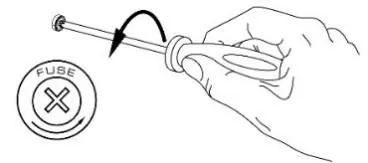
- If the fuse is defective, replace it with one of the same type and value. Open the fuse holder on the rear panel with a screwdriver, remove the old fuse, install the new one, and replace the holder.
Troubleshooting
If the unit does not respond, check the power supply and connections. If it does not respond to the DMX controller, verify the DMX line, ensure the controller is connected, and check the DMX address settings. If the light output is intermittent, the unit may be overheating; ensure proper airflow and clean the unit if necessary.
Technical Specifications
The Cobra 720 features a 180W white LED, 6 LEDs, a 6° beam angle, and 7 colours + open. It supports DMX, automatic programs, and Master/Slave modes. It has an IP20 rating and requires 100-240VAC 50/60Hz power.
Manufacturer information
beamZ
Practical help
Common problems
No response from unit
Check that power is turned on and cables are connected. Check if the fuse is blown.
Unit does not respond to DMX controller
Check controller connection, DMX line integrity, and unit DMX address settings. Ensure the DMX line is terminated with a 120 Ohm resistor.
Light output cuts out intermittently
The unit may be too hot. Allow it to cool, ensure free airflow, and clean the unit if necessary.
Error after reset
The effect may require mechanical adjustment. Check the software version and error messages.
Before use
- Unpack and check for transport damage.
- Verify mains voltage matches the unit specifications.
- Ensure ventilation slots are not blocked.
- Check that the mounting surface is stable.
- Attach a safety cable for overhead mounting.
- Ensure the unit is not exposed to extreme heat, moisture, or dust.
Specs in practice
- DMX channels
- 17 channels available for control.
- Power consumption
- 1.436 - 0.678A depending on operating conditions.
Images and diagrams
- Rigging diagram shows how to attach the omega bracket to the base plate using quick-lock fasteners and how to secure the unit with a safety cable.
- DMX wiring diagram illustrates the daisy-chain connection from the controller to multiple units and the placement of the 120 Ohm terminator at the end of the line.
- Fuse replacement diagram shows using a screwdriver to open the fuse holder on the rear panel.
Model compatibility
- Do not connect the unit to a dimmer pack.
- Only use fuses of the same type and rating.
- Ambient temperature must be between -5°C and +45°C.

Manual page author
Michael Turner
Technical manual editor
Reviews PDF manuals for structure, safety notes, and practical product details so readers can find the right information quickly.