Lighting / Stage Lighting
User Manual for beamZ Uranus LED Double Moon
Quick guide for the beamZ Uranus LED Double Moon. Includes safety instructions, installation tips, fuse replacement, cleaning procedures, and troubleshooting steps.
Table of contents
Quick guide from the manual
The beamZ Uranus is a stage lighting effect unit. This guide provides essential information for safe operation, installation, and maintenance. Always read the full safety instructions before use.
Safety Instructions
- Indoor use only: Do not use in the immediate vicinity of fluids.
- Ventilation: Ensure at least 50 cm of free space around the unit. Never block ventilation slots.
- Mounting: If mounting above 100 cm, always use an appropriate safety rope. Never attach the safety rope to transport handles.
- Electrical: Verify mains voltage matches the unit's requirements before connecting. Always connect to a protected circuit (fuse/breaker).
- Temperature: Ambient temperature must be between -5°C and +45°C. If exposed to drastic temperature changes, allow the unit to reach room temperature before switching on to avoid condensation damage.
- Operation: Do not look directly into the light beam. Fast flashing lights may trigger seizures in photosensitive individuals.
Installation and Operation
Upon receiving the unit, unpack and check for transport damage. Keep all packaging materials. Ensure the unit is installed in a well-ventilated area. Do not connect the unit to a dimmer pack. Always ensure the unit is properly grounded.
Maintenance and Cleaning
Regular cleaning is required to maintain light output and prevent overheating. Dust buildup reduces cooling efficiency.
- Cleaning: Disconnect from power and allow to cool completely. Use a vacuum or low-pressure compressed air to clean vents (prevent fan blades from spinning). Clean glass components with a soft, lint-free cloth and a weak detergent solution. Do not use solvents or abrasives.
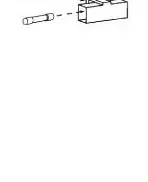
- Fuse Replacement: If the fuse is defective, replace it with one of the same type and rating.
Fuse Replacement Procedure
- Disconnect the unit from the power supply.
- Open the fuse holder on the rear panel using a fitting screwdriver.
- Remove the old fuse from the holder.
- Install the new fuse.
- Replace the fuse holder in the housing.
Troubleshooting
If you encounter issues, check the following:
- No response: Check power connection, cables, and the fuse.
- Intermittent light output: The unit may be too hot. Allow it to cool, reduce ambient temperature, and ensure free airflow.
- LEDs damaged: Disconnect the unit and contact support.
- Power settings: Ensure the power supply settings match local AC voltage and frequency.
Technical Specifications
- Light source: Single colour LED
- LED colours: Red, Green, Blue, White
- Quantity of LEDs: 72
- Quantity of strobe LEDs: 44
- Power consumption: 30W
- Power supply: 220-240VAC 50Hz
- Dimensions: 230 x 270 x 142 mm
- Weight: 2.10 kg
Manufacturer information
beamZ
Practical help
Common problems
No response from unit
Check that power is turned on, verify cables and connections, and check if the fuse is blown.
Light output cuts out intermittently
The unit may be too hot. Allow it to cool, reduce ambient temperature, and ensure free airflow around the unit.
Power supply mismatch
Ensure the power supply settings match the local AC voltage and frequency.
Before use
- Check for transport damage immediately upon unpacking.
- Verify that local mains voltage matches the unit's requirements.
- Ensure at least 50 cm of free space around the unit for ventilation.
- If mounting above 100 cm, use an appropriate safety rope.
- Allow the unit to reach room temperature if it was exposed to drastic temperature changes.
Specs in practice
- Power consumption
- 30W
- Light source
- 72 LEDs (Red, Green, Blue, White)
Images and diagrams
- The fuse replacement diagram on page 5 illustrates the 4-step process: opening the fuse holder on the rear panel, removing the old fuse, inserting the new one, and closing the holder.
Model compatibility
- Do not connect to a dimmer pack.
- Indoor use only.
- Ambient temperature must be between -5°C and +45°C.

Manual page author
Michael Turner
Technical manual editor
Reviews PDF manuals for structure, safety notes, and practical product details so readers can find the right information quickly.