Music / Guitar Effects
User Manual for Behringer FX600 Digital Stereo Multi-Effects Pedal
Quick guide for the Behringer FX600 Digital Stereo Multi-Effects Pedal. Learn how to use the controls, connect your instrument, install the battery, and understand the six modulation effects.
Table of contents
Quick guide from the manual
The Behringer FX600 is a digital stereo multi-effects pedal. It features six modulation effects: Chorus, Flanger, Phaser, Pitch Shifter, Tremolo, and Delay. The unit does not have an on/off switch; it activates automatically when a jack is inserted into the input connector.
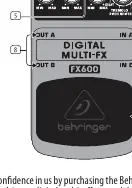
Controls
LEVEL: Adjusts the output level.
PAR 1 and PAR 2: These controls have different functions depending on the selected effect (e.g., speed, depth, time, feedback).
FX: Selects between the six modulation effects.
ON/BATT LED: Indicates when the effect is active and serves as a battery level indicator.
Connections
Inputs (IN A / IN B): Use both for stereo input. For mono, use only IN A.
Outputs (OUT A / OUT B): Use both for stereo output. For mono, use only OUT A.
DC IN: Connect a 9V power supply (not included).
Battery Installation
The battery compartment is located under the pedal cover. To install or replace the 9V battery, press the hinges with a ballpoint pen and remove the pedal cover. Be careful not to scratch the unit.
Safety Instructions
- Do not use near water or heat sources.
- Use only authorized attachments/accessories.
- Do not attempt to repair the product yourself.
- Remove the battery if the product is to be left unused for a long time.
Manufacturer information
Behringer
Practical help
Common problems
Battery drains quickly
Remove the jack from the IN connector when not in use, as the unit is always on when a cable is inserted.
No sound
Check that the battery is fresh or the power supply is connected, and ensure cables are plugged into the correct IN/OUT jacks.
Before use
- Ensure a 9V battery is installed or a 9V power supply is connected.
- Connect your instrument to the IN A (or IN A/B for stereo) jack.
- Connect your amplifier to the OUT A (or OUT A/B for stereo) jack.
- Select the desired effect using the FX control.
- Adjust the LEVEL and PAR 1/2 controls to your preference.
Images and diagrams
- The front panel features the LEVEL, PAR 1, PAR 2, and FX controls, along with the ON/BATT LED and footswitch.
- The top/side panels contain the IN A/B and OUT A/B jacks, and the DC IN power connector.
Model compatibility
- Supports both mono and stereo operation depending on input/output connections.
- Requires 9V power.

Manual page author
Emily Carter
User documentation editor
Prepares concise manual descriptions and highlights the most useful setup, operation, and maintenance information for readers.