Music / Guitar Effects
User Manual for Behringer HM300 Heavy Metal Distortion Effects Pedal
Quick guide for the Behringer HM300 Heavy Metal Distortion Effects Pedal. Learn how to adjust controls, install the battery, and connect your instrument.
Table of contents
Quick guide from the manual
The Behringer HM300 is a high-quality distortion effects pedal designed for hard rock and heavy metal sounds. It features a tube-like distortion effect with adjustable sustain. The pedal does not have a dedicated on/off switch; it activates automatically when a cable is inserted into the IN connector.
Controls
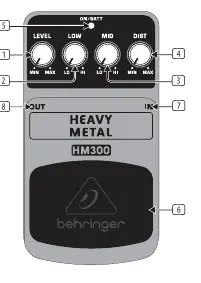
- LEVEL: Adjusts the output volume of the pedal.
- LOW: Boosts or cuts the low-frequency range.
- MID: Boosts or cuts the mid-frequency range.
- DIST: Controls the intensity of the distortion and the length of the sustain. Higher settings result in longer sustain times.
- ON/BATT LED: Illuminates when the effect is active and also functions as a battery level indicator.
- Footswitch: Used to activate or deactivate the effect.
- IN Connector: 1/4" TS input for your instrument cable.
- OUT Connector: 1/4" TS output to send the signal to your amplifier.
Battery Installation
The battery compartment is located underneath the pedal cover. To install or replace the 9V battery (not included):
- Press the hinges on the pedal cover using a ballpoint pen.
- Remove the pedal cover carefully to avoid scratching the unit.
- Insert or replace the 9V battery (type 6LR61).
- Replace the cover.
Operation
The pedal is powered on as soon as you insert a plug into the IN connector. To preserve battery life, always remove the plug from the IN connector when the pedal is not in use.
Power Supply
You can use an external 9V DC power supply (not included) via the DC IN connection. Ensure the power supply is regulated and matches the required specifications (9V, 100 mA, negative center).
Safety Instructions
- Do not use the device near water or install it near heat sources.
- Use only authorized attachments and accessories.
- Do not attempt to service the product yourself. Contact qualified service personnel for repairs, especially if the power supply cord or plug is damaged.
Technical Specifications
- Input Connector: 1/4" TS
- Input Impedance: 500 kΩ
- Output Connector: 1/4" TS
- Output Impedance: 1 kΩ
- Power Supply: 9V, 100 mA regulated
- Battery: 9V type 6LR61
- Power Consumption: 30 mA
- Dimensions: 54 x 70 x 123 mm
- Weight: 0.33 kg
Manufacturer information
Behringer
Practical help
Common problems
Pedal does not turn on.
The HM300 has no on/off switch. It activates automatically when a cable is inserted into the IN connector. Ensure your instrument cable is fully inserted.
Battery drains quickly.
Remove the input cable from the IN connector when the pedal is not in use to disconnect the power.
Before use
- Ensure you have a 9V battery (type 6LR61) or a compatible 9V DC power adapter.
- Check that your instrument cables are standard 1/4" TS cables.
- Verify the pedal is placed on a stable surface away from water or heat sources.
- If using a power adapter, ensure it is a regulated 9V supply with a negative center pin.
Specs in practice
- Input Impedance (500 kΩ)
- Optimized for standard electric guitar pickups to maintain signal integrity.
- Power Consumption (30 mA)
- The amount of current the pedal draws during operation.
- Power Connector (2 mm DC jack, negative center)
- Standard polarity for guitar pedals; ensure your power supply matches this configuration.
Images and diagrams
- The control panel features four knobs: LEVEL, LOW, MID, and DIST.
- The footswitch is located at the bottom of the pedal for easy activation.
- The IN and OUT connectors are located on the sides of the pedal.
- The DC IN port is located on the side for external power.
Model compatibility
- Requires a 9V battery or external 9V DC power supply.
- Compatible with standard 1/4" TS instrument cables.

Manual page author
David Miller
Documentation analyst
Organizes user manual content into clear summaries, with attention to model details, product context, and everyday usability.