Music / Guitar Effects
User Guide for Behringer PB1000/PB600 Pedal Board
Quick guide for the Behringer PB1000 and PB600 pedal boards. Learn how to connect your effects pedals, set up the power supply, and understand the technical specifications.
Table of contents
Manual images
Click an image to enlargeQuick guide from the manual
The Behringer PB1000 and PB600 are high-quality, lightweight pedal boards designed to transport and power your effects pedals. The PB1000 accommodates up to 12 pedals, while the PB600 accommodates up to 6 pedals. Both units feature an integrated 1.7 A power supply and include the necessary cabling to power your collection of stompboxes.
Connections
The connection panel allows for routing your instrument signal and powering your pedals. Follow these steps:
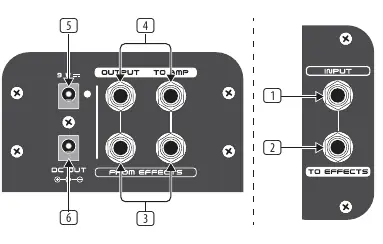
- 1. INPUT: Use this 1/4" TS connector to plug in your instrument cable. Use a high-quality cable.
- 2. TO EFFECTS: Sends the signal from your instrument to your effects pedals.
- 3. FROM EFFECTS: Use these 1/4" TS connectors to plug in the stereo effects signal from your pedals.
- 4. OUTPUT TO AMP: Sends the final signal to your amplifier(s).
- 5. 9 V: Connect the included 9 V power supply here.
- 6. DC OUT: Use this connector to plug in the included daisy chain cable to power all your effects pedals.
Application Example
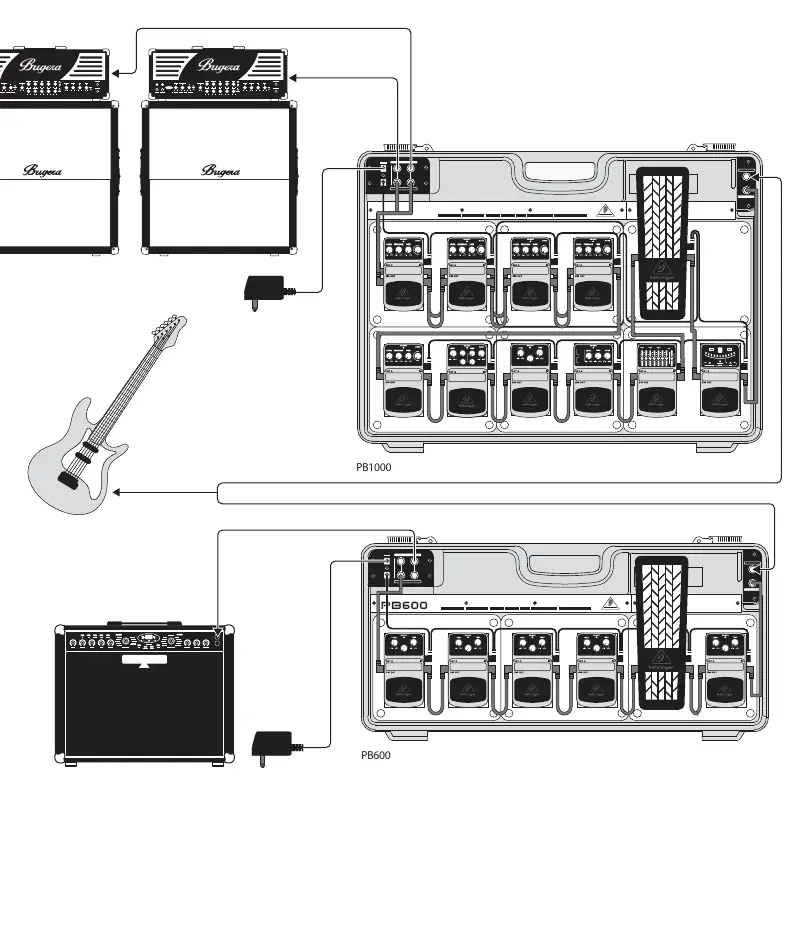
The system allows for a clean signal path from your guitar, through your pedal chain, and into your amplifier. Ensure all pedals are connected to the daisy chain power cable and the signal path is correctly routed through the TO EFFECTS and FROM EFFECTS jacks.
Safety Instructions
- Do not use the device near water or install it near heat sources.
- Use only authorized attachments and accessories.
- Do not attempt to service the product yourself. Contact qualified service personnel for repairs, especially if the power cord or plug is damaged.
Specifications
Both models utilize a 9 V, 1.7 A switching adaptor. Connectors are 1/4" TS, unbalanced. The power consumption is 2 mA. The PB1000 weighs approximately 12.3 lbs (5.6 kg), and the PB600 weighs approximately 8.4 lbs (3.8 kg).
Manufacturer information
Behringer
Practical help
Common problems
No power to pedals
Check that the 9V power supply is securely connected to the 9V input and that the daisy chain cable is properly connected to the DC OUT port.
No sound output
Verify that the instrument cable is plugged into the INPUT jack and the amplifier cable is connected to the OUTPUT TO AMP jack.
Before use
- Ensure you have a high-quality instrument cable.
- Verify the 9V power supply is connected to the 9V input.
- Connect the daisy chain cable to the DC OUT connector.
- Check that all pedals are properly connected to the effects loop.
Specs in practice
- Power Supply
- 9 V, 1.7 A switching adaptor (included).
- Power Consumption
- 2 mA.
Images and diagrams
- The connection panel features 6 main ports: Input, To Effects, From Effects, Output to Amp, 9V Power, and DC Out.
Model compatibility
- PB1000 supports up to 12 pedals.
- PB600 supports up to 6 pedals.

Manual page author
Emily Carter
User documentation editor
Prepares concise manual descriptions and highlights the most useful setup, operation, and maintenance information for readers.