Health / Heating Pads
User Manual for Beurer LV 500 Pure Flow 2-in-1 Air Purifier and Fan
Quick guide for the Beurer LV 500 Pure Flow 2-in-1 Air Purifier and Fan. Includes setup, operation modes, filter maintenance, and troubleshooting.
Quick answers from the manual
Quick answer
- The LV 500 is a 2-in-1 air purifier and fan. It features 12 fan speeds, 5 modes (Basic, Nature, Child, Sleep, Auto), a timer (1-12h), and oscillation. Filters should be cleaned monthly and replaced after 1440 operating hours. p. 7, 8, 14, 15
Key actions
- Filter replacement p. 8, 15
- Setting the timer p. 8, 15
- Cleaning the filter p. 8, 15
First start
- Remove packaging, unwrap filters, place on stable surface with 30cm clearance, pull remote battery strip, plug in. p. 7, 14
Problems and fixes
Device loud
Place on stable, level surface.
p. 9, 16
Insufficient air flow
Clean filter or check for blockages.
p. 9, 16Maintenance and reset
- Hold Swing button for 5 seconds after filter replacement to reset filter indicator. p. 8, 15
Technical specifications
| Parameter | Value | Meaning | Pages |
|---|---|---|---|
| Power | 48 W | Max power consumption | p. 10, 16 |
| Dimensions | 111 x 23 x 23 cm | Device size | p. 10, 16 |
Where to find it in the PDF
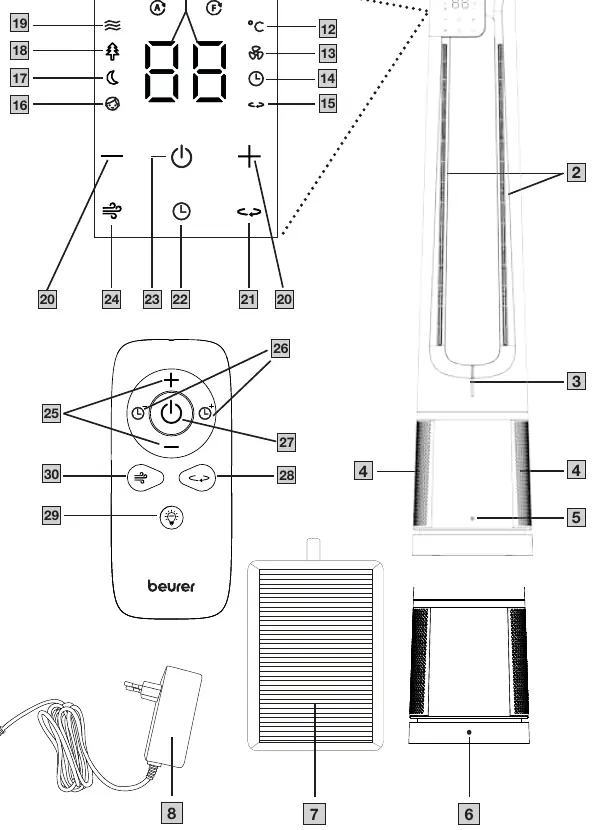
- Control Panel and Remote Diagram p. 3
- Setup and Usage p. 7, 14
- Filter Replacement p. 8, 15
Table of contents
Manual images
Click an image to enlargeQuick guide from the manual
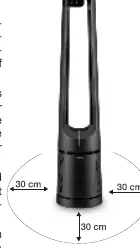
The Beurer LV 500 Pure Flow is a 2-in-1 device that functions as both an air purifier and a fan. Before first use, ensure all packaging materials and transport tapes are removed. The filters must be removed from their plastic film and re-inserted into the device. Place the unit on a stable, level surface with at least 30 cm of clearance on all sides. Pull the battery strip from the remote control to activate it.
Device description
The device features a display with a control panel, an air outlet, an ambient air indicator, an air intake, and a PM 2.5 fine dust particle sensor. It comes with a remote control for convenient operation.
Usage
Switching on the device
Connect the mains adapter to the socket on the rear of the device, then plug it into a power outlet. Press the ON/OFF button on the remote or control panel. The device starts automatically at the lowest fan speed in Basic mode.
Fan speeds and modes
The device offers 12 fan speeds and 5 modes:
- Basic mode: Continuous air flow.
- Nature mode: Simulates natural wind.
- Sleep mode: Starts at speed 12, reduces to 6 after 10 minutes, and to 3 after another 10 minutes. Display and indicator lights turn off after 10 seconds.
- Child mode: Starts at speed 6, reduces to 3 after 10 minutes, enables oscillation, and sets a 3-hour timer.
- Automatic mode: Adjusts fan speed based on ambient air quality.
Timer and Oscillation
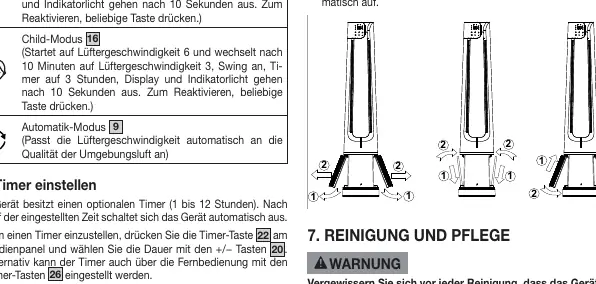
A timer can be set from 1 to 12 hours. The oscillation (Swing) function can be enabled to rotate the device slowly.
Cleaning and maintenance
Regular maintenance is essential for optimal performance:
- Filter cleaning: Clean the outside of the filters monthly using a vacuum cleaner brush attachment or a dry cloth.
- Filter replacement: Replace filters after 1440 operating hours (approx. 6 months). The filter indicator will light up when replacement is needed.
- Housing: Clean with a slightly damp cloth. Do not use solvents or abrasive cleaners.
Troubleshooting
If the device does not turn on, check the power connection. If the remote does not work, replace the battery. If the device is loud, ensure it is on a stable surface. If air flow is insufficient, clean the filter or check for blockages.
Practical help
Common problems
Device won't turn on via control panel
Check if plugged in; contact customer service if faulty.
Device won't turn on via remote
Replace remote battery; check if plugged in.
Device is very loud
Place on a stable, level surface.
Insufficient air flow
Clean filter or check for blockages in intake/outlet.
Control panel not lit
Check power connection; press any button to wake from Sleep/Child mode.
Before use
- Remove all packaging and transport tapes.
- Remove filters from plastic film and re-insert.
- Place on a stable, level surface.
- Ensure 30 cm clearance on all sides.
- Pull out battery strip on remote.
Specs in practice
- Power consumption
- 20W (low), 35W (medium), 48W (high).
Images and diagrams
- Page 3 shows the control panel and remote control buttons.
- Page 8/15 shows the filter replacement process.
Model compatibility
- For indoor use only.
- Not for commercial use.

Manual page author
Michael Turner
Technical manual editor
Reviews PDF manuals for structure, safety notes, and practical product details so readers can find the right information quickly.