Electronics / Remote Controls
User Manual for Global Sources PJ HEPA Air Purifier
Comprehensive user guide for the Global Sources PJ HEPA Air Purifier. Includes setup instructions, Wi-Fi configuration, filter replacement, maintenance, and troubleshooting steps.
Quick answers from the manual
Quick answer
- The PJ HEPA Air Purifier is a household air cleaning device. Setup involves removing the filter's protective plastic, placing the unit on a flat surface, and plugging it into a power outlet. It supports Wi-Fi control via the 'pjrobot' app. p. 7, 9
Key actions
- Replace the filter by rotating the inlet grille counterclockwise, swapping the filter, and rotating clockwise to secure. p. 12
- Connect to Wi-Fi by holding the Wi-Fi icon for 3 seconds until it flashes, then use the 'pjrobot' app. p. 10, 11
First start
- Remove packaging, remove plastic from filter, place on flat surface, and plug in. p. 7
Problems and fixes
Unit will not start
Check power connection, assembly, and filter fit.
p. 15Maintenance and reset
- Press the Filter button after replacing the filter to reset the indicator. p. 11
Technical specifications
| Parameter | Value | Meaning | Pages |
|---|---|---|---|
| Power | 20W | Power consumption | p. 13 |
| Coverage Area | 18-35m² | Effective room size | p. 13 |
Where to find it in the PDF
- Product Diagram p. 6
- Specifications p. 13
Table of contents
Manual images
Click an image to enlargeQuick Guide from the Manual
The Global Sources PJ HEPA Air Purifier is designed to capture dust, pollen, pet dander, smoke, and odors. Before first use, you must remove the protective plastic from the filter. The unit requires a firm, level surface with at least 30cm of clearance from walls or furniture for proper airflow.
Product Diagram and Controls
The top of the unit features a touch control panel. Key indicators and buttons include:
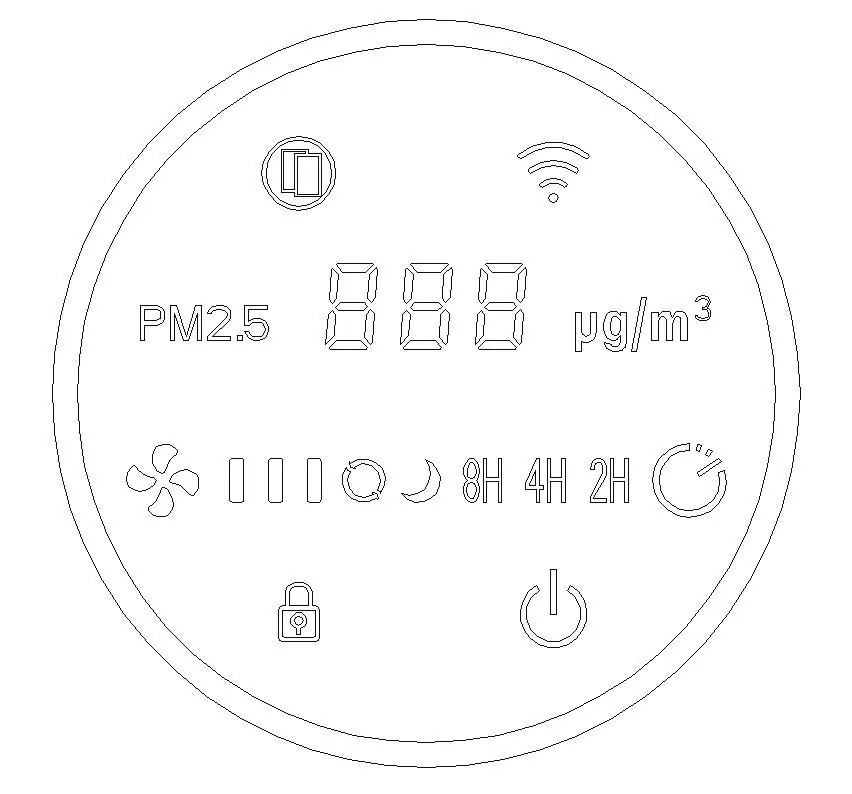
- Power/Switch Button: Turns the unit on/off and controls ambient light.
- Fan Speed Button: Cycles through 3 speed levels (Low, Medium, High).
- Timer Button: Sets a 2H, 4H, or 8H timer.
- Child Lock: Press and hold to activate/deactivate.
- Wi-Fi Button: Used for network configuration.
- Filter Reset: Used after replacing the filter.
- Air Quality Indicator: A ring light that changes color based on air quality (Green: Good, Orange: General, Red: Bad).
Smart Control and Wi-Fi
To use smart features, download the pjrobot app from the App Store or Google Play. Ensure your smartphone is connected to a 2.4GHz Wi-Fi network. To connect the purifier: press and hold the Wi-Fi icon for 3 seconds until it flashes red, then follow the in-app instructions to complete the setup.
Replacing the Filter
The filter life detection system will trigger the indicator light to flash red when replacement is needed. It is recommended to replace the filter every three months.
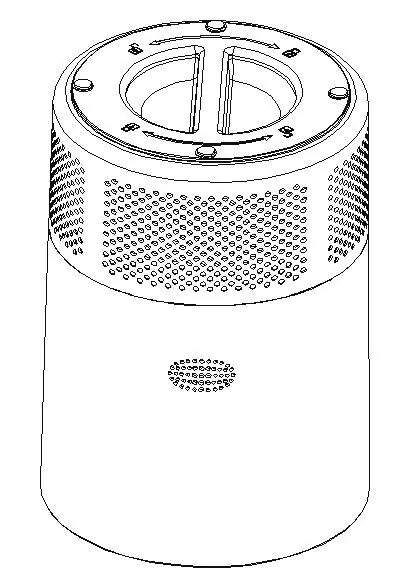
- Disconnect the power adapter.
- Place the air purifier upside down on a table.
- Rotate the air inlet grille counterclockwise to remove it.
- Replace the old filter with a new one.
- Follow the direction arrow on the lower cover and rotate clockwise to secure the grille in place.
Cleaning and Care
Clean the air purifier at least once a month using a clean, dry, soft cloth or a vacuum. Do not use gasoline, benzene, or harsh cleaners. The filter is not washable; do not immerse it in water. You may lightly brush the pre-filter to remove visible dust.
Troubleshooting
If the unit does not start, check that the power plug is connected, the outlet is on, and the unit is assembled correctly. If there is excessive noise, check for foreign objects in the fan or ensure the filter is not clogged. If the unit produces an unpleasant smell, it may be normal for new units; otherwise, clean or replace the filter.
Practical help
Common problems
Unit will not start
Check that the power plug is connected to a live outlet, the unit is assembled correctly, and the filter is fitted properly.
Excessive noise
Check for foreign objects in contact with the fan, ensure the filter is not clogged, and verify the unit is on a level surface.
Unpleasant smell
New units may have a plastic smell; this is normal. If the smell persists, clean or replace the filter.
Cannot connect to Wi-Fi
Ensure you are using a 2.4GHz network, the device is in standby mode, and the Wi-Fi icon is flashing before attempting to connect via the app.
Before use
- Remove the air purifier from the packaging.
- Remove the protective plastic from the filter.
- Insert the filter into the unit.
- Place the unit on a firm, level surface.
- Ensure at least 30cm (1ft) of clearance from walls or furniture.
- Plug the power adapter into an AC outlet.
Specs in practice
- Coverage Area
- Effective for rooms between 18 and 35 square meters.
Images and diagrams
- The control panel includes icons for Filter Reset, Wi-Fi, PM2.5 Index, Fan Speed, Timer, Child Lock, and Power.
- The air quality ring light provides visual feedback on current air conditions.
Model compatibility
- Requires 2.4GHz Wi-Fi band.
- Compatible with iOS 10.0+ or Android 5.0+.
- Use only the provided AC adapter.

Manual page author
Emily Carter
User documentation editor
Prepares concise manual descriptions and highlights the most useful setup, operation, and maintenance information for readers.