Home Appliances / Air Purifiers
User Manual for Levoit Vital 200S Smart True HEPA Air Purifier
Quick guide for the Levoit Vital 200S Smart True HEPA Air Purifier. Learn about setup, filter installation, smart features, maintenance, and troubleshooting.
Quick answers from the manual
Quick answer
- The Levoit Vital 200S is a smart air purifier. Setup involves removing the plastic packaging from the filter, placing the unit on a flat surface, and connecting it to the VeSync app for smart features. p. 7, 8, 9
Key actions
- Replace the filter p. 19
- Reset the Check Filter Indicator p. 17
- Connect to Wi-Fi p. 6, 9
First start
- Remove plastic from filter, place on flat surface, plug in, and download VeSync app. p. 7, 8, 9
Problems and fixes
Air purifier will not turn on
Check power cord, try different outlet, or contact support.
p. 21Maintenance and reset
- Reset Check Filter Indicator by holding the Sleep Mode button for 3 seconds. p. 17
Technical specifications
| Parameter | Value | Meaning | Pages |
|---|---|---|---|
| Power Supply | 24V 2.5A | Input voltage and current. | p. 2 |
| Rated Power | 50W | Power consumption. | p. 2 |
| Ideal Room Size | 380 ft² / 35 m² | Recommended room size for 5 air changes per hour. | p. 2 |
Where to find it in the PDF
- Controls & Display p. 5, 6
- Getting Started p. 7, 8
- Maintenance p. 17, 18, 19, 20
Table of contents
Manual images
Click an image to enlargeQuick guide from the manual
The Levoit Vital 200S is a smart air purifier designed for household use. Before first use, you must remove the plastic packaging from the internal filter. The device can be controlled via the top panel or the VeSync app, which enables smart features like scheduling, remote control, and voice assistant integration.
Getting started
Follow these steps to prepare your air purifier:
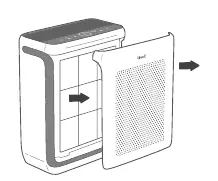
- Place the air purifier on a flat, stable surface.
- Pull both sides of the front cover to remove it.
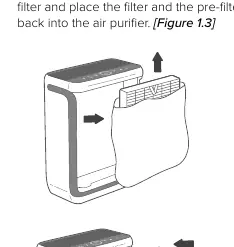
- Push the pre-filter tabs inward to remove the pre-filter.
- Remove the True HEPA/Activated Carbon filter and take off all plastic packaging.
- Reinsert the filter (ensure the ribbon handle faces outward) and the pre-filter.
- Replace the front cover, aligning the tabs with the slots.
- Connect the power adapter to the back of the unit.
- Ensure at least 15 inches (38 cm) of clearance from the front of the unit for proper airflow.
Controls and display
The top panel features touch-sensitive buttons and indicators:
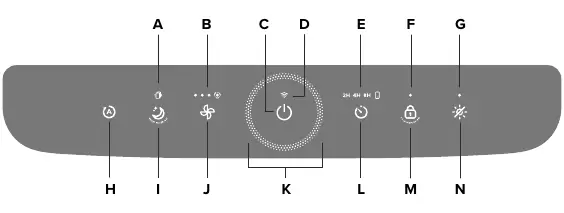
- On/Off Button: Turns the unit on/off. Hold for 3 seconds to connect to the VeSync app or reset Wi-Fi.
- Fan Speed Button: Cycles through low, medium, high, and turbo speeds.
- Auto Mode: Automatically adjusts fan speed based on air quality detected by the infrared sensor.
- Sleep Mode: Operates quietly with a lower fan speed and turns off the display after 6 seconds.
- Timer Button: Sets a timer for 2, 4, or 8 hours.
- Display Lock: Prevents settings from being changed.
VeSync app setup
To access smart features:
- Download the VeSync app from the Apple App Store or Google Play Store.
- Log in or sign up for an account.
- Follow in-app instructions to connect your air purifier to a 2.4GHz Wi-Fi network.
Care and maintenance
Regular maintenance ensures optimal performance:
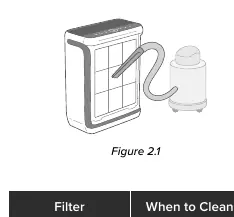
- Cleaning the Pre-Filter: Clean every 2–4 weeks using a vacuum or by washing with water and mild detergent. Allow to air-dry completely before reinserting.
- Replacing the Filter: The True HEPA/Activated Carbon filter should be replaced every 12 months. The Check Filter Indicator will light up when it is time to check the filter.
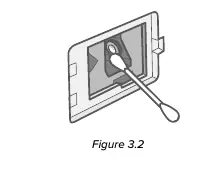
- Cleaning the Dust Sensor: If the Air Quality Indicator is consistently red, clean the sensor lens using a cotton swab dipped in water, then dry with a clean swab.
Troubleshooting
If the unit does not turn on, check the power connection and outlet. If airflow is reduced, ensure the filter packaging is removed and the pre-filter is clean. If the unit makes unusual noise, ensure it is on a flat surface and the filter is properly installed. For connectivity issues, ensure your phone is on a 2.4GHz Wi-Fi network and Bluetooth is enabled during setup.
Practical help
Common problems
Air purifier will not turn on
Check if the power cord is damaged, try a different outlet, or contact customer support.
Airflow is significantly reduced
Ensure filter packaging is removed, clean the pre-filter, or replace the main filter.
Unusual noise during operation
Ensure the filter is properly installed, place the unit on a hard, flat surface, or check for foreign objects.
Poor air purification quality
Increase fan speed, remove obstructions from the inlet/outlet, or replace the filter.
Before use
- Remove plastic packaging from the filter inside the unit.
- Place on a flat, stable surface.
- Ensure 15 inches (38 cm) of clearance from the front.
- Download the VeSync app for smart features.
- Connect to a 2.4GHz Wi-Fi network.
Specs in practice
- Ideal Room Size
- 380 sq ft / 35 m2 based on 5 air changes per hour.
Images and diagrams
- Figure 1.1-1.2: Removing the front cover and pre-filter.
- Figure 1.3-1.4: Removing plastic from the filter and re-inserting.
- Figure 2.1-2.3: Cleaning the pre-filter with a vacuum or water.
- Figure 3.1-3.3: Cleaning the dust sensor lens.
Model compatibility
- Requires 2.4GHz Wi-Fi network for app connectivity.
- Not for commercial use; household use only.
- Do not use with solid-state speed controls like dimmer switches.

Manual page author
Michael Turner
Technical manual editor
Reviews PDF manuals for structure, safety notes, and practical product details so readers can find the right information quickly.