Home Appliances / Air Purifiers
User Manual for Blueair 200 Series Air Purifier
Quick guide for the Blueair 200 Series air purifier. Learn how to set up, operate, maintain, and replace filters for optimal air quality.
Quick answers from the manual
Quick answer
- The Blueair 200 Series is an air purifier that uses HEPASilent technology. For best results, keep it running 24/7 in a closed room and replace the filter every 6 months. p. 3, 6, 8
Key actions
- Replace filter p. 7, 8
- Placement p. 4
First start
- Plug into a grounded outlet, turn on, and set speed to max for initial cleaning. p. 5
Where to find it in the PDF
- Filter Replacement p. 7
Table of contents
Manual images
Click an image to enlargeImportant Information
The Blueair 200 Series is designed to provide clean indoor air. For optimal performance, it is recommended to keep the unit running 24 hours a day, 7 days a week. Ensure the unit is appropriate for your room size and replace the filter every 6 months.
Safety and Placement
The unit is an electrical appliance. Follow these safety guidelines:
- Place the unit in a location that allows free air circulation around it.
- Maintain a minimum distance of 10 cm from other objects.
- Do not place the unit directly on or against soft textiles like curtains or bedding.
- Keep away from heat sources (radiators, fireplaces, ovens).
- Do not use in wet areas like bathrooms or laundry rooms.
- Do not use outdoors.
Settings and Operation
To start the unit, connect the power cable to a grounded wall outlet and turn it on. A blue LED indicates the unit is operating. Use the speed control knob to adjust the airflow:
- Max Speed: Recommended for fast initial cleaning, daytime use, or in heavily polluted air.
- Low Speed: Recommended for nighttime use.
Optimizing Performance
To ensure the system works effectively, treat it similarly to air conditioning or heating systems:
- Keep windows and doors closed to prevent outside air from entering.
- Run the system 24/7 to ensure constant air circulation.
- The system is energy-efficient, consuming roughly the same amount of energy as a light bulb.
Filter Replacement
For optimal performance, replace the filter every 6 months. Use only original Blueair filters to maintain warranty and performance.
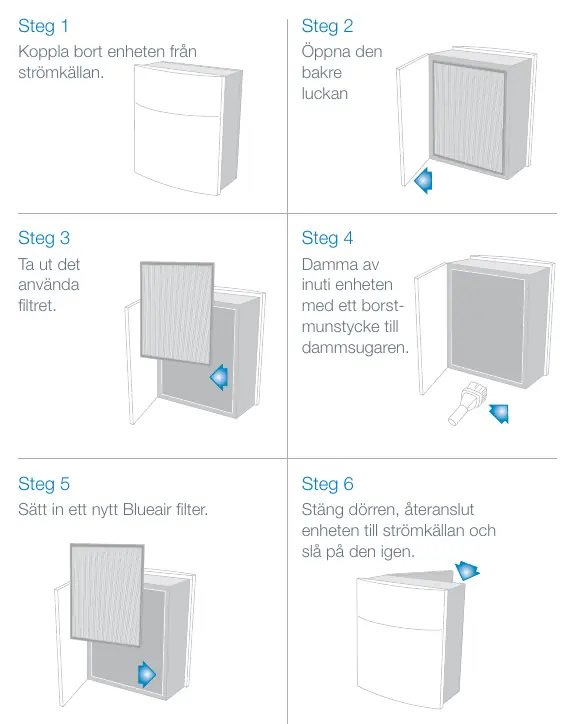
- Disconnect the unit from the power source.
- Open the rear door.
- Remove the used filter.
- Vacuum the inside of the unit with a brush attachment.
- Insert a new Blueair filter.
- Close the door, reconnect the power, and turn the unit on.
Maintenance
- Vacuum the air intake grille from the inside when changing the filter.
- Use a brush attachment to dust the small intakes.
- Clean the exterior with a soft, clean, damp cloth.
- Do not use gasoline, solvents, or corrosive chemicals.
- Do not allow foreign objects to enter the ventilation or exhaust openings.
- Do not attempt to repair electrical or mechanical functions yourself.
How it Works
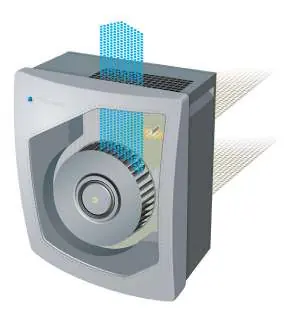
The unit uses HEPASilent technology. Filtered air leaving the unit is charged with negative ions. These ions collide with airborne particles in the room. When the air is drawn back into the unit, the HEPASilent filter captures the charged particles.
Practical help
Common problems
Unit does not turn on
Ensure the power cable is securely connected to a grounded wall outlet.
Poor air quality or performance
Ensure windows and doors are closed, and check if the filter needs replacement (recommended every 6 months).
Strange odor
If using a new SmokeStop filter, a faint odor from the carbon may be present initially but will disappear quickly.
Before use
- Place on a flat surface with at least 10cm clearance
- Ensure the unit is not near heat sources or water
- Verify the filter is installed correctly
- Connect to a grounded power outlet
Specs in practice
- Particle Filter
- Standard filter for dust, pollen, bacteria, and pet dander.
- SmokeStop Filter
- Filter containing active carbon to remove gas pollutants and odors.
Images and diagrams
- The unit draws air in, charges particles negatively, and traps them in the filter before releasing clean air.
Model compatibility
- Use only original Blueair filters to ensure warranty validity and proper operation.

Manual page author
Emily Carter
User documentation editor
Prepares concise manual descriptions and highlights the most useful setup, operation, and maintenance information for readers.