Power / Batteries Chargers
Bosch GAL 18V-160 C Battery Charger Instruction Manual
Quick guide for the Bosch GAL 18V-160 C battery charger, covering safety, charging modes, connectivity, wall mounting, and troubleshooting.
Table of contents
Manual images
Jump to the sectionQuick guide from the manual
This manual provides essential safety and operating instructions for the Bosch GAL 18V-160 C battery charger. Always read the safety warnings before use. The charger is designed for Bosch or AMPShare rechargeable batteries. It features Active Air Cooling to monitor battery temperature and prevent overheating during the charging process.
Device description
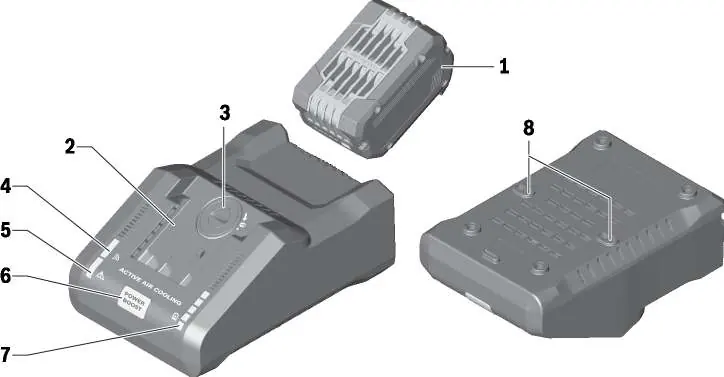
The charger includes a connectivity module compartment, a Power Boost button, charging status LEDs, an error indicator, and wall mount slots. It supports data transmission when the optional GCY42 connectivity module is installed.
Charging modes
- Standard: The default mode, charging the battery to 100% for an optimal balance of speed and battery life.
- Power Boost: Rapidly charges the battery to approximately 50% capacity. Once reached, it continues to charge to 80% in a slower mode.
- Max Lifetime: Charges the battery to 80% to significantly prolong its service life. This mode is only available via the Bosch Toolbox app.
- Storage: Charges the battery to 50% for long-term storage (6 months or more). This mode is only available via the Bosch Toolbox app.
Connectivity
By installing the GCY42 connectivity module (sold separately) and using the Bosch Toolbox app, you can customize charging modes, check battery health, view estimated time remaining, and receive alerts. The connection status is indicated by a blue light on the charger.

Wall mounting
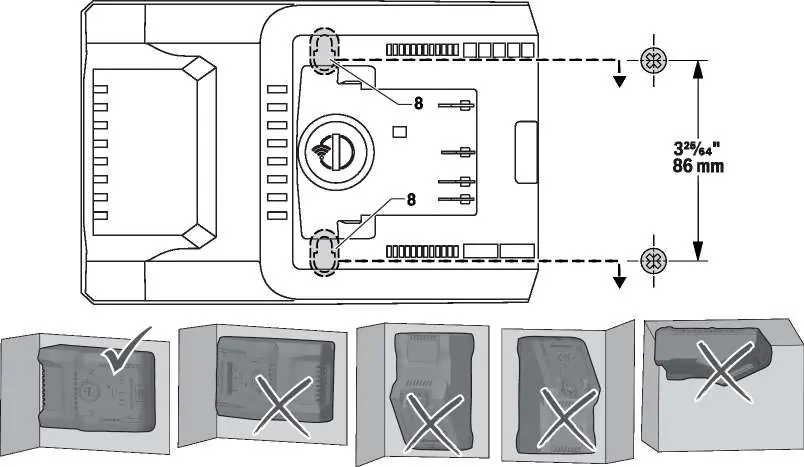
The charger can be mounted to a wall using the slots on the back. Ensure the mounting surface can support the weight of the charger and the heaviest battery. Use appropriate screws (13/64" to 1/4" diameter) and anchors for your wall type. Do not mount the charger upside down or inverted.
Troubleshooting
If the red error light flashes, ensure the battery is inserted correctly, clean the contacts, or check for a battery/charger fault. If the green charging light does not turn on, check the power outlet, fuse, or circuit breaker. If the blue connection light does not turn on, ensure the GCY42 module is installed correctly and check your mobile device's Bluetooth settings.
Manufacturer information
Bosch
Practical help
Common problems
Red error light is flashing
Check if the battery is inserted properly, clean the battery contacts, or replace the battery if faulty.
Green charging light is not lit
Ensure the charger is plugged into a working outlet and check for tripped circuit breakers.
No Bluetooth connection
Verify the GCY42 module is installed correctly, toggle Bluetooth on your mobile device, or reduce the distance between the charger and the device.
Before use
- Read all safety instructions and markings on the charger and battery.
- Ensure the charger is placed on a flat, non-flammable surface.
- Check the charger, cable, and plug for any damage before each use.
- Verify the ambient temperature is between 32°F (0°C) and 113°F (45°C).
- Ensure the battery pack case is not cracked.
Specs in practice
- Input Voltage
- 120V AC, 60Hz
- Charging Current
- 16.0A
Images and diagrams
- Fig 1: Overview of charger components including battery pack, connectivity module compartment, and indicators.
- Fig 2: Steps for installing the GCY42 connectivity module.
- Fig 3: Wall mounting instructions showing the 86mm (3-25/64") spacing between mounting screws.
Model compatibility
- Only charge Bosch or AMPShare batteries (BAT600-BAT650, WCBAT612-WCBAT625, GBA18V000-GBA18V999).
- Using non-Bosch chargers or batteries will void the warranty.

Manual page author
Michael Turner
Technical manual editor
Reviews PDF manuals for structure, safety notes, and practical product details so readers can find the right information quickly.