Tools / Drills
Bosch ISR Industrial 18V-30 P / 18V-30 PHX Cordless Drill/Driver User Manual
Quick guide for the Bosch ISR Industrial 18V-30 P and 18V-30 PHX cordless drill/driver. Includes setup, operation, connectivity, maintenance, and safety instructions.
Quick answers from the manual
Quick answer
- The Bosch ISR Industrial 18V-30 P and 18V-30 PHX are cordless drill/drivers intended for driving and loosening screws and for drilling in metal and plastic. p. 8
Key actions
- Insert battery p. 9
- Change tool (18V-30 P) p. 10
- Change tool (18V-30 PHX) p. 10
Problems and fixes
LED flashes 3x during operation
Battery status is low; charge or replace the battery.
p. 11Maintenance and reset
- Keep the tool and ventilation slots clean. p. 12
Technical specifications
| Parameter | Value | Meaning | Pages |
|---|---|---|---|
| Rated voltage | 18 V | Operating voltage | p. 8 |
Where to find it in the PDF
- Product Overview p. 3, 4
- Technical Data p. 8
Table of contents
Manual images
Click an image to enlargeQuick guide from the manual
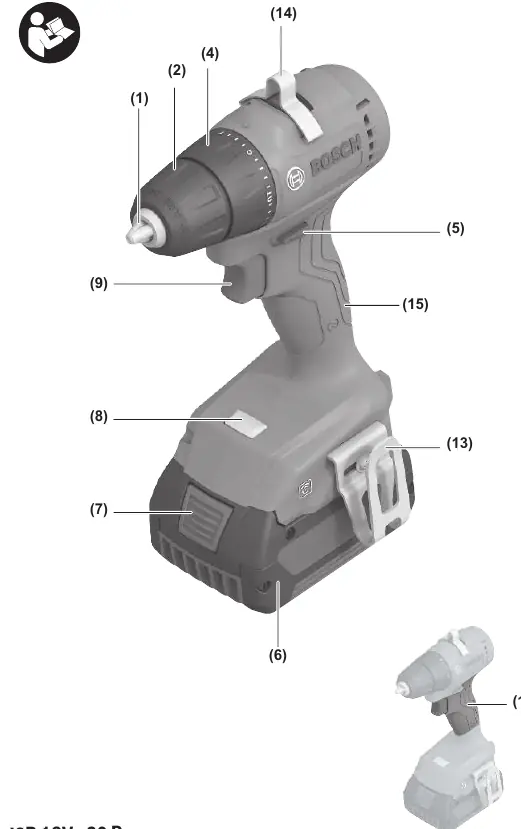
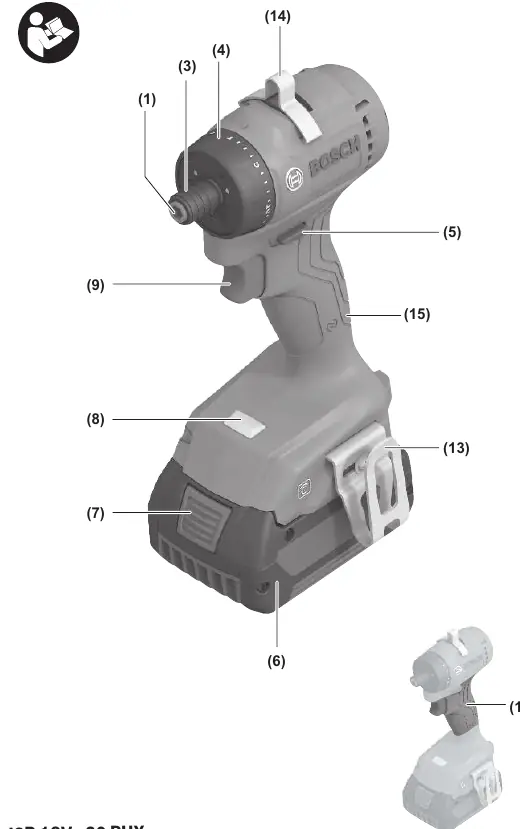
The Bosch ISR Industrial 18V-30 P and 18V-30 PHX are cordless drill/drivers designed for driving screws and drilling in metal and plastic. This manual covers both models, which differ primarily in their tool holding mechanism (keyless chuck vs. locking sleeve).
Product Description
The tool features a torque presetting ring, rotational direction switch, and an LED worklight that also serves as a status indicator. The 18V-30 P model uses a keyless chuck, while the 18V-30 PHX uses a locking sleeve. Both models support NFC connectivity for use with the BeConnected or PRO360 apps.
Assembly
Battery: Push the charged battery into the battery holder until it clicks into place. To remove, press the battery release button and pull the battery out.
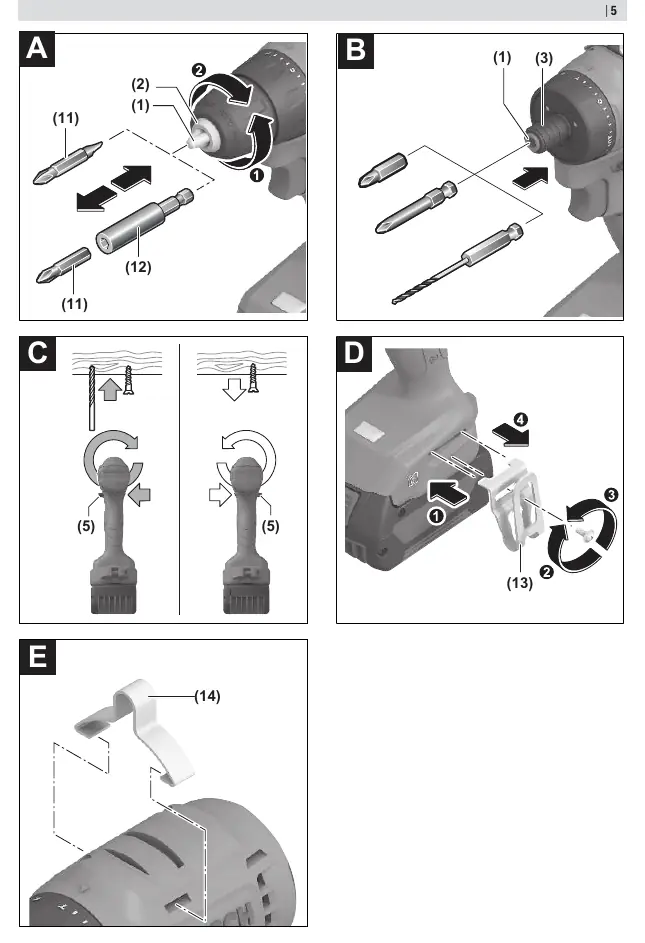

Changing the tool (18V-30 P): Open the keyless chuck by turning it in the direction of rotation 1 until the tool can be inserted. Insert the tool and firmly tighten the chuck by turning it in the direction of rotation 2.
Changing the tool (18V-30 PHX): Pull the locking sleeve back, guide the application tool into the tool holder as far as it will go, and release the locking sleeve to lock the tool.
Operation
Direction: Use the rotational direction switch to change the direction of the tool. Press to the left for right rotation (drilling/screwing) and to the right for left rotation (loosening screws).
Torque: Use the torque presetting ring to select the required torque in 20 stages. For drilling, set the ring to the drilling symbol.
Speed: Speed is controlled by the pressure applied to the on/off switch. Light pressure results in low speed; increased pressure increases speed.
Connectivity
The tool includes built-in NFC technology. Install the BeConnected or PRO360 app on your mobile device to access features like registration, status checks, and settings.
Maintenance
Always remove the battery before performing any work on the tool. Keep the tool and ventilation slots clean for safe and efficient operation.
Manufacturer information
Bosch
Practical help
Common problems
LED flashes 3x during operation
Battery status is low. Charge or replace the battery.
LED flashes 3x during downtime
Device protection is active to prevent battery overload or damage.
Tool does not start
Check if the battery is charged and properly inserted.
Before use
- Ensure the battery is fully charged.
- Select the correct bit for the application.
- Set the rotational direction switch to the desired position.
- Adjust the torque ring to the appropriate setting for the task.
Specs in practice
- No-load speed
- 0-1400 min-1
- Max. torque (hard/soft)
- 30/9 Nm
- Chuck capacity
- 10 mm (18V-30 P model only)
Images and diagrams
- Figure A: Inserting tool into keyless chuck (18V-30 P)
- Figure B: Inserting tool into locking sleeve (18V-30 PHX)
- Figure C: Rotational direction switch operation
- Figure D: Belt hook installation
- Figure E: Utility hook installation
Model compatibility
- Compatible with Bosch GBA 18V and ProCORE18V batteries.
- Use only chargers listed in the technical data.

Manual page author
Emily Carter
User documentation editor
Prepares concise manual descriptions and highlights the most useful setup, operation, and maintenance information for readers.