Tools / Drills
User Manual for Bosch GSR 18V-60 FC Cordless Drill/Driver
Quick guide for the Bosch GSR 18V-60 FC Cordless Drill/Driver. Includes instructions for assembly, operation, maintenance, and troubleshooting.
Quick answers from the manual
Quick answer
- The GSR 18V-60 FC is a cordless drill/driver designed for driving/loosening screws and drilling in wood, metal, and plastic. It supports interchangeable chuck adapters. p. 15
Key actions
- Insert battery p. 18
- Attach adapter p. 18
First start
- Charge battery fully p. 17
Problems and fixes
Tool stops during operation
Check battery charge or if overload protection is triggered.
p. 17, 19Technical specifications
| Parameter | Value | Meaning | Pages |
|---|---|---|---|
| Voltage | 18V | Battery voltage | p. 16 |
| No-load speed (1st gear) | 0-600 min-1 | Low speed range | p. 16 |
| No-load speed (2nd gear) | 0-1900 min-1 | High speed range | p. 16 |
Where to find it in the PDF
- Technical Data p. 9, 16
- Assembly p. 10, 17
Table of contents
Manual images
Click an image to enlargeQuick guide from the manual
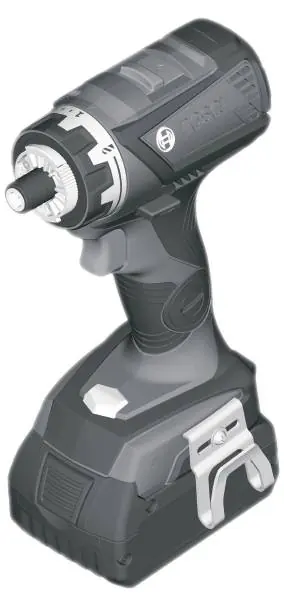
The Bosch GSR 18V-60 FC is a professional cordless drill/driver designed for driving and loosening screws, as well as drilling in wood, metal, and plastic. It features an interchangeable chuck system for versatile applications.
Product Description
The tool features a holder for various adapters (GFA 18-M, GFA 18-B, GFA 18-W, GFA 18-E, GFA 18-WB), a torque presetting ring, a gear selector, and an LED worklight. It also supports Bluetooth connectivity when the optional GCY 30-4 module is installed.
Assembly
Battery: Remove the battery before any work on the tool (maintenance, tool change, etc.) and for transport/storage. Insert the charged battery into the handle until it engages.
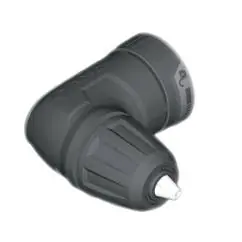
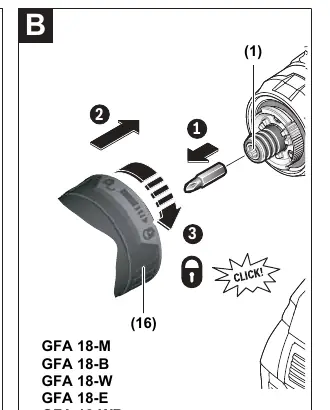
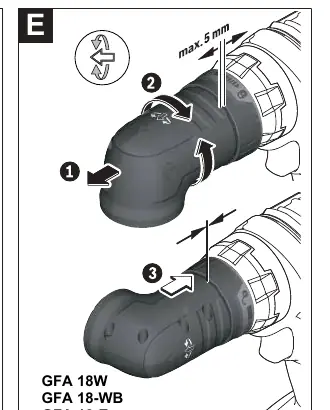

Adapters: To mount an adapter, remove the application tool, insert the adapter into the holder (1), and turn the locking ring (16) until it clicks into place.
Operation
Direction of Rotation: Use the rotational direction switch (9) only when the tool is at a standstill. Press left for drilling/screwing, right for loosening.
Torque Setting: Use the torque presetting ring (3) to select the required torque in 15 stages. The overload clutch is deactivated in the drill position.
Gear Selection: Use the gear selector (4) only when the tool is at a standstill. Gear I is for low speed/high torque (large diameters), Gear II is for high speed (small diameters).
Maintenance and Cleaning
Always keep the tool and ventilation slots clean for safe operation. Remove the battery before any maintenance work.
Manufacturer information
Bosch
Practical help
Common problems
Tool stops during operation
Check if the battery is charged or if the overload protection has been triggered.
Battery does not charge
Ensure the charger is compatible and the battery is correctly inserted.
Before use
- Charge the battery fully before first use.
- Ensure the correct adapter is securely attached.
- Check the rotational direction switch.
- Select the appropriate gear for the task.
Images and diagrams
- Page 3 shows the tool components and various adapters.
- Page 4-5 show assembly steps for different adapters.
Model compatibility
- Compatible with GFA 18-M, GFA 18-B, GFA 18-W, GFA 18-E, GFA 18-WB adapters.

Manual page author
Emily Carter
User documentation editor
Prepares concise manual descriptions and highlights the most useful setup, operation, and maintenance information for readers.