Tools / Drills
User Manual for Bosch GBH 18V-24 C Professional Cordless Rotary Hammer
Quick guide and user manual for the Bosch GBH 18V-24 C Professional Cordless Rotary Hammer. Includes setup, operation, maintenance, and safety instructions.
Quick answers from the manual
Quick answer
- The GBH 18V-24 C is a cordless rotary hammer for hammer drilling in concrete, brick, and stone, and light chiseling. It also supports drilling without impact and screwdriving. p. 9, 19
Key actions
- Insert battery p. 10, 20
- Select operating mode p. 12, 22
First start
- Charge battery fully before first use. p. 10, 20
Problems and fixes
Rapid shut-off triggered
Release on/off switch and press again.
p. 14, 24Maintenance and reset
- Clean tool holder after each use. p. 15, 25
Technical specifications
| Parameter | Value | Meaning | Pages |
|---|---|---|---|
| Impact energy | 2.4 J | Energy per stroke | p. 9, 19 |
Where to find it in the PDF
- Safety instructions p. 6, 16
- Technical data p. 9, 19
Table of contents
Manual images
Click an image to enlargeQuick guide from the manual
The Bosch GBH 18V-24 C Professional is a cordless rotary hammer designed for hammer drilling in concrete, brick, and stone, as well as light chiseling work. It is also suitable for drilling without impact in wood, metal, ceramic, and plastic, and for screwdriving.
Product Description
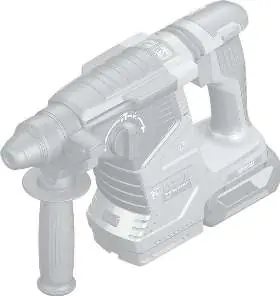
The tool features an SDS-plus tool holder, a user interface for mode selection and status monitoring, and Bluetooth connectivity for data transfer via the Bosch Toolbox app.
Operation
Start-up: Insert a fully charged battery into the battery holder until it clicks into place. Ensure the auxiliary handle is securely tightened before use.
Operating Modes: Use the impact/mode selector switch to choose between hammer drilling, drilling without impact, Vario-Lock (for chisel positioning), and chiseling.
Speed/Impact Rate: Regulate the speed and impact rate by varying the pressure on the on/off switch.
Connectivity: With the Bluetooth Low Energy Module inserted, you can configure settings and monitor tool status via the Bosch Toolbox app.
Maintenance and Cleaning
Always remove the battery before performing any maintenance or changing tools. Keep the tool and ventilation slots clean. Replace a damaged dust protection cap immediately. The built-in coin cell for Bluetooth connectivity must be replaced by an authorized service center.
Manufacturer information
Bosch
Practical help
Common problems
Tool does not start
Check battery charge and ensure it is properly inserted.
Rapid shut-off (KickBack Control) triggered
Release the on/off switch and press it again to restart.
Bluetooth not detected
Check the distance to the mobile device and ensure the coin cell battery is not empty.
Before use
- Check battery charge level
- Ensure auxiliary handle is securely tightened
- Check dust protection cap for damage
- Select the correct operating mode
Specs in practice
- Impact energy
- 2.4 J (Energy per stroke)
- Max drilling diameter (concrete)
- 24 mm
- Rated voltage
- 18 V
Images and diagrams
- (1) SDS plus drill chuck
- (7) Impact/mode selector switch
- (15) User interface
Model compatibility
- Compatible with GBA 18V and ProCORE18V batteries.

Manual page author
Michael Turner
Technical manual editor
Reviews PDF manuals for structure, safety notes, and practical product details so readers can find the right information quickly.