Tools / Saws
Cordless Jigsaw Bosch GST 12V-70 Professional
Quick guide for the Bosch GST 12V-70 Professional cordless jigsaw. Includes setup, operation, maintenance, and safety instructions.
Table of contents
Manual images
Click an image to enlargeQuick guide from the manual
This manual provides essential information for operating the Bosch GST 12V-70 Professional cordless jigsaw. Key operations include battery installation, saw blade changing, adjusting the pendulum action, and setting the mitre angle. Always ensure the battery is removed before performing any maintenance or changing accessories to prevent accidental startup.
Device description
The jigsaw features a battery receptacle, a stroke rate preselection thumbwheel, a base plate, a guide roller, and a saw blade receptacle. It includes an LED worklight for better visibility and a temperature/overload protection indicator to ensure safe operation.
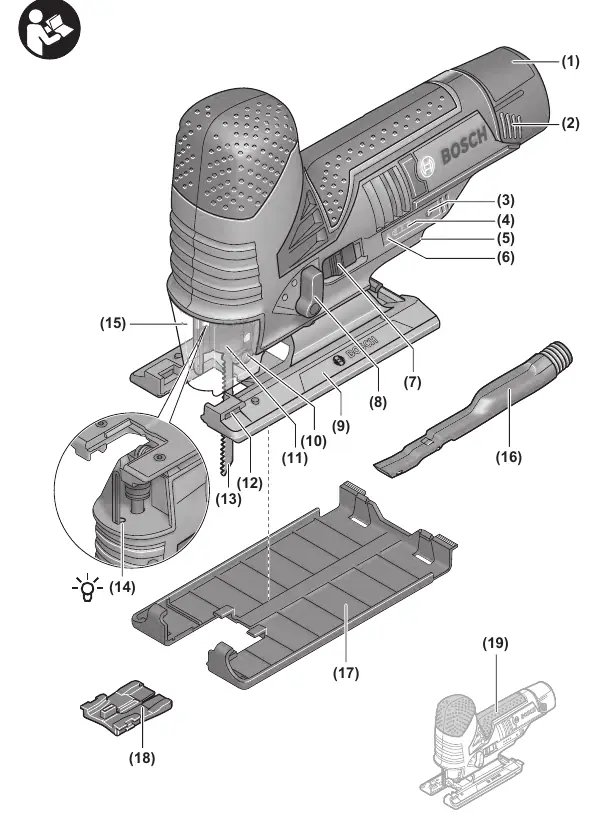
Assembly
Battery: Insert the charged battery into the battery receptacle until it clicks into place. To remove, press the release button and pull the battery downwards.
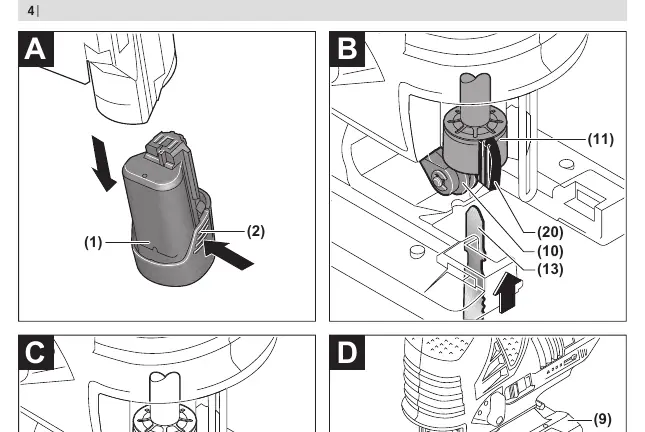
Saw blade: Wear protective gloves when changing blades. Clean the blade shaft before insertion. Push the blade into the receptacle until it clicks. The SDS lever will automatically lock the blade. Ensure the back of the blade sits in the guide roller groove.
Operation
Pendulum action: Adjustable in three levels (0, I, II) to adapt cutting speed and performance to the material. Use the adjusting lever to change settings.
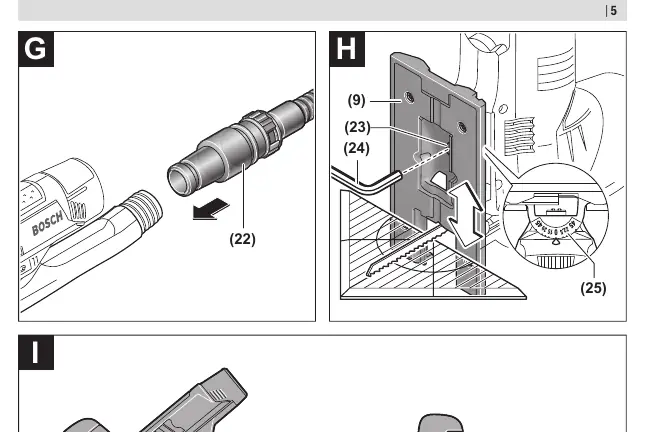
Mitre angle: The base plate can be swivelled up to 45° to the left or right. Loosen the base plate screw, slide the plate towards the battery, adjust to the desired angle using the scale, and retighten the screw.
Starting: Slide the on/off switch forward to 'I' to start and backward to '0' to stop. The tool features restart protection; if it triggers, switch off and on again.
Working advice
Plunge cutting: Only for soft materials like wood or gypsum board. Use short saw blades and a 0° mitre angle. Place the front edge of the base plate on the workpiece and slowly plunge the blade.
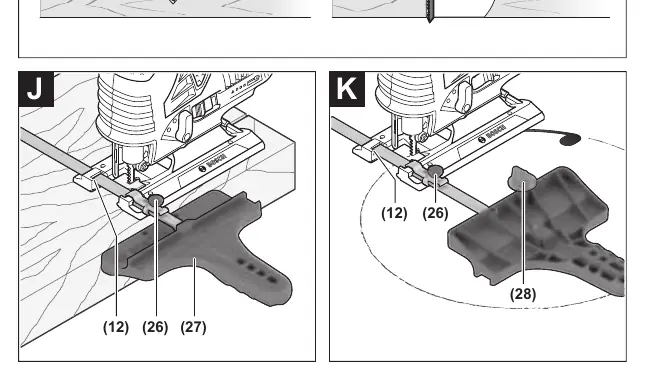
Parallel guide: For parallel cuts, slide the guide through the base plate and set the desired width. For circular cuts, use the centering tip with the parallel guide.
Maintenance and cleaning
Keep the tool and ventilation slots clean. Regularly clean the saw blade receptacle by removing the blade and tapping the tool on a flat surface. Lubricate the guide roller occasionally with a drop of oil. If the tool becomes heavily soiled, it may lead to malfunctions.
Safety and disposal
Protect the battery from heat, fire, and moisture. Dispose of power tools, batteries, and packaging in an environmentally friendly manner according to local regulations.
Manufacturer information
Bosch
Practical help
Common problems
Tool does not start
Check battery charge or restart protection (switch off and on again).
Saw blade blocks
Switch off immediately, remove battery, and clear the blockage.
Reduced performance
Battery may be depleted or damaged; check charge indicator.
Before use
- Ensure battery is fully charged
- Check saw blade for damage
- Ensure base plate is securely attached
- Check for foreign objects in workpiece (nails, screws)
Specs in practice
- No-load stroke rate
- 1500–2800 min-1, adjustable for different materials.
- Max cutting depth
- 70mm in wood, 3mm in aluminum/steel.
- Stroke length
- 18mm.
Images and diagrams
- Page 3 shows the main components including the battery, switch, base plate, and blade receptacle.
- Page 4 shows battery installation and blade changing steps.
- Page 5 shows mitre angle adjustment and parallel guide usage.
Model compatibility
- Use only T-shank saw blades.
- Use only Bosch-recommended chargers.

Manual page author
Emily Carter
User documentation editor
Prepares concise manual descriptions and highlights the most useful setup, operation, and maintenance information for readers.