Tools / Drills
User Manual for Bosch GSR 18V-110 C / GSB 18V-110 C Cordless Drill/Driver
Quick guide for the Bosch GSR 18V-110 C and GSB 18V-110 C cordless drill/driver. Includes setup, operation, safety, maintenance, and troubleshooting.
Table of contents
Manual images
Click an image to enlargeQuick guide from the manual
This manual provides essential information for operating the Bosch GSR 18V-110 C and GSB 18V-110 C cordless drill/drivers. Always remove the battery before performing maintenance or changing tools to prevent accidental activation.
Product Description
These tools are designed for driving and loosening screws and for drilling in wood, metal, ceramic, and plastic. The GSB model is also designed for impact drilling in brick, masonry, and stone.

Assembly
Auxiliary Handle: Always use the auxiliary handle (4) for safe operation. To mount, turn the lower gripping end anticlockwise, pull back the intermediate piece (5), slide the handle over the drill chuck, and retighten.
Depth Stop: Use the depth stop (3) to set the required drilling depth. Loosen the wing bolt (6), insert the depth stop, adjust to the desired depth, and retighten.
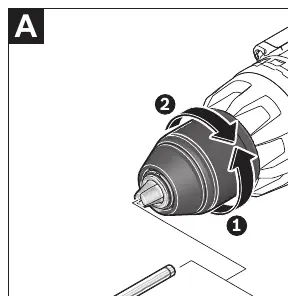
Tool Change: The drill spindle is locked when the on/off switch (17) is not pressed. Open the keyless chuck (2) by turning it in the direction of rotation 1, insert the tool, and firmly tighten the chuck sleeve in direction 2.
Operation
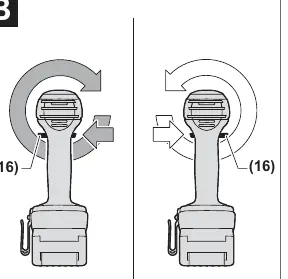
Direction of Rotation: Use the rotational direction switch (16) to change the direction. Do not operate while the on/off switch (17) is pressed.
Operating Mode: Set the mode selector switch (8) to the desired symbol: Drilling, Screwdriving, or Impact Drilling (GSB model only).
Speed and Torque: Adjust speed by varying pressure on the on/off switch (17). Use the torque presetting ring (7) to select the required torque in 25 stages.
Gear Selection: Use the gear selector switch (9) only when the tool is at a standstill. Position 1 is for heavy-duty applications (large diameters), and position 2 is for light-duty applications (small diameters).
Safety and Maintenance
Overload Protection: If the tool is overloaded or the temperature is outside the permitted range, the speed is reduced. The tool will return to full speed once the permitted temperature is reached. A red LED (14) indicates activation of the temperature-dependent overload protection.
KickBack Control: This feature provides better control and user protection. If the tool suddenly rotates around the drill axis, it will switch off automatically. The LED will flash to indicate this. To restart, release and press the on/off switch again.
Maintenance: Keep the tool and ventilation slots clean for safe and efficient operation.
Manufacturer information
Bosch
Practical help
Common problems
Tool stops unexpectedly
Check if the tool is overloaded or if the temperature is outside the permitted range (indicated by red LED 14). Let the tool cool down or run at no load.
KickBack Control triggered
If the tool suddenly rotates around the drill axis, it will switch off. Release the on/off switch and press it again to restart.
Tool will not start
Ensure the battery is fully charged and correctly inserted. If KickBack Control is faulty, have the tool serviced by a qualified professional.
Before use
- Ensure the battery is fully charged.
- Check that the auxiliary handle is securely tightened.
- Set the correct operating mode (Drilling, Screwdriving, or Impact Drilling).
- Select the appropriate gear (1 or 2) for the task.
- Ensure the tool is switched off before placing it on the screw.
Images and diagrams
- The manual includes diagrams showing the tool components, including the keyless chuck, auxiliary handle, mode selector, and gear selector.
- Figure A illustrates the tool change process.
- Figure B illustrates the rotational direction switch.
Model compatibility
- Compatible with Bosch GBA 18V and ProCORE18V battery systems.
- Compatible with Bluetooth Low Energy Modules GCY 30-4, GCY 42, and GCY 42 NC.

Manual page author
Emily Carter
User documentation editor
Prepares concise manual descriptions and highlights the most useful setup, operation, and maintenance information for readers.