Lighting / Fixtures
User Manual for Brilliant Seaford 5W 20cm Spike Light
Quick guide for the Brilliant Seaford 5W 20cm Spike Light. Includes installation steps, maintenance, globe replacement, and safety instructions for models 21625/06, 21625/15, and 21625/16.
Quick answers from the manual
Quick answer
- The Brilliant Seaford 5W 20cm Spike Light is an outdoor LED fixture. Installation requires assembling the spike rod to the base and connecting the quick clip connector to a 12V DC power source. p. 1
Key actions
- Install the light p. 1
- Replace the globe p. 1
Problems and fixes
Blotches on stainless steel
Clean with a soft cloth soaked in neutral oil (WD-40).
p. 2Maintenance and reset
- Treat stainless steel parts with neutral oil in corrosive environments. p. 2
Technical specifications
| Parameter | Value | Meaning | Pages |
|---|---|---|---|
| Power Supply | 12V DC | Requires 12V DC transformer | p. 1 |
| Globe Type | LED MR16 5W | Included bulb type | p. 1 |
| IP Rating | IP65 | Weatherproof | p. 1 |
Where to find it in the PDF
- Installation and Specifications p. 1
- Maintenance and Warranty p. 2
Table of contents
Important Information
The Brilliant Seaford 5W 20cm Spike Light is an outdoor lighting fixture designed for use with a 12V DC power supply. This manual covers installation, maintenance, and safety procedures for models 21625/06, 21625/15, and 21625/16.
Safety Warnings
- Power Off: Ensure the power is switched OFF before starting any installation.
- Heat: The light may become extremely hot during use. Do not mount in positions easily accessible by children or the infirm.
- Maintenance: Never attempt to touch the light or replace the globe while the unit is ON. Allow the fitting and globe to cool to room temperature before handling.
Installation
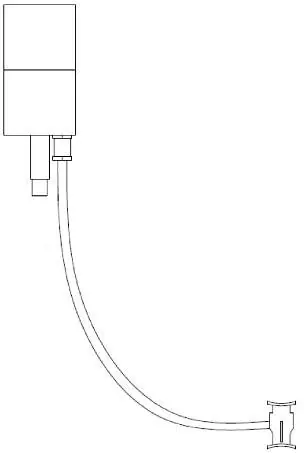
- Carefully unpack the fitting and dispose of packaging materials.
- Screw the Spike Rod (A) into the Light Base (B) and ensure it is firmly secured.
- Attach the Quick Clip Connector (C) into the 12V cable (F) on the transformer output.
- Push the spike light into the ground.
Maintenance and Globe Replacement
To replace the globe:
- Unscrew the Light Cover (D) in an anticlockwise direction.
- Gently push up the MR16 globe and replace it with a new one (20952SP001).
- Screw the Light Cover (D) back on, ensuring the rubber seal ring is correctly positioned.
To release the connector from the cable, press the side and gently pull the connector apart.
Stainless Steel Care
Stainless steel models require specific care to maintain their finish, especially in coastal or corrosive environments:
- Blotches: If blotches appear (caused by free iron atoms from polishing brushes), clean with a soft cloth soaked in neutral oil (e.g., WD-40). This is not a fault.
- Corrosive Environments: Before installation, treat stainless steel parts with neutral oil, ensuring it penetrates all joints. Dry with a soft cloth. In highly corrosive areas, repeat this treatment at least 4 times a year.
- Serious Corrosion: Use an abrasive paste designed for stainless steel to remove stains, then reapply neutral oil.
Specifications
- Power Supply: 12V DC
- Globe: LED MR16 5W (included)
- Weatherproof Protection: IP65 (suitable for outdoor use)
Practical help
Common problems
Blotches on the stainless steel surface
This is not a fault. Clean the surface with a soft cloth soaked in neutral oil (e.g., WD-40).
Light not turning on
Ensure the Quick Clip Connector is properly attached to the 12V cable and that the power supply is active.
Before use
- Ensure power is OFF before installation.
- Verify the installation location is not accessible by children.
- Ensure you have a compatible 12V DC transformer.
- Check that the rubber seal ring is in position when replacing the cover.
Specs in practice
- Power Supply
- Requires a 12V DC transformer to operate.
Images and diagrams
- The diagram illustrates the assembly of the spike rod (A) to the base (B) and the connection of the quick clip connector (C) to the 12V cable (F).
Model compatibility
- Compatible with Brilliant 12V DC transformers (19915/06, 19916/06, 19917/06).
- Compatible with Brilliant extension cables (19918/06, 21638/06).

Manual page author
Emily Carter
User documentation editor
Prepares concise manual descriptions and highlights the most useful setup, operation, and maintenance information for readers.