Automotive / Car Audio
User Manual for Caliber RMD 033DAB-BT Car Radio
Quick start guide and installation manual for the Caliber RMD 033DAB-BT car radio. Includes wiring instructions, DAB antenna installation, Bluetooth pairing, and operation settings.
Table of contents
Manual images
Click an image to enlargeQuick Start Guide
This guide provides essential information for installing and operating the Caliber RMD 033DAB-BT car radio. Please read all safety precautions before beginning installation.
Installation and Wiring
The unit is designed for 12V mobile applications with a negative ground system. Use only the provided ISO connectors for installation. If your vehicle is not equipped with an ISO connector, use the provided ISO loom cable to prevent incorrect wiring, which may void the warranty.
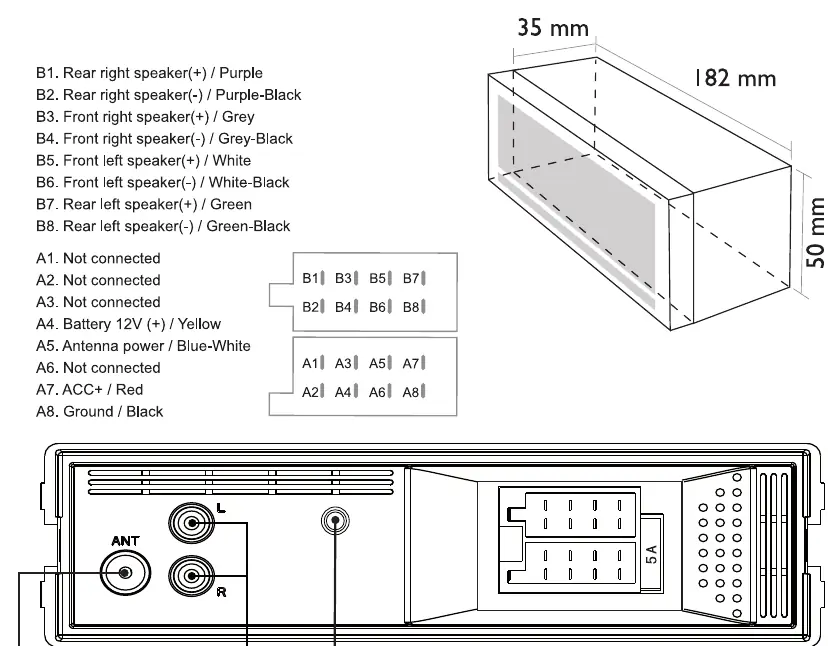
Warning: The negative speaker lead must NOT be grounded, as this will damage the radio.
DAB Antenna Installation
For optimal DAB reception, follow these steps:
- Remove the cover of the A-post.
- Place the antenna on the windshield near the A-post.
- Stick the transparent part of the antenna to the windshield.
- Attach the black (magnetic) part to the metal frame of the car.
- Power the DAB antenna using the blue/white (12V Remote) cable. Ensure wires are stripped before connecting.
Controls and Operation
The front panel features the following key controls:
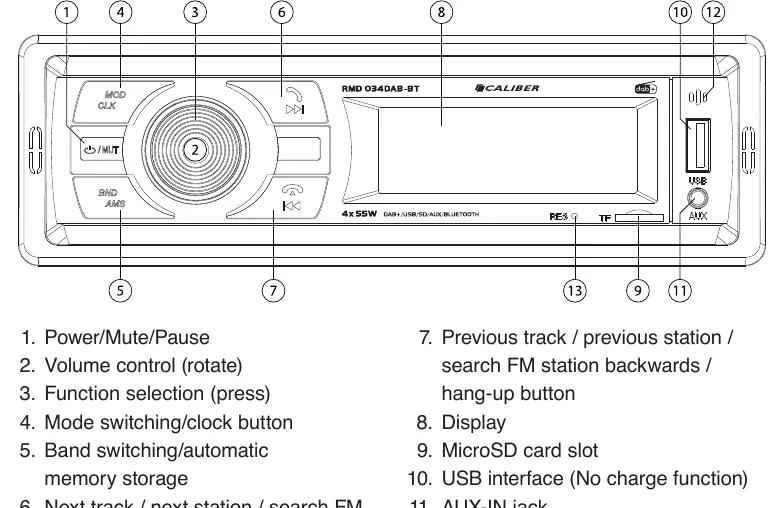
- 1. Power/Mute/Pause: Press to turn on/off, mute, or pause playback.
- 2. Volume Control: Rotate to adjust volume.
- 3. Function Selection: Press to access audio settings.
- 4. Mode/Clock: Switch between sources (Tuner, AUX, Bluetooth).
- 5. Band/AMS: Switch bands (FM/DAB) or perform automatic memory storage.
- 6. Next Track/Station/Answer: Navigate forward or answer calls.
- 7. Previous Track/Station/Hang-up: Navigate backward or end calls.
- 9/10/11: MicroSD slot, USB interface, and AUX-IN jack.
Bluetooth Setup
To connect your mobile device:
- Press the MOD/CLK button to open Bluetooth mode.
- Activate Bluetooth on your mobile phone and search for available devices.
- Select 'RMD033DAB-BT' from the list.
- Enter the password '0000' if prompted.
- Once connected, 'Linked BT' will appear on the display.
DAB Settings
Upon first switching to DAB mode, the system will automatically search for and store stations. To re-scan, long-press the BND/AMS button. The 18 strongest stations are stored across three bands (DAB1, DAB2, DAB3).
Safety and Maintenance
- Do not operate the unit while driving.
- Keep volume at a level where outside noises are still audible.
- Clean the unit with a soft, dry cloth. For stubborn stains, dampen the cloth with water only.
- Ensure the vehicle temperature is between 0°C and +45°C before turning on the unit.
Manufacturer information
Caliber Europe
Practical help
Common problems
Unit will not turn on
Check the 12V power connection and ensure the fuse is intact.
No sound from speakers
Verify that the negative speaker leads are not grounded, as this causes damage.
Bluetooth pairing fails
Ensure the phone is searching for devices and use the password '0000'.
DAB stations not found
Ensure the DAB antenna is correctly installed on the windshield and powered via the blue/white remote wire.
Before use
- Verify vehicle has a 12V negative ground electrical system.
- Ensure ISO connector is available or use the provided ISO loom.
- Check that speaker negative leads are not grounded.
- Install DAB antenna on the windshield near the A-post.
- Strip wires before connecting to the power/antenna cable.
Specs in practice
- Power Supply
- DC 11-15V (Standard 12V vehicle system).
- Power Output
- 4x 55W (Maximum output).
- Load Impedance
- 4 to 8 Ohm speakers.
- Bluetooth Frequency
- 2402-2480 Mhz.
Images and diagrams
- Front Panel: Identifies buttons 1-13 for power, volume, mode, and media control.
- ISO Connector: Shows pinout for speakers (B1-B8) and power/ground (A1-A8).
- DAB Antenna: Illustrates A-post placement and wiring connection.
Model compatibility
- Requires 12V negative ground vehicle electrical system.
- USB and SD card slots support media up to 32GB.

Manual page author
Emily Carter
User documentation editor
Prepares concise manual descriptions and highlights the most useful setup, operation, and maintenance information for readers.