Automotive / Car Audio
User Manual for Caliber RMD 056DAB-BT Car Radio
Quick guide for the Caliber RMD 056DAB-BT car radio. Includes wiring diagrams, DAB antenna installation, Bluetooth pairing, and button operation instructions.
Table of contents
Manual images
Click an image to enlargeQuick guide from the manual
This manual provides instructions for the Caliber RMD 056DAB-BT car radio. It covers installation, wiring, Bluetooth connectivity, and general operation. Important: Do not operate the unit while driving. The device is designed for 12V negative ground systems only.
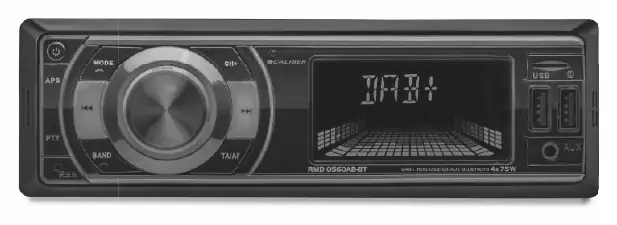
Installation and Wiring
Proper installation is critical for the unit to function correctly. Ensure the vehicle has a 12V negative ground system.
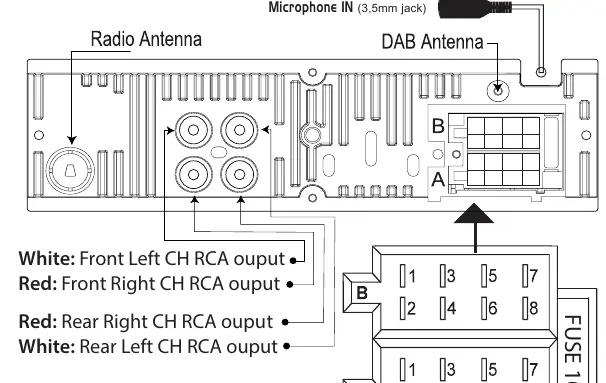
Wiring Diagram
- Connector A: Includes Power (Memory +12V yellow, Ignition +12V red), Remote +12V output (blue), and Ground (black).
- Connector B: Dedicated to speaker outputs (Front Left/Right, Rear Left/Right).
- Antenna: The active DAB+ antenna is powered through the core of the antenna wire (+5V). No separate power source is required.
DAB Antenna Installation
- Remove the cover of the A-post.
- Place the antenna on the windshield near the 'A post'.
- Stick the transparent part of the antenna on the windshield and attach the black part to the metal frame of the car.
Operation and Controls
The unit features a multi-functional rotary knob and various buttons for mode selection, volume, and playback control.
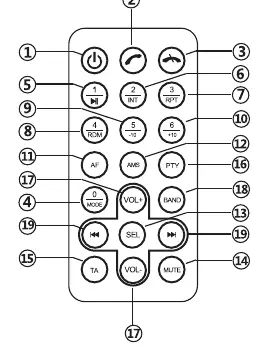
Bluetooth Pairing
- Press the MODE button to open Bluetooth mode.
- Activate Bluetooth on your mobile phone and search for available devices.
- Select RMD056DAB-BT_CALIBER.
- Enter password 0000 if prompted.
- If successful, the display will show BT ON. If it fails, it will show NO CON.
General Functions
- Reset: Use a non-metallic pointed object to press and hold the reset button for 5 seconds to restore factory settings.
- Audio Menu: Allows adjustment of Bass, Treble, Balance, Fader, Loudness, EQ, DX/LOCAL, and Stereo/Mono.
- USB/SD: Inserting a USB stick or SD card automatically switches the unit to the respective mode (Max 32GB).
Specifications
- Power Supply: 12V DC, negative ground.
- Power Output: 75W x 4 channels (Max), 20W x 4 channels (RMS).
- Fuse: 10A.
- DAB Frequency: 174 ~ 240MHz.
- FM Frequency: 87.5-108.0 MHz.
- USB Charge Output: 5V, max 1.1A.
Manufacturer information
Caliber Europe
Practical help
Common problems
Display shows 'NO CON' during Bluetooth pairing
Pairing failed. Ensure Bluetooth is active on your phone and try again. Ensure the correct device name 'RMD056DAB-BT_CALIBER' is selected.
Unit will not turn on
Check the 10A fuse and ensure the wiring (Connector A) is correctly connected to 12V ignition and constant power.
Poor radio reception
Ensure the antenna is correctly installed and the DAB antenna is properly grounded to the car frame.
Before use
- Verify vehicle has a 12V negative ground system.
- Ensure the 10A fuse is intact.
- Check that the DAB antenna is mounted on the windshield near the A-post.
- Ensure all speaker wires are connected to Connector B.
- Verify temperature in the vehicle is between 0°C and +45°C.
Images and diagrams
- Connector A handles power and ignition signals.
- Connector B handles all speaker connections.
- The DAB antenna requires connection to the metal car frame for proper grounding.
Model compatibility
- Compatible with USB and SD cards up to 32GB.
- Designed for 12V vehicles only.
- DAB antenna requires active +5V phantom power (provided by the unit).

Manual page author
David Miller
Documentation analyst
Organizes user manual content into clear summaries, with attention to model details, product context, and everyday usability.