Electronics / Amplifiers Receivers
Installation Guide for Adastra UM-series Amplifier and 100V Ceiling Speakers
Quick installation guide for Adastra UM-series amplifiers and 100V ceiling speakers. Learn how to connect speakers in parallel, configure audio inputs, and set up power sources.
Table of contents
Quick guide from the manual
This document provides essential instructions for installing Adastra UM-series amplifiers with 100V ceiling speakers. The system supports parallel speaker connections and offers multiple input options for audio sources and microphones.
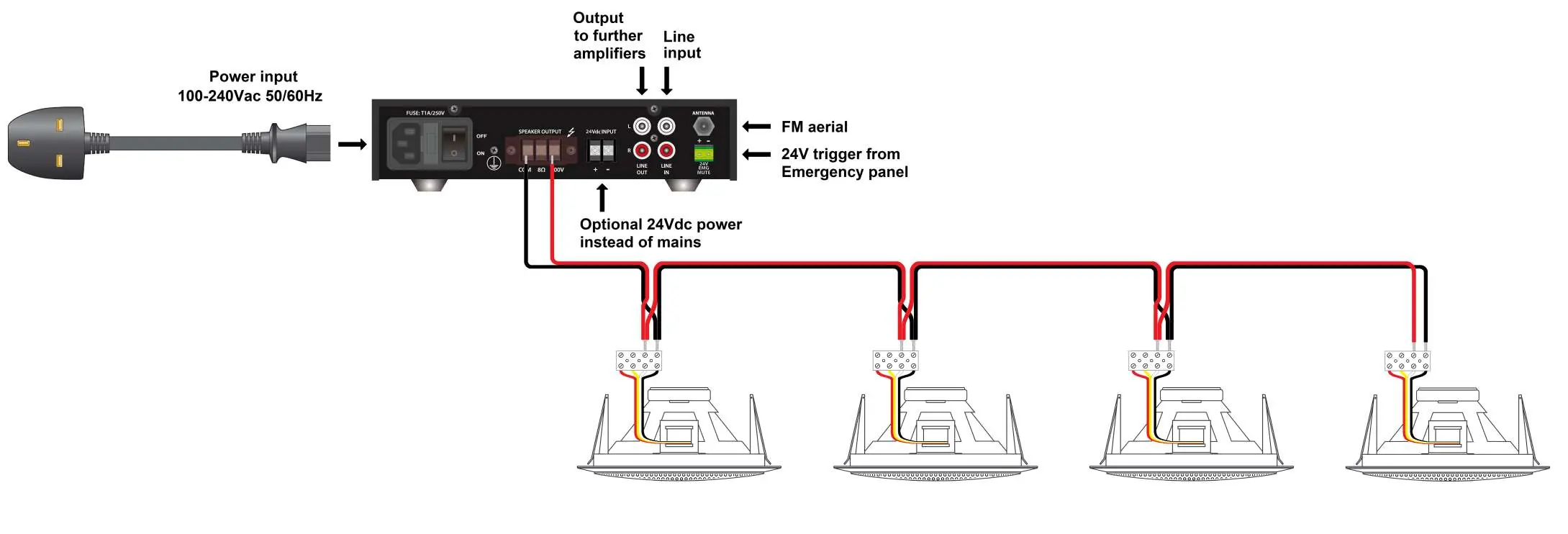
Speaker connection
The system is designed for 100V line operation. Follow these steps to ensure correct speaker installation:
- Parallel Wiring: Connect all ceiling speakers in parallel.
- Terminals: Connect the speaker wires to the amplifier's COM and 100V output terminals.
- Power Output: For the EC56V speakers, connect to the Black (COM) and White (6V) terminals to achieve the full 6W output.
Inputs and outputs
The amplifier features various connectivity options on the front and rear panels:
- FM Antenna: Connect an external FM aerial to the F-connector labeled ANTENNA.
- Line Inputs: Use the RCA sockets labeled LINE IN for devices like CD players, laptops, or TV tuners.
- AUX Input: A 3.5mm stereo jack is available on the front panel for additional line-level audio.
- Microphone: A 6.3mm mono jack on the front panel accepts microphone inputs for announcements.
- Line Output: Use the RCA connectors labeled LINE OUT on the rear panel to link the signal mix to a further amplifier.
Power supply
The amplifier supports two power configurations:
- Mains Power: Standard operation using 100-240Vac 50/60Hz.
- Alternative Power: Where mains power is unavailable, a 24Vdc supply may be connected to the screw terminals located on the rear panel.
Practical help
Common problems
No sound from speakers
Verify that speakers are connected to the COM and 100V terminals on the amplifier and that the wiring is in parallel.
Speaker output is too low
Ensure the speaker is connected to the Black (COM) and White (6V) terminals for the full 6W output.
Before use
- Confirm speakers are 100V type.
- Verify parallel wiring configuration for all speakers.
- Check if using mains (100-240Vac) or 24Vdc backup power.
- Ensure correct cables are used for RCA and 3.5mm inputs.
Images and diagrams
- Shows the rear panel layout of the amplifier.
- Illustrates the parallel wiring method for multiple ceiling speakers.
- Indicates the location of power inputs and signal connections.
Model compatibility
- Designed for 100V type speakers.
- Compatible with 24Vdc alternative power supply.

Manual page author
David Miller
Documentation analyst
Organizes user manual content into clear summaries, with attention to model details, product context, and everyday usability.