Electronics / PA Systems
User Manual for Audibax Zone 120BT / 240BT / 360BT Amplifier
Comprehensive user guide for the Audibax Zone series public address amplifiers. Learn how to connect loudspeakers, configure audio sources, set up Bluetooth and USB playback, and manage system settings.
Table of contents
Manual images
Click an image to enlargeQuick Guide
The Audibax Zone series amplifiers are designed for commercial public address applications. Before operating, ensure the power is switched off. Connect your loudspeakers to either the 100V constant voltage output or the 4Ω low impedance output, but never both simultaneously. For Bluetooth models, ensure the antenna is in a vertical position. Always set input gain trimmers to a central position before powering on.
Product Overview
The Zone series amplifiers feature a built-in media player (USB/SD/MMC), FM tuner, and Bluetooth (on +BT models). The front panel allows for individual input level control, master volume adjustment, and zone selection (1-4). The rear panel provides various input and output connections, including XLR/Jack combo inputs, RCA line inputs, and terminal blocks for emergency, chime, and fire signals.

Connecting the Loudspeakers
The amplifier supports two types of speaker configurations. You must choose one method based on your installation requirements:
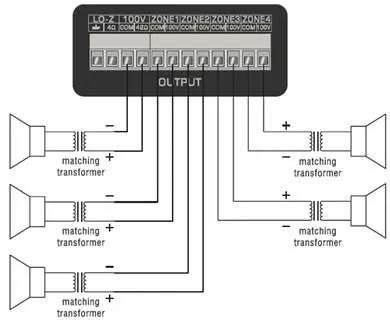
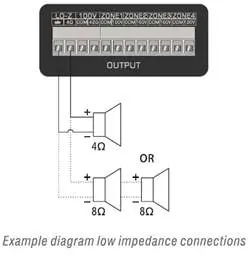
- Low Impedance (4Ω): Connect speakers with a minimum impedance of 4Ω to the 4Ω output terminal.
- Constant Voltage (100V): Connect 100V speakers to the 100V output terminals. The positive output connects to the positive terminal of the speaker, and the negative output connects to the COM (ground) terminal.
Warning: The total impedance of all connected speakers must be greater than the rated impedance of the amplifier.
Connecting Audio Sources
Before connecting audio sources, turn all channel input and master volume controls fully counter-clockwise. Connect your sources (microphones, tuners, etc.) to the appropriate inputs:
- Mic/Line Inputs (1-3): Use the combination XLR/6.3mm jack inputs. Channels 1 and 2 support 15V phantom power for condenser microphones, enabled via switches located between the inputs.
- Line Inputs (2-3): Use the RCA jacks for stereo line-level sources.
- Priority Inputs: Chime, Fire, and Tel inputs are available via terminal blocks for emergency or paging systems.
Operation
Media Player: Insert a USB drive or SD/MMC card to automatically start playback. Use the front panel buttons to navigate tracks, adjust volume, or switch modes (USB/SD/Bluetooth/FM).
Bluetooth: Press the 'M' button to select Bluetooth mode. Ensure the antenna is vertical. Search for 'Bluetooth' on your playback device and connect.
Tone and Volume: Use the bass and treble rotary dials to adjust frequency response (+/- 12dB). Use the master volume control to set the overall output level.
Firmware Update
To update the firmware, format a USB storage device or SD card and copy the firmware file onto it. Insert the media into the device. The LCD screen will turn off, and the update will begin automatically. The device will restart after approximately 10 seconds.
Technical Specifications
- RMS Output Power: 120W (120BT), 240W (240BT), 360W (360BT)
- Frequency Response: 20Hz - 20kHz
- Signal to Noise Ratio: >90dB
- THD+N:<0.5%
- Phantom Power: 15V DC (Mic 1-2)
- Power Supply: AC 230V-240V / 50-60Hz or DC 24V (Standby)
Practical help
Common problems
No sound output
Check that the master volume is turned up, the channel volume is adjusted, and the specific zone output switch is enabled.
Distorted sound
Reduce the input gain or master volume. If the peak indicator (0dB) lights up frequently, the signal is too loud.
Bluetooth connection issues
Ensure the Bluetooth antenna is in a vertical position and the device is set to Bluetooth mode using the 'M' button.
Firmware update fails
Ensure the USB/SD card contains only the firmware file and no other data.
Before use
- Ensure the power is OFF before making any connections.
- Verify loudspeaker impedance (4Ω or 100V) matches the output used.
- Set input gain trimmers on the rear panel to a central position.
- Ensure the Bluetooth antenna is vertical (if applicable).
- Check that the master volume is at minimum before powering on.
Specs in practice
- Phantom Power (15V)
- Required power supply for condenser microphones, enabled via rear switches.
- Priority Inputs
- Inputs like Chime/Fire/Tel that automatically mute other audio sources when active.
Images and diagrams
- Wiring diagrams for 100V constant voltage and low-impedance speaker connections.
- Pinout diagrams for XLR and RCA connectors.
Model compatibility
- Only use one output type (100V or 4Ω) at a time.
- Bluetooth functionality is only available on models with '+BT' in the name.
- The device supports MP3, WMA, WAV, FLAC, and AAC audio formats.

Manual page author
Michael Turner
Technical manual editor
Reviews PDF manuals for structure, safety notes, and practical product details so readers can find the right information quickly.