General / Other Manuals
Celestron StarSense Explorer DX 102AZ Quick Setup Guide
Comprehensive setup and operation guide for the Celestron StarSense Explorer DX 102AZ telescope, including smartphone integration, app synchronization, and maintenance tips.
Table of contents
Manual images
Jump to the sectionProduct Overview
The Celestron StarSense Explorer DX 102AZ is a high-quality refractor telescope designed to make stargazing accessible and intuitive. By utilizing the power of your smartphone and the StarSense Explorer app, the telescope helps you locate celestial objects in the night sky with ease. The system features a manual alt-azimuth mount with slow-motion controls for precise tracking.
Setup and Assembly
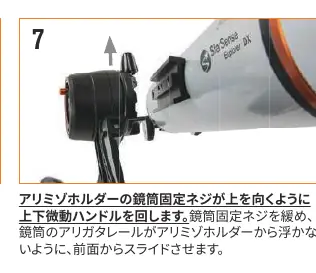
Begin by unpacking the telescope and ensuring all components are present, including the optical tube, mount, tripod, eyepieces, StarSense smartphone dock, and accessories. Extend the tripod legs to a stable height and secure the accessory tray. Attach the slow-motion handles to the mount using the provided hex key. Mount the optical tube onto the alt-azimuth head by sliding the dovetail bar into the holder and tightening the locking screw. Finally, install the star pointer finder scope and the diagonal prism with your chosen eyepiece.
Smartphone Integration
The StarSense Explorer app is essential for navigating the night sky. Download the app from the Apple App Store or Google Play. Use the activation code provided on the included card to unlock the app features. Secure your smartphone into the StarSense dock, ensuring it is centered and firmly held. The app uses your phone's camera to analyze the star patterns and guide you to your desired targets.
Alignment and Operation
Before your first observation, it is crucial to align the telescope's optics with the StarSense dock and the finder scope. Perform this alignment during the day by targeting a distant object at least 500 meters away. Use the 25mm eyepiece to center the object in the telescope's field of view, then adjust the finder scope and the app's camera view to match. Once synchronized, the app will provide on-screen arrows to guide you to celestial objects.
Safety and Maintenance
Warning: Never look directly at the sun through the telescope, finder scope, or eyepiece, as this can cause permanent eye damage. Keep the telescope in a dry, cool place away from direct sunlight when not in use. Clean lenses only with specialized optical cleaning supplies, using a blower to remove dust before wiping. Avoid touching lens surfaces directly with your fingers.
Manufacturer information
Celestron
Practical help
Common problems
Smartphone camera view is not aligned with telescope view
Perform the synchronization process during the day by centering a distant object (500m+) in the eyepiece and adjusting the app's camera view.
StarPointer finder scope is not pointing at the same target
Use the two adjustment knobs on the finder scope to align the red dot with the object centered in the main telescope eyepiece.
App does not recognize the sky
Ensure the smartphone is securely mounted, the lens cap is removed, and the environment is dark enough to see stars.
Before use
- Ensure all tripod legs are locked securely.
- Remove all lens caps from the telescope and finder scope.
- Check that the smartphone is securely mounted in the dock.
- Verify the StarSense app is updated and activated.
- Ensure the diagonal prism and eyepiece are firmly attached.
- Confirm the environment is safe and away from direct sunlight.
Specs in practice
- 25mm Eyepiece
- Low-power eyepiece used for initial target acquisition and wide-field viewing.
- 10mm Eyepiece
- High-power eyepiece used for detailed observation of celestial objects.
Images and diagrams
- The mount features slow-motion handles for fine adjustments.
- The StarSense dock uses a mirror to capture the sky for the smartphone camera.
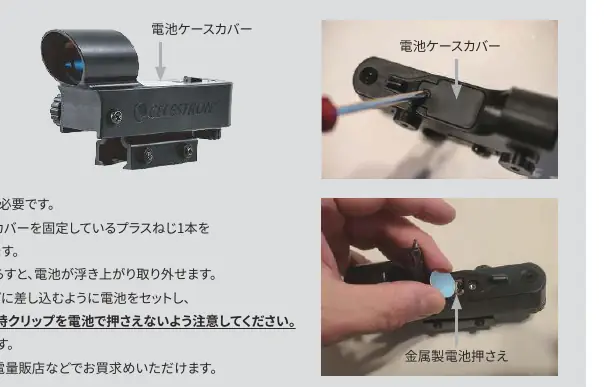
- The finder scope has a power/brightness knob for the red dot reticle.
Model compatibility
- Compatible with Android 7.1.2+ and iPhone 6+ (latest iOS recommended).
- Requires camera, gyroscope, and accelerometer sensors.
- Smartphone size limit: 180mm x 80mm.
- Remove bulky smartphone cases before mounting.

Manual page author
David Miller
Documentation analyst
Organizes user manual content into clear summaries, with attention to model details, product context, and everyday usability.