Lighting / Stage Lighting
User Manual for Chauvet DJ Intimidator Scan 360
Quick reference guide for the Chauvet DJ Intimidator Scan 360. Includes mounting instructions, DMX configuration, menu options, and safety guidelines.
Table of contents
Manual images
Click an image to enlargeQuick Start Guide
The Intimidator Scan 360 is a professional stage lighting fixture. This guide provides essential information for setup, mounting, and operation. For advanced configurations and full technical details, please refer to the full user manual available on the manufacturer's website.
Safety Notes
- Indoor Use Only: This product is rated IP20 and must not be exposed to rain or moisture.
- Mounting: Always use a safety cable when mounting overhead. Ensure the unit is mounted in a location with adequate ventilation, at least 50 cm (20 in) from adjacent surfaces.
- Electrical: Connect only to a grounded and protected circuit. Never connect to a dimmer or rheostat.
- Handling: Do not touch the housing during operation as it becomes hot. Do not look directly into the light source.
- Maintenance: Disconnect from power before cleaning or replacing the fuse.
Mounting
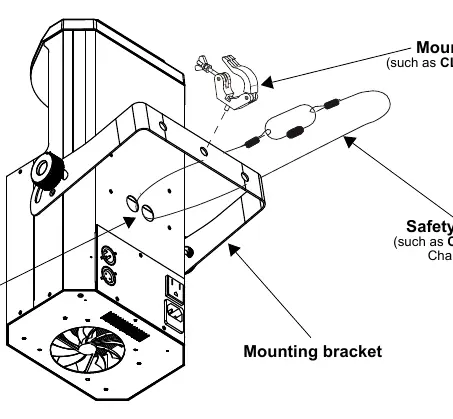
Before mounting, ensure the structure can support the weight of the unit. Use the provided mounting bracket and a compatible clamp (such as the Chauvet CLP-10). Always secure the unit with a safety cable passed through the designated safety cable pass-through.
AC Power and Fuse Replacement
The unit features an auto-ranging power supply (100–240 VAC, 50/60 Hz). To replace the fuse:
- Disconnect the product from power.
- Insert a flat-head screwdriver into the slot of the fuse holder.
- Pry the safety cap out of the housing.
- Remove the blown fuse and replace it with a fuse of the exact same type and rating.
- Re-insert the fuse holder and reconnect power.
DMX Linking
The Intimidator Scan 360 can be controlled via a DMX controller. To ensure full access to all channels, the highest recommended DMX starting address is 501. The unit also supports Master/Slave mode using DMX data connections.
Control Panel Operation
The control panel allows you to navigate the menu and configure settings:
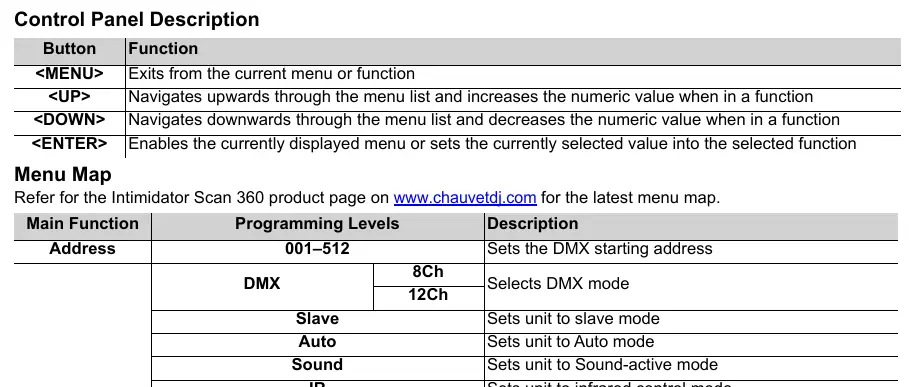
- <MENU>: Exits the current menu or function.
- <UP>: Navigates upwards or increases numeric values.
- <DOWN>: Navigates downwards or decreases numeric values.
- <ENTER>: Enables the displayed menu or sets the selected value.
The menu allows configuration of Run Mode (DMX, Slave, Auto, Sound, IR), Manual settings (Pan, Tilt, Color, Gobo, etc.), and Setup options (Pan/Tilt Reverse, Signal Loss behavior, Sensitivity, etc.).
DMX Values and Gobos
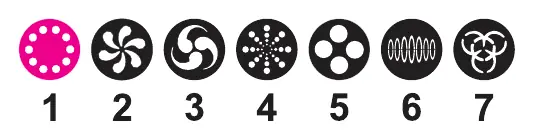
The unit supports 8-channel and 12-channel DMX modes. The gobos are indexed and rotatable. Refer to the DMX values table in the full manual for specific channel assignments regarding pan, tilt, color, gobo rotation, prism, focus, dimmer, and strobe effects.
Practical help
Common problems
Unit does not power on
Check the power connection and inspect the fuse. Replace the fuse if blown with one of the exact same type and rating.
DMX signal lost
Check DMX cable connections. Configure the 'Signal Loss' setting in the menu to Blackout, Hold, Auto, or Sound mode as desired.
Overheating
Ensure ventilation slots are not blocked and the ambient temperature does not exceed 40°C (104°F).
Before use
- Unpack the unit and inspect for damage.
- Verify the power outlet voltage matches the product requirements (100-240 VAC).
- Ensure the mounting location has at least 50 cm of clearance for ventilation.
- Attach a safety cable when mounting overhead.
- Do not connect to a dimmer or rheostat.
Specs in practice
- DMX Starting Address
- The highest recommended address is 501 to ensure all channels are accessible.
- Auto-ranging Power Supply
- The unit automatically adjusts to input voltages between 100 and 240 VAC.
Images and diagrams
- Mounting Diagram: Illustrates the correct installation of the mounting bracket, safety cable, and clamp.
Model compatibility
- Compatible with CHAUVET IRC-6 infrared remote control.
- Compatible with standard DMX controllers.

Manual page author
Michael Turner
Technical manual editor
Reviews PDF manuals for structure, safety notes, and practical product details so readers can find the right information quickly.