Music / Music Accessories
Chord IEM16 In-Ear Monitoring System User Manual
Quick guide for the Chord IEM16 In-Ear Monitoring System (171.892UK). Includes setup instructions, transmitter and receiver operation, frequency settings, and troubleshooting tips.
Quick answers from the manual
Quick answer
- The Chord IEM16 is a UHF in-ear monitoring system. Setup involves connecting the transmitter to an audio source, attaching the antenna, and syncing the bodypack receiver to the same channel as the transmitter. p. 3
Key actions
- Setting up the system p. 3
- Adjusting transmitter settings p. 4
- Adjusting receiver settings p. 5
First start
- Power on transmitter and receiver, ensure they are on the same channel, and adjust volume. p. 3, 4, 5
Problems and fixes
POWER LED does not light
Ensure power adapter is connected and POWER button is switched on.
p. 6
No RF indication
Check transmitter is on, in range, and receiver is on the same channel.
p. 6Maintenance and reset
- Clean with a soft cloth and neutral detergent; do not use solvents. p. 2
Technical specifications
| Parameter | Value | Meaning | Pages |
|---|---|---|---|
| Carrier frequencies | 863.1 - 864.9MHz | 16 channels | p. 6 |
| Max range | 50m | Maximum operating distance | p. 6 |
Where to find it in the PDF
- Introduction and Safety p. 2
- Controls and Setup p. 3
- Operation p. 4, 5
- Specifications and Troubleshooting p. 6
Table of contents
Manual images
Click an image to enlargeQuick guide from the manual
The Chord IEM16 is a professional UHF in-ear monitoring system. Before use, ensure all components are present: UHF wireless transmitter, detachable BNC antenna, UHF bodypack receiver, dual driver in-ear monitor headphones, 19" rack-mounting kit, mains power adapter, and 2 x AA batteries.
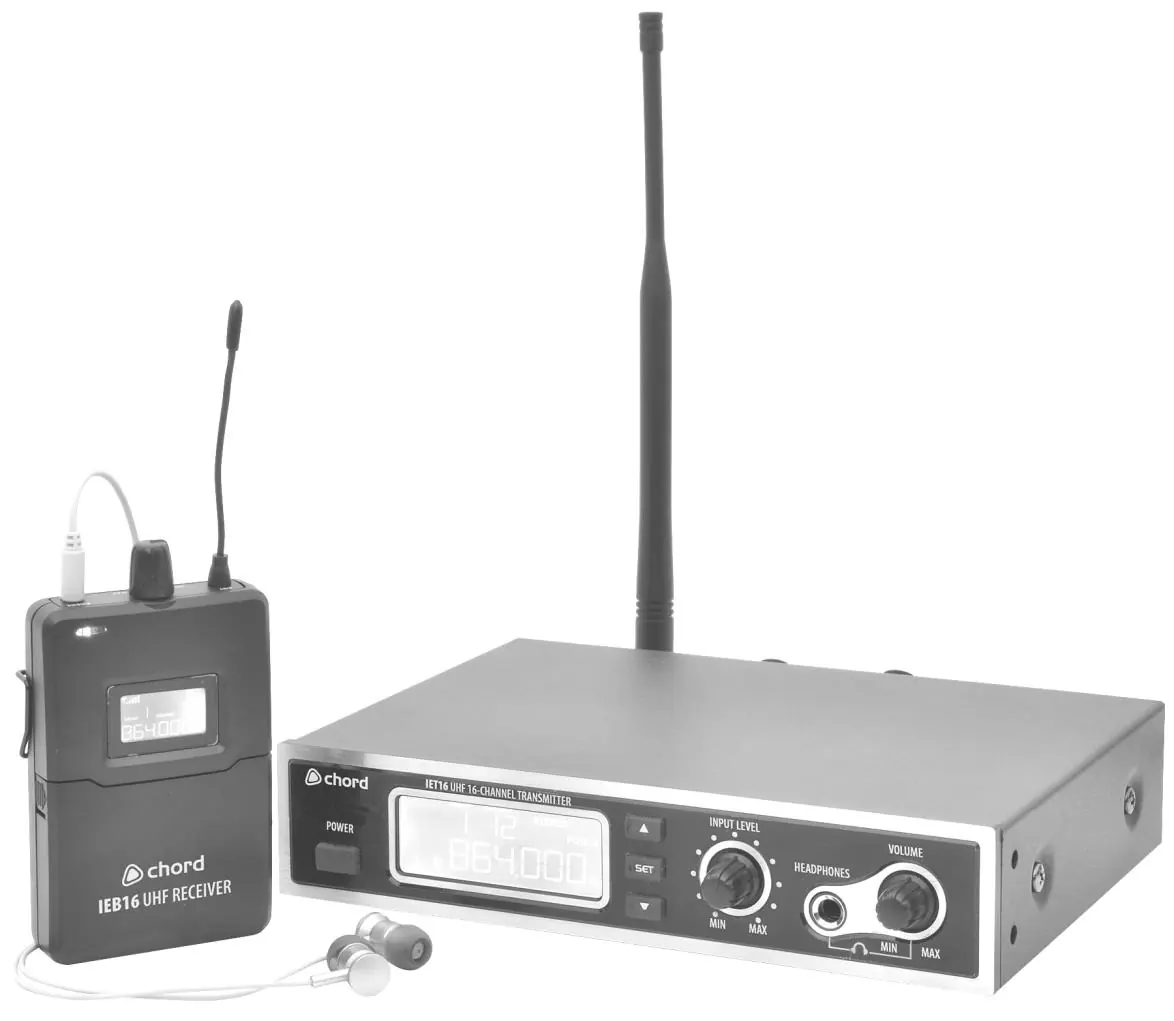
Setting up
- Transmitter: Connect the monitor mix signal from a mixing console to the rear XLR/jack inputs. Attach the BNC antenna and extend it fully. Connect the supplied DC power adapter.
- Bodypack Receiver: Open the front cover and insert 2 x AA batteries, observing correct polarity. Connect the in-ear headphones to the 3.5mm jack output.
Transmitter operation
Power on the unit using the Power button. The LCD displays signal levels. Use the SET button to cycle through settings:
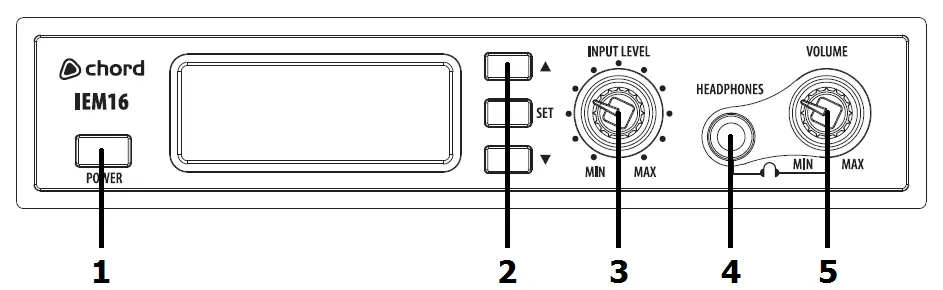
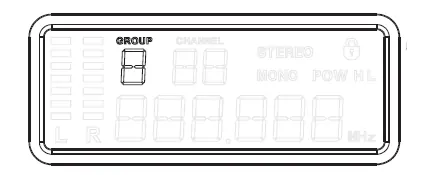
- GROUP: Only 1 group available; no change needed.
- CHANNEL: Select one of 16 available UHF frequencies.
- STEREO/MONO: Toggle output mode.
- POW: Select H (high) or L (low) power.
- LOC: Lock/unlock the panel settings.
Bodypack receiver operation
Switch on using the volume control. Open the front cover to access settings:
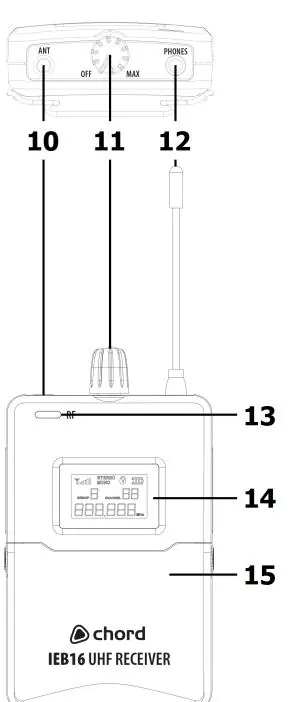
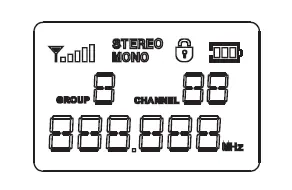
- GROUP/CHANNEL: Must match the transmitter settings.
- LOC: Lock/unlock balance controls.
- Balance: Use UP/DOWN buttons to adjust left/right output balance.
Up to 4 IEM16 systems can operate in the same area on different frequencies. There is no limit to the number of receivers that can listen to one transmitter.
Specifications
- Carrier frequencies: 863.1 - 864.9MHz (16 channels)
- Max range: 50m
- Frequency response: 40Hz - 16kHz
- Power supply (Transmitter): 12-18Vdc, 300mA
- Power supply (Receiver): 3Vdc (2 x AA batteries)
Troubleshooting
- No RF indication: Ensure transmitter is on, within range, and set to the same channel as the receiver.
- No sound: Check audio input, ensure input level control is not turned down, and check volume on the bodypack.
- Intermittent signal: Avoid physical barriers, adjust antenna angle, set transmitter power to High (H), or try a different channel.
- Distorted sound: Turn down volume on the bodypack or transmitter input level; use the PAD switch (-12dB) for high-level inputs.
Safety and maintenance
Do not expose components to rain, moisture, or heat sources. Use a soft cloth with neutral detergent for cleaning; do not use solvents. Keep the transmitter and receiver away from damp or dusty environments.
Manufacturer information
Chord
Practical help
Common problems
No RF indication on receiver
Ensure transmitter is powered on, within range, and both units are set to the same channel.
No sound from headphones
Check audio input connection, ensure input level control is not at minimum, and check bodypack volume.
Intermittent signal dropouts
Remove physical barriers, adjust antenna angle, set transmitter power to High (H), or change the UHF channel.
Distorted audio
Reduce volume on bodypack or transmitter input level; engage the -12dB PAD switch on the rear panel.
Before use
- Unpack and inspect all components for damage.
- Connect the BNC antenna to the transmitter and extend fully.
- Connect the DC power adapter to the transmitter and a mains socket.
- Insert 2 x AA batteries into the bodypack receiver.
- Connect the in-ear headphones to the 3.5mm jack on the receiver.
- Ensure the volume control is turned off before connecting headphones.
Specs in practice
- Carrier frequencies
- 863.1 - 864.9MHz (16 channels available for selection).
- Power supply (Transmitter)
- 12-18Vdc, 300mA (adapter included).
Images and diagrams
- Transmitter front panel: Power button, LCD, navigation buttons, input level, and headphone volume.
- Transmitter rear panel: DC input, XLR/jack inputs, PAD switch, and antenna connection.
- Bodypack receiver: Volume/power control, antenna, LED indicator, LCD, and battery compartment.
Model compatibility
- Up to 4 IEM16 systems can be operated in the same area on different frequencies.
- Unlimited number of bodypack receivers can listen to a single transmitter if set to the same channel.

Manual page author
Michael Turner
Technical manual editor
Reviews PDF manuals for structure, safety notes, and practical product details so readers can find the right information quickly.