Electronics / Media Players
User Manual for Chord RCT-4 Rechargeable Clip Tuner
Quick guide for the Chord RCT-4 rechargeable clip tuner. Learn how to charge, operate, change tuning modes, and understand the display indicators.
Quick answers from the manual
Quick answer
- The Chord RCT-4 is a rechargeable clip-on tuner. Charge it via USB-C, attach it to your instrument's headstock, and use the button to select between Chromatic, Guitar, Bass, or Ukulele modes. p. 1
Key actions
- Charge the tuner before first use via the USB-C port. p. 1
- Select tuning mode by short pressing the On/Off button. p. 1
First start
- Charge the device fully using the supplied USB-C lead before first use. p. 1
Problems and fixes
Tuner powers down automatically
The tuner automatically powers down after 5 minutes with no note detected.
p. 1Technical specifications
| Parameter | Value | Meaning | Pages |
|---|---|---|---|
| Battery | 3.7V 90mAh Li-ion | Rechargeable battery type | p. 1 |
| Battery Life | 270 minutes | Continuous usage time | p. 1 |
Where to find it in the PDF
- User Manual p. 1
Table of contents
Quick Guide
The Chord RCT-4 is a rechargeable clip-on tuner designed for instruments. Before first use, it is advised to fully charge the device using the USB-C input. The tuner features an auto-power-down function that activates after 5 minutes of inactivity to preserve battery life.
Operation
To use the tuner, follow these steps:
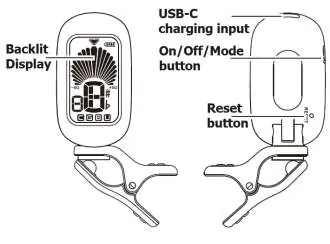
- Charging: Connect the USB-C input to a USB outlet or charger using the supplied lead. The battery charge indicator on the display shows the status while charging.
- Attaching: Clip the tuner onto the headstock of your instrument.
- Positioning: Rotate the display to ensure a clear view of the LCD screen.
- Powering On/Off: Press and hold the On/Off/Mode button until the display lights up. Repeat the hold action to power down.
- Selecting Mode: With the device on, perform short presses of the On/Off button to cycle through the available modes: Chromatic, Guitar, Bass, and Ukulele (soprano type).
Display Indicators
When playing a string, the display shows the detected note and a virtual needle indicating tuning accuracy:
- Flat: The needle is to the left of the center.
- In Tune: The needle is in the center, and the backlight changes color to green.
- Sharp: The needle is to the right of the center.
Specifications
- Battery: 3.7V 90mAh Li-ion rechargeable
- Battery Life: 270 minutes
- Tuning Modes: Chromatic, Guitar, Bass, Ukulele
- Tuning Stability: ±1 cent
- Dimensions: 54 x 39 x 30mm
- Weight: 34g
Disposal
This product is classed as Electrical or Electronic equipment and should not be disposed of with household or commercial waste. Please follow local council guidelines for disposal.
Manufacturer information
Chord
Practical help
Common problems
Tuner does not turn on
Ensure the device is fully charged via the USB-C port.
Tuner turns off unexpectedly
The device has an auto-power-down feature that activates after 5 minutes of inactivity.
Before use
- Charge the device fully using the USB-C input.
- Attach the clip to the instrument headstock.
- Rotate the display for optimal viewing.
- Power on by holding the On/Off button.
Specs in practice
- Tuning stability
- Accuracy of the tuner, rated at ±1 cent.
- Battery Life
- Approximately 270 minutes of continuous use.
Images and diagrams
- The display shows a virtual needle. When the needle is in the center, the note is in tune and the backlight turns green.
Model compatibility
- Ukulele mode is specifically for soprano type ukuleles.

Manual page author
Michael Turner
Technical manual editor
Reviews PDF manuals for structure, safety notes, and practical product details so readers can find the right information quickly.