Music / Music Accessories
User Manual for Chord VGW1 VHF Guitar Wireless System
Quick guide for the Chord VGW1 VHF Guitar Wireless System (171.848UK). Learn how to set up the transmitter and receiver, connect to your amplifier, and troubleshoot common audio issues.
Quick answers from the manual
Quick answer
- The Chord VGW1 is a VHF wireless system for guitars. Setup involves inserting a 9V battery into the transmitter, connecting the receiver to power and your amplifier, and adjusting the volume levels. p. 3
Key actions
- Insert 9V battery into transmitter p. 3
- Connect receiver to power and amplifier p. 3
First start
- Insert battery, connect power, extend antennas, connect to amp, turn on, adjust volume. p. 3
Problems and fixes
Power LED does not light
Ensure power adapter is connected to mains and working properly; ensure receiver is switched on.
p. 4Maintenance and reset
- Clean with soft cloth and neutral detergent; remove batteries if unused for long periods. p. 2, 3
Technical specifications
| Parameter | Value | Meaning | Pages |
|---|---|---|---|
| Carrier frequency | 863.8MHz + 864.8MHz | Operating frequency | p. 4 |
| Range | 60m | Maximum operating distance | p. 4 |
Where to find it in the PDF
- Introduction and Safety p. 2
- Operation and Diagrams p. 3
- Specifications and Troubleshooting p. 4
Table of contents
Manual images
Click an image to enlargeQuick Start Guide
The Chord VGW1 is a professional VHF wireless system designed for guitars. To begin, ensure you have all components, install the battery in the transmitter, connect the receiver to power and your amplifier, and adjust the volume levels.
Components
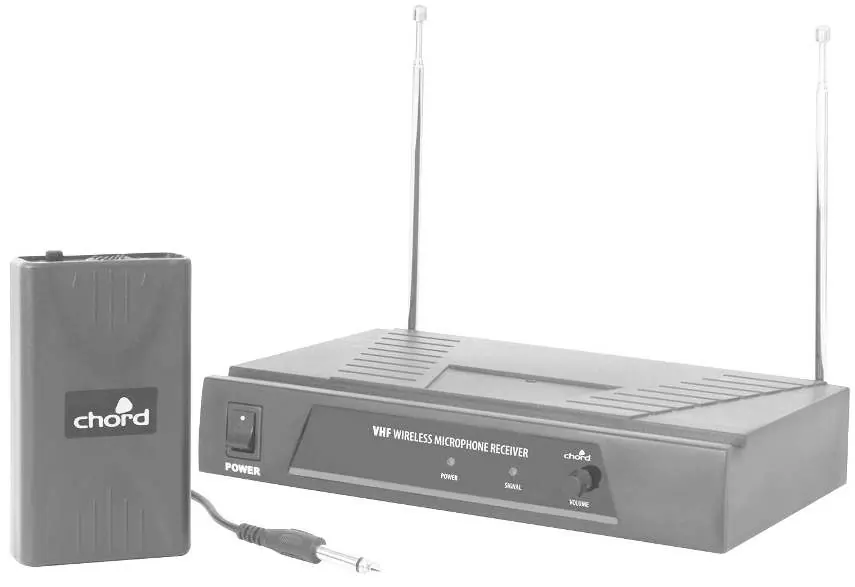
- VHF wireless receiver
- Mains power adapter
- 6.3mm to 3.5mm instrument jack lead
- 6.3mm mono jack lead
- 9V battery, PP3
Operation
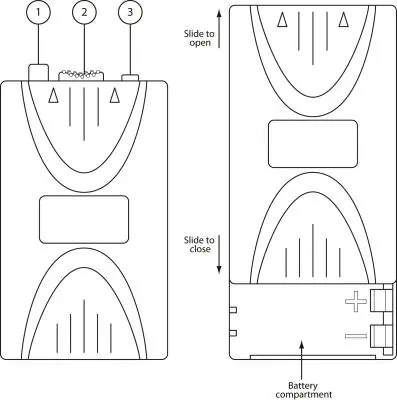
Transmitter Setup: Slide the front half of the beltpack upwards to reveal the battery compartment. Insert the supplied 9V battery, ensuring correct polarity (+ and -), and slide the case back together.
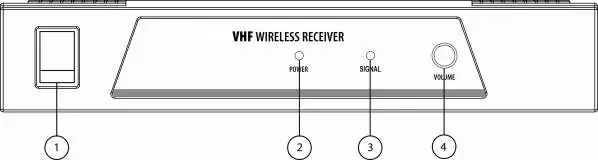
Receiver Setup: Position the receiver within the best available line of sight to the transmitter. Connect the DC jack of the supplied power adapter to the receiver and the plug-top to the mains outlet. Extend both antennas fully upwards and outwards slightly. Switch the power on and turn the output level down on the receiver.
Connecting to Audio: Connect the jack or XLR lead to the receiver’s audio output connector. Turn down the volume of the guitar amplifier or effect unit, then connect the lead to the amplifier. Move the slide switch on the beltpack transmitter to the first notch (MUTE) to check the LED, then move to the second notch (ON). Gradually increase the output level on the receiver and the volume on the guitar amplifier until the sound is audible.
Safety and Placement
- Do not expose components to rain or moisture.
- Keep components out of direct sunlight and away from heat sources.
- Do not place heavy objects on top of the receiver or transmitter.
- If rack-mounting, secure the receiver to a 1U rack tray.
- Use alkaline or NiMH batteries and remove them if the unit is unused for long periods.
Cleaning
Use a soft cloth with a neutral detergent to clean the body of the beltpack transmitter and receiver. Lightly damp sterile wipes may be used on the beltpack for hygiene. Do not use solvents to clean the components.
Troubleshooting
If you encounter issues, check the following:
- Power LED does not light: Ensure the power adapter is connected to the mains and working properly, and the receiver is switched on.
- No sound from mic: Make sure the receiver is connected to the mixer/amplifier and that channel volumes are turned up.
- Distorted sound: Turn down the volume on the receiver, reduce the gain on the bodypack transmitter, or reduce the gain on the mixer/amplifier.
- Low output: Turn up the volume on the receiver, increase the gain on the bodypack transmitter, or increase the gain of the mixer/amplifier input.
Technical Specifications
- Carrier frequency: 863.8MHz + 864.8MHz
- Range: 60m (max)
- Power supply (receiver): 12 - 18Vdc 350mA adaptor
- Batteries (transmitters): 9V battery (PP3)
- S/N ratio: >80dB
- THD:<0.5% @ 1kHz
- Audio frequency response: 50Hz - 18kHz
Manufacturer information
Chord
Practical help
Common problems
Power LED does not light on receiver
Ensure power adapter is connected to mains and working properly; ensure receiver is switched on.
No sound from mic
Make sure receiver is connected to mixer/amplifier; ensure receiver and amplifier/mixer channel volumes are turned up.
Microphone output is very loud or distorted
Turn down VOLUME on receiver; turn down gain on bodypack transmitter; reduce gain on mixer/amplifier.
Microphone output is very low
Turn up VOLUME on receiver; turn up gain on bodypack transmitter; increase gain of mixer/amplifier input.
Before use
- Check for damage upon unpacking.
- Ensure 9V battery is installed with correct polarity in the transmitter.
- Connect receiver to power adapter.
- Extend antennas fully upwards and outwards.
- Turn down volume before connecting to amplifier.
Specs in practice
- Carrier frequency
- 863.8MHz + 864.8MHz
- Power supply
- 12-18Vdc 350mA
Images and diagrams
- Beltpack Transmitter: Shows battery compartment and gain control.
- Receiver Rear Panel: Shows antenna, power, and output connections.
- Receiver Front Panel: Shows power switch and volume control.
Model compatibility
- Ensure an XLR output is not fed to a line input.
- Ensure a jack output is not fed to a mic input.

Manual page author
Emily Carter
User documentation editor
Prepares concise manual descriptions and highlights the most useful setup, operation, and maintenance information for readers.