Electronics / Speakers & Soundbars
User Manual for Citronic CAB-Series Active Speakers
Comprehensive user guide for Citronic CAB-Series active speakers (178.010UK, 178.012UK, 178.015UK). Includes setup instructions, Bluetooth pairing, stereo linking, input connections, EQ controls, and technical specifications.
Quick answers from the manual
Quick answer
- The Citronic CAB-Series are active speakers with Bluetooth connectivity. They feature multiple inputs (Mic/Line), EQ controls, and a wireless Bluetooth link function for stereo playback. p. 2, 5, 6
Key actions
- Pairing a Bluetooth device p. 5
- Linking two speakers for stereo p. 6
First start
- Initial setup procedure p. 4
Problems and fixes
Feedback/Squealing
Keep the microphone pointing away from the front of the speaker.
p. 4Maintenance and reset
- Reset Bluetooth pairing p. 6
Technical specifications
| Parameter | Value | Meaning | Pages |
|---|---|---|---|
| CAB-10L Output Power (RMS) | 220W | Continuous power output | p. 7 |
| CAB-12L Output Power (RMS) | 300W | Continuous power output | p. 7 |
| CAB-15L Output Power (RMS) | 350W | Continuous power output | p. 7 |
Where to find it in the PDF
- Rear Panel Diagram p. 3
- Specifications p. 7
Table of contents
Manual images
Click an image to enlargeQuick guide from the manual
The Citronic CAB-Series active speakers are designed for versatile, high-quality sound reinforcement. This manual covers the operation of models 178.010UK, 178.012UK, and 178.015UK. Before use, ensure the product is in good condition and that you have the IEC mains power lead. Do not attempt to modify the unit, as this invalidates the warranty.
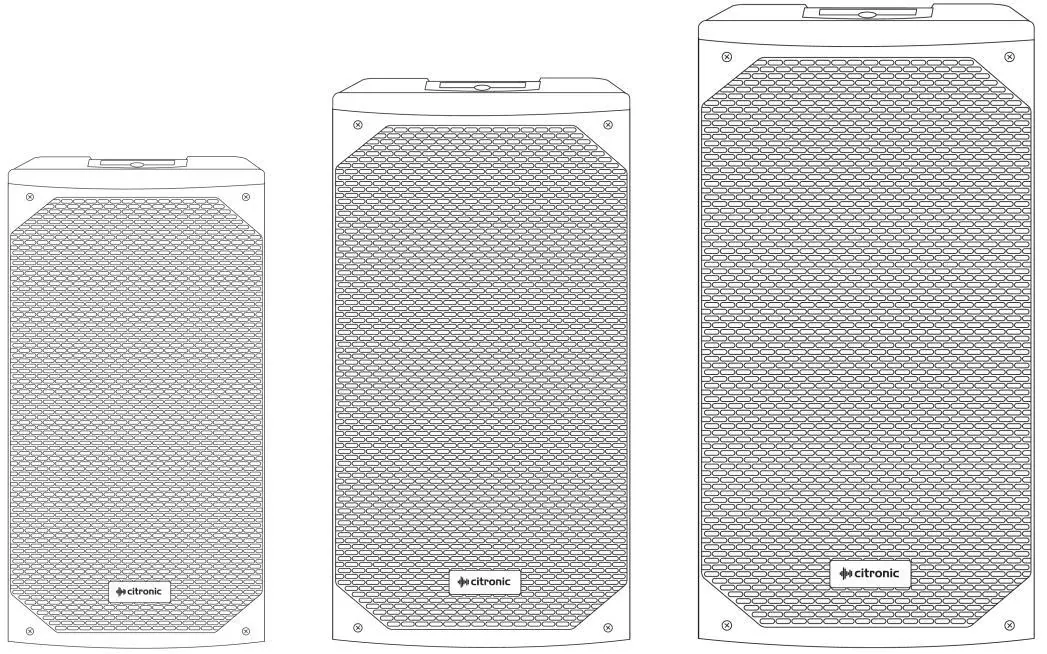
Safety and Placement
To prevent fire or electric shock, keep the unit away from moisture, rain, and direct sunlight. Ensure the supply voltage is correct before connecting to mains. The unit should be placed on a stable surface capable of supporting its weight.
Rear Panel Controls
The rear panel contains all necessary controls for operation:
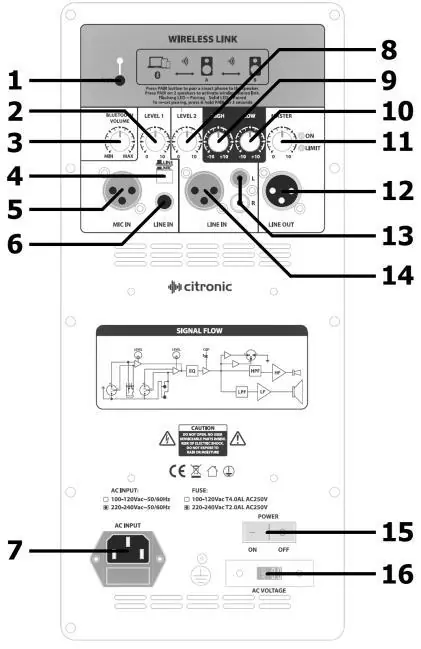
- Bluetooth pairing button: Used for connecting devices and stereo linking.
- Input 1 & 2 controls: Includes level switches, XLR, jack, and RCA inputs.
- EQ controls: High and Low frequency boost/cut controls.
- Master output: Controls overall volume and status LEDs.
- Power: On/off rocker switch and mains voltage selector.
Setting up and Mounting
The cabinets feature a 35mm diameter pole mount socket at the base with a securing screw. Always loosen the screw before mounting and tighten it to secure the cabinet. For suspended installation, remove the plastic domed caps to reveal threaded inserts for eyebolts or brackets. Always use a secondary fixing with a drop wire when suspending cabinets.
Connections
Connect microphones via the Mic Input 1 XLR and set the switch to MIC. Connect line-level sources (CD, MP3, laptop) to the Input 1 jack or Input 2 XLR/RCA sockets, setting the switch to LINE. You can link to an additional active speaker using the XLR line output.
Operation and Bluetooth
Before powering on, turn all volume controls down and set EQ controls to the 12 o'clock position. Switch on the power. To pair a device, press the Bluetooth pairing button; the LED will flash. Search for the speaker model on your device and connect. For stereo playback, power on two speakers of the same size; they will automatically pair and announce 'Left speaker' and 'Right speaker'.
Technical Specifications
The CAB-Series includes three models with varying driver sizes (10", 12", and 15"). They feature Class D + Class AB amplification, XLR line outputs, and frequency responses ranging from 46Hz to 19kHz depending on the model.
Practical help
Common problems
Feedback (howling/squealing noise)
Keep the microphone pointing away from the front of the speaker.
Bluetooth pairing failure
Reset Bluetooth pairing by holding down the pairing button for 3 seconds.
Speakers not linking for stereo
Ensure both cabinets are the same size (e.g., CAB-10L cannot link with CAB-12L).
Before use
- Check that the supply voltage matches the setting on the mains voltage selector (110Vac or 230Vac).
- Ensure the stand or bracket can safely support the cabinet weight.
- Turn all volume controls (Bluetooth, Level 1, Level 2, Master) fully down before powering on.
- Set High and Low EQ controls to the 12 o'clock position.
- Verify that the mains lead is in good condition.
Specs in practice
- Crossover freq.
- The frequency at which the signal is split between the high and low frequency drivers.
Images and diagrams
- The rear panel diagram identifies 16 key components, including input jacks, volume controls, EQ knobs, and power settings.
Model compatibility
- Bluetooth link function only works between cabinets of the same size (e.g., CAB-10L with CAB-10L).
- Wired inputs (Input 1 and 2) are not transmitted wirelessly via the Bluetooth link.

Manual page author
Michael Turner
Technical manual editor
Reviews PDF manuals for structure, safety notes, and practical product details so readers can find the right information quickly.