Electronics / Audio Mixers
User Manual for Citronic U-PAD Compact Mixer 170.879UK
Quick guide for the Citronic U-PAD Compact Mixer (170.879UK). Learn how to connect microphones, instruments, and USB devices, adjust EQ and volume, and configure output settings.
Quick answers from the manual
Quick answer
- The Citronic U-PAD is a compact mixer with a USB interface, featuring 2 mono channels with switchable line/instrument inputs, +48V phantom power, and stereo inputs for playback devices. p. 1, 3
Key actions
- Connect microphones or instruments to the combo inputs (1). p. 3, 5
- Set the IMPED switch for instruments or +48V for condenser mics. p. 3
First start
- Turn volume controls down, connect USB power, and select U-PAD in computer audio settings. p. 5, 6
Problems and fixes
Feedback/Howling
Aim microphone away from speakers.
p. 6Technical specifications
| Parameter | Value | Meaning | Pages |
|---|---|---|---|
| Frequency Response | 20Hz - 20kHz | Audio range | p. 7 |
| Sampling format | 24-bit, 96kHz max. | Digital audio quality | p. 7 |
Where to find it in the PDF
- Introduction and Safety p. 2
- Console Layout p. 3, 4, 5
- Operation p. 6
- Specifications p. 7
Table of contents
Quick guide from the manual
The Citronic U-PAD is a compact audio mixer with a built-in USB interface. Before operating, ensure all volume controls are turned down to avoid loud noises. Connect the device to a host computer or a 5Vdc 1A USB power supply. The unit is plug-and-play for digital recording setups.
Safety and Placement
- Warning: Do not expose the unit to rain or moisture. There are no user-serviceable parts inside.
- Placement: Keep away from direct sunlight, heat sources, dampness, and dust. Allow adequate space for airflow.
- Cleaning: Use a soft cloth with a neutral detergent. Do not use solvents.
Console Layout and Inputs
The mixer features 2 mono input channels and a stereo input.
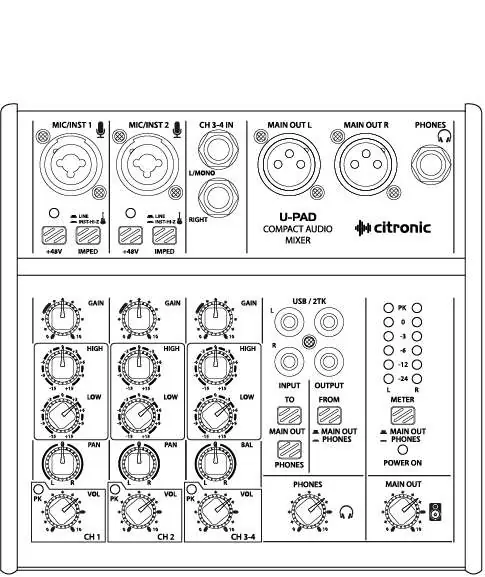
- Channel 1 & 2: Combo sockets accepting XLR (microphone) or 6.3mm jack (line/instrument).
- IMPED Switch: Press in for high impedance (Hi-Z) instruments like electric guitars. Leave up for line-level inputs.
- +48V Phantom Power: Press in to provide power to condenser microphones or DI boxes. Do not use with unbalanced XLR connectors.
- Stereo Input: 6.3mm jack inputs for playback devices or line-level instruments.
Channel Controls
- GAIN: Adjusts input level. If the PEAK LED lights constantly, reduce the gain.
- EQ (HIGH/LOW): Boost or cut frequencies by ±15dB. The 12 o'clock position is neutral.
- PAN/BAL: Adjusts the signal position in the stereo field.
- VOL: Adjusts the volume level of the channel sent to the output.
USB and 2TK Operation
The U-PAD acts as a generic USB Audio Device when connected to a PC/Mac. The FROM button selects whether the USB output is sourced from the PHONES output or the MAIN outputs. Audio from the host computer is routed to the U-PAD via USB and can be sent to PHONES or MAIN OUT using the TO MAIN OUT or TO PHONES buttons.
Specifications
- Power Supply: 5.5Vdc (USB)
- Frequency Response: 20Hz - 20kHz
- Sampling Format: 24-bit, 96kHz max
- Input Impedance: Mic 2kΩ, Instrument 1MΩ, Line 20kΩ
Practical help
Common problems
Feedback (whistling/howling sound)
Avoid aiming the microphone or instrument pickup towards the loudspeakers.
PEAK LED lighting constantly
The gain is set too high. Reduce the GAIN, channel volume, or EQ settings.
No sound from condenser microphone
Ensure the +48V phantom power button is pressed in.
Before use
- Turn all volume controls fully down before powering on.
- Check that the IMPED switch is correctly set for your instrument (Hi-Z for guitars).
- Ensure the USB power supply provides 5Vdc and at least 1A output.
- Verify that the U-PAD is selected in your computer's audio settings.
Specs in practice
- +48V Phantom Power
- Provides power to condenser microphones and DI boxes via XLR.
- IMPED Switch
- Sets input impedance; press in for Hi-Z instruments (guitars), leave up for line level.
Images and diagrams
- The front panel diagram illustrates the location of all input channels, EQ knobs, volume controls, and output routing buttons.
Model compatibility
- USB interface is plug & play for PC/Mac host computers.
- Requires 5Vdc 1A power supply.

Manual page author
Michael Turner
Technical manual editor
Reviews PDF manuals for structure, safety notes, and practical product details so readers can find the right information quickly.