Electronics / Speakers & Soundbars
User Manual for Citronic CASA-28BA Active Subwoofer
Quick guide for the Citronic CASA-28BA active subwoofer. Learn about setup, rear panel controls, operation, safety precautions, and technical specifications.
Quick answers from the manual
Quick answer
- The Citronic CASA-28BA is an active subwoofer. Connect your audio source to the Line Input (XLR/Jack), ensure the level is down before powering on, and use the rear panel controls to adjust volume, phase, and boost. p. 3
Key actions
- Adjusting volume and boost p. 3
- Preventing feedback p. 3
First start
- Powering on the unit p. 3
Problems and fixes
CLIP LED is lit
Turn down the output level control to a lower setting to avoid overdriving the amplifier.
p. 3Maintenance and reset
- Cleaning the cabinet p. 2
Technical specifications
| Parameter | Value | Meaning | Pages |
|---|---|---|---|
| Output power (RMS) | 400W | Continuous power handling | p. 4 |
| Frequency response | 55 - 150Hz | Range of frequencies produced | p. 4 |
Where to find it in the PDF
- Introduction and Safety p. 2
- Rear Panel and Setup p. 3
- Specifications p. 4
Table of contents
Manual images
Click an image to enlargeQuick Guide
The Citronic CASA-28BA is an active subwoofer designed to enhance sound systems with powerful low frequencies. This guide covers the essential setup and operation steps to ensure optimal performance and prevent damage.
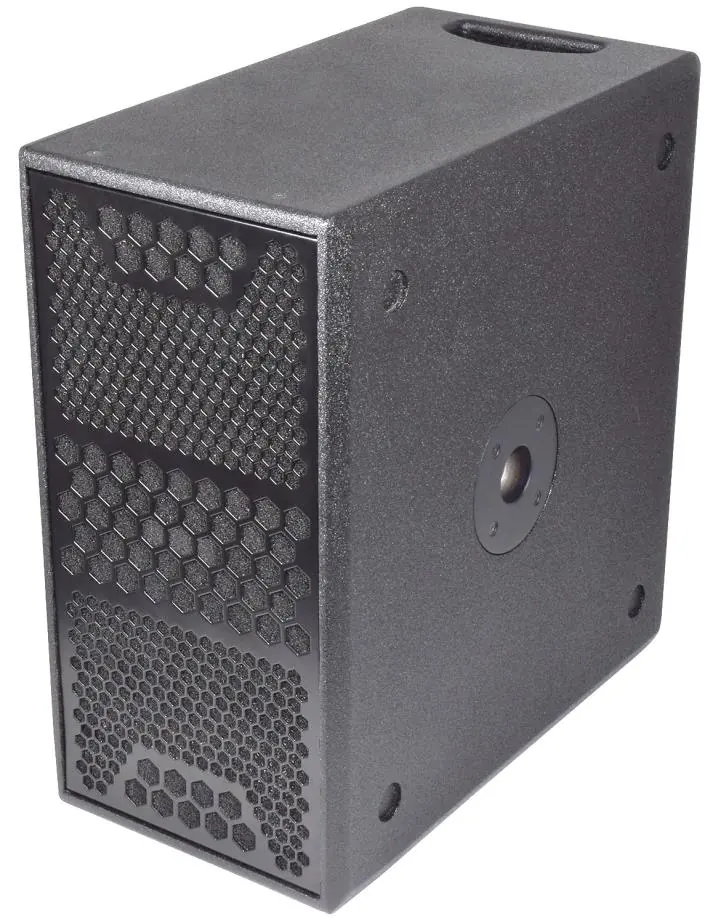
- Setup: Place on a stable surface, connect audio via XLR or 6.3mm jack, and ensure the output level is turned down before powering on.
- Operation: Gradually increase the output level after powering on. Use the boost switch for extra output and the phase switch to align frequencies if using multiple speakers.
- Safety: Do not open the unit (risk of electric shock). Ensure the unit is earthed and kept away from moisture.
Safety and Placement
To ensure safe operation and longevity of the equipment, observe the following:
- Placement: Position the cabinet on a stable surface capable of supporting its weight. Keep away from direct sunlight, heat sources, damp, or dusty environments. Allow adequate space for cooling at the rear.
- Electrical Safety: Ensure the correct mains lead is used. The unit must be earthed. If liquids are spilled on the cabinet, stop using it immediately and have it checked by qualified personnel.
- Cleaning: Use a soft, dry, or slightly damp cloth. A soft brush can be used to clear debris from controls. Do not use solvents.
Rear Panel Layout
The rear panel contains all necessary controls and connections:
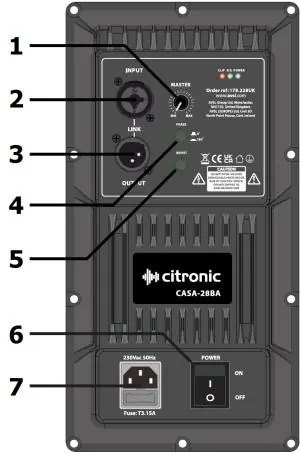
- Output level control: Adjusts the volume of the subwoofer.
- Line input: Combo XLR / 6.3mm jack for audio source.
- Line output: XLR output for daisy-chaining to other active cabinets.
- Phase switch: Toggles between 0° and 180° to prevent phase cancellation.
- Boost switch: Provides a pre-set increase to the output.
- Power switch: Turns the unit on or off.
- IEC mains inlet & fuse holder: For power connection.
Operation
Follow these steps for proper operation:
- Powering On: Turn the output level control fully down, connect the power, and switch on. Gradually increase the level to the desired volume.
- Boost Switch: To avoid damage, do not engage the boost switch while playing at high volume. Turn down the level, press the switch, then increase the level again.
- LED Indicators:
- POWER: Lit when the unit is on.
- SIG: Lights periodically in sync with the audio signal.
- CLIP: Lights if the signal is distorted. If this lights more than momentarily, turn down the output level control immediately.
- Phase Adjustment: If using multiple subwoofers, use the phase switch to determine which setting (0° or 180°) provides the loudest or most coherent sound.
Specifications
Key technical parameters for the CASA-28BA:
- Power Supply: 230Vac, 50Hz (IEC)
- Amplifier: Class-D
- Frequency Response: 55 - 150Hz
- Output Power (RMS/Max/Peak): 400W / 700W / 1400W
- Drivers: 2 x 200mm (8") woofers
- Dimensions: 475 x 450 x 250mm
- Weight: 15.7kg
Practical help
Common problems
Distorted sound or CLIP LED is lit
The amplifier is being overdriven. Turn down the output level control immediately.
Feedback or booming sound
Ensure the subwoofer is not in direct line of sight with microphones and keep microphone stands away from the unit. Try toggling the phase switch.
Sound cancellation or weak bass
The speakers may be out of phase. Toggle the phase switch between 0° and 180° to find the setting with the best output.
Before use
- Ensure the unit is placed on a stable surface.
- Verify the mains voltage matches the unit requirements.
- Turn the output level control fully down before powering on.
- Ensure all audio cables (XLR/Jack) are securely connected.
- Check that the unit is earthed.
Specs in practice
- Phase switch (0°/180°)
- Adjusts the phase of the subwoofer to prevent cancellation when used with other speakers.
- Boost switch
- Applies a pre-set gain increase to the output signal.
Images and diagrams
- The rear panel diagram identifies the input/output ports, power switch, and control knobs (Level, Phase, Boost).
Model compatibility
- Input sensitivity: 0.775Vrms @ 0dB.
- Mounting: Features a 35mm pole socket for mounting full-range cabinets.

Manual page author
David Miller
Documentation analyst
Organizes user manual content into clear summaries, with attention to model details, product context, and everyday usability.