Electronics / Audio Mixers
Citronic Q-PAD Compact Mixer User Manual
Quick guide for the Citronic Q-PAD compact mixer. Learn how to connect microphones, instruments, and USB/Bluetooth devices, adjust EQ and delay effects, and use the PC audio interface.
Quick answers from the manual
Quick answer
- The Citronic Q-PAD is a compact mixer with 2 mono channels (XLR/Jack) and a stereo channel. It supports USB playback, Bluetooth streaming, and acts as a USB audio interface for PCs. p. 1, 3, 6
Key actions
- Connect a microphone p. 3, 4
- Pair Bluetooth device p. 6
- Connect to PC for audio p. 6
First start
- Initial setup p. 5
Problems and fixes
CLIP LEDs lighting constantly
There is overload; the output should be turned down.
p. 4Technical specifications
| Parameter | Value | Meaning | Pages |
|---|---|---|---|
| Power supply | 5Vdc 2A | USB type-C adaptor included | p. 7 |
| Dimensions | 182 x 160 x 50mm | Physical size of the unit | p. 7 |
Where to find it in the PDF
- Front Cover p. 1
- Safety and Introduction p. 2
- Console Layout p. 3, 4
- Operation p. 5, 6
- Specifications p. 7
Table of contents
Quick guide from the manual
The Citronic Q-PAD is a compact mixing console designed for professional sound reinforcement. It features two mono input channels with switchable phantom power and a stereo input channel for playback devices. The unit also functions as a USB audio interface for PC recording and playback.
Safety and placement
- Use only the supplied 5Vdc power adaptor.
- Do not expose the unit to rain or moisture.
- Keep the console away from direct sunlight, heat sources, damp, or dust.
- Do not place heavy objects on the control surface.
- No user-serviceable parts inside; refer all servicing to qualified personnel.
Console layout and inputs
The mixer is divided into distinct sections to simplify operation:
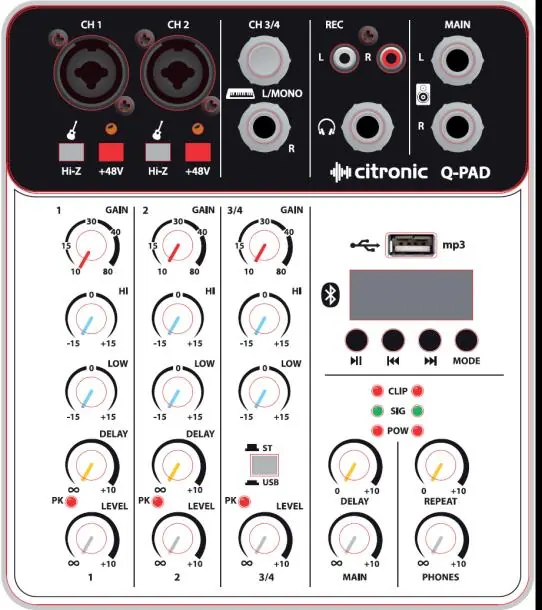
- Channel inputs: Provided as combo sockets accepting XLR (low impedance/microphone) or 6.3mm jack (high impedance/line) plugs.
- Hi-Z switch: Press in when connecting instruments directly (e.g., electric guitar) to match higher impedance.
- +48V phantom power: Press to enable power for condenser microphones and DI boxes. Do not use with unbalanced XLR connectors.
Operation and controls
- Gain: Adjusts input signal level. Increase if the source is quiet; reduce if the signal is distorted or overloading.
- HI/LOW EQ: Boost or cut high/low frequencies by ±15dB. The 12 o'clock position is zero (flat).
- Delay: Controls the amount of signal fed through the delay effect section.
- Level: Adjusts the output volume of the channel.
- Master Output: Use the MAIN control to set the overall volume level.
USB, Bluetooth, and PC audio
- USB Player: Insert a USB flash drive with mp3, wma, wav, ape, or flac tracks. Use the MODE button to switch between USB and Bluetooth.
- Bluetooth: Press MODE until the display shows "bLUE". Search for "QX-BT" on your smartphone to pair.
- PC Audio: Connect the rear USB-C port to a PC. Ensure the PC/MP3 button is in the "out" position. Select the Q-PAD as the USB audio device in your PC settings for playback or recording.
Cleaning and maintenance
- Use a soft cloth with a neutral detergent to clean the housing.
- Use a soft brush to clear debris from between controls.
- Do not use solvents.
Practical help
Common problems
Distorted or overloaded sound
Reduce the GAIN control for the specific channel.
Sound is too quiet
Increase the GAIN control for the specific channel.
Feedback (whistling/howling)
Avoid aiming the microphone or instrument pickup towards the loudspeakers.
No sound from USB/Bluetooth
Ensure the ST/USB switch is pressed in.
Before use
- Ensure the supplied 5Vdc power adaptor is connected.
- Set all LEVEL and DELAY controls to minimum.
- Set HI and LOW EQ controls to the mid position (12 o'clock).
- Check if +48V phantom power is required for your microphone.
- Ensure the ST/USB switch is in the correct position for your input source.
Specs in practice
- +48V Phantom Power
- Provides power to condenser microphones and DI boxes.
Images and diagrams
- The control panel is organized into channel strips (1, 2, 3/4) and a master section.
- Combo sockets allow for both XLR and 6.3mm jack connections.
- LED indicators (CLIP, SIG, POW) provide visual feedback on signal status.
Model compatibility
- Requires 5Vdc 2A power supply.
- USB-C interface for PC audio and power.
- Headphones must be 16 Ohm minimum.

Manual page author
Emily Carter
User documentation editor
Prepares concise manual descriptions and highlights the most useful setup, operation, and maintenance information for readers.