Power / Batteries & Chargers
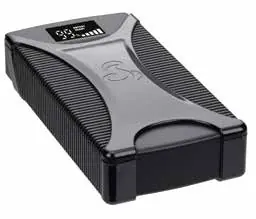
Cobra Jump Starter 1000A
Quick guide for the Cobra Jump Starter 1000A. Learn how to jump-start your vehicle using direct-to-battery or in-car methods, charge your devices, and interpret LED status indicators.
Table of contents
Manual images
Click an image to enlargeQuick Start Guide
For optimal performance, fully charge your Cobra Jump Starter 1000A prior to first use and every 12 months. This device is designed to jump-start vehicles and charge portable devices via USB.
Device Overview
The device features include:
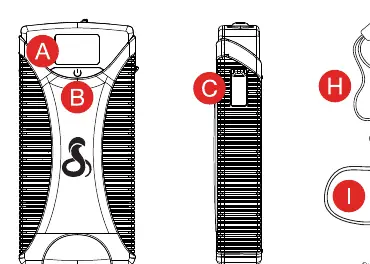
- A: LED Display
- B: Power/Flashlight Button
- C: Jump Start Connector
- D: LED Flashlight
- E: USB-C Fast Charge Input/Output
- F: (2) USB-A Fast Charge Outputs
- G: 12V Jump Start Connector
- H: Jump Start Cable
- I: USB-C to USB-A Cable
- J: 12V Jump Start Cable
Charging the Jump Starter
Use the USB-C Fast Charge Input/Output port to charge the unit. You can connect it to a computer or a wall adapter (not included) using the provided USB-C to USB-A cable.
Jump Starting Your Vehicle
There are two methods to jump-start your vehicle:
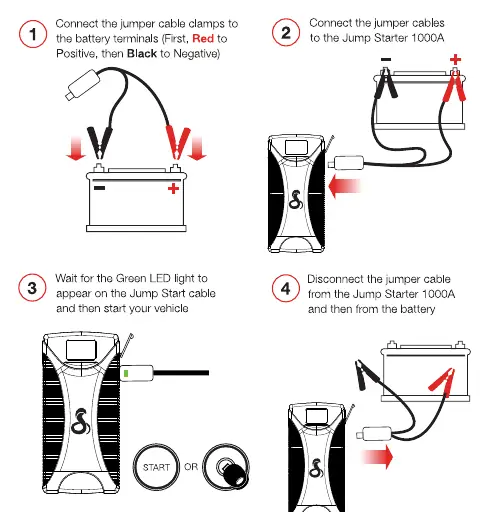
Direct-to-Battery
- Connect the jumper cable clamps to the battery terminals (Red to Positive +, Black to Negative -).
- Connect the jumper cables to the Jump Starter 1000A.
- Wait for the Green LED light to appear on the jump start cable.
- Start your vehicle.
- Disconnect the jumper cable from the Jump Starter 1000A and then from the battery.
In-Car
- Turn off all vehicle accessories.
- Connect the jumper cable to the Jump Starter 1000A.
- Connect the jumper cable plug into the vehicle's 12V accessory port.
- Push the START button to Accessory mode or turn the ignition switch to the Accessory position.
- Wait for "Output Ready" and 5 solid charging bars on the Jump Starter 1000A LED screen.
- Start your vehicle.
- Disconnect the jump start cable from the 12V accessory port and the Jump Starter 1000A. Leave the engine running for at least 20 minutes to allow the vehicle's battery to recharge.
LED Status Indicators
The Status LED indicates the following conditions:
- No LED: Connection not detected or device depleted. Check battery level and cable connection.
- Solid Red: Reverse polarity connection. Reverse the clamps.
- Flashing Red: Over-current protection. Wait for 30 seconds and then retry connection.
- Solid Yellow: Solid contact established and charging for jump start.
- Flashing Yellow: Cables not properly connected or Jump Starter 1000A is too hot. Remove cable and retry.
- Red and Green Flashing Alternatingly: Safety feature to prevent overheating from too many jump start attempts. Remove cable and wait a few minutes.
- Solid Green: Ready to jump start your vehicle.
Manufacturer information
Cobra Electronics
Practical help
Common problems
Solid Red LED
Reverse polarity connection. Reverse the clamps on the battery terminals.
Flashing Red LED
Over-current protection. Wait for 30 seconds and then retry the connection.
Red and Green Flashing Alternatingly
Safety feature triggered by overheating. Remove the cable and wait a few minutes before trying again.
No LED
Connection not detected or device is depleted. Check the battery level and ensure the jumper cable is securely connected.
Before use
- Fully charge the device before first use.
- Charge the device every 12 months for optimal performance.
- Ensure all vehicle accessories are turned off before attempting to jump start.
- Verify the jumper cable connection to the Jump Starter 1000A.
Specs in practice
- USB-A Fast Charge
- Output ports for charging mobile devices.
- USB-C Fast Charge
- Input/Output port used to charge the jump starter or external devices.
- 12V Jump Start Connector
- Dedicated port for connecting the jumper cables to the unit.
Images and diagrams
- Direct-to-Battery: Connect Red clamp to Positive (+), Black clamp to Negative (-). Wait for Green LED before starting.
- In-Car: Connect to 12V accessory port, wait for 'Output Ready' on screen, then start vehicle.
Model compatibility
- In-car jump starting is intended for use with the vehicle's 12V accessory port.
- If the vehicle does not start with the in-car method, use the direct-to-battery method.

Manual page author
Michael Turner
Technical manual editor
Reviews PDF manuals for structure, safety notes, and practical product details so readers can find the right information quickly.