Home Appliances / Fans
User Manual for Commercial Electric 24 in. 2-Speed Heavy Duty Tilt Drum Fan
Quick guide for the Commercial Electric 24 in. 2-Speed Heavy Duty Tilt Drum Fan (Model SFDC6-600CT0-4). Includes assembly instructions, operation, maintenance, and safety warnings.
Quick answers from the manual
Quick answer
- The Commercial Electric 24 in. 2-Speed Heavy Duty Tilt Drum Fan is operated via a switch with settings 0 (Off), 1 (Low), and 2 (High). Always unplug before moving or cleaning. p. 6, 7
Key actions
- Assemble the wheels p. 5
- Adjust tilt angle p. 6
First start
- Plug in and select speed p. 6
Problems and fixes
Fan stops working
Wait for the thermal protector to cool down, then restart.
p. 7Maintenance and reset
- Thermal protector reset p. 7
Technical specifications
| Parameter | Value | Meaning | Pages |
|---|---|---|---|
| Speeds | 2 | Low and High | p. 6 |
Where to find it in the PDF
- Safety Information p. 2
- Assembly p. 5
- Operation p. 6
- Maintenance p. 7
Table of contents
Manual images
Click an image to enlargeQuick guide from the manual
This guide provides essential information for the Commercial Electric 24 in. 2-Speed Heavy Duty Tilt Drum Fan. The fan features two speed settings and an adjustable tilt angle. Always ensure the fan is unplugged before performing any maintenance or adjustments.
Safety Information
- Unplug the fan before moving it or performing maintenance.
- Do not touch the fan with wet hands.
- Do not use the fan outdoors.
- Do not use an extension cord.
- Do not use the fan if the cable or plug is damaged.
- Do not insert hands or objects into the guard.
- Do not use with any solid-state speed control device.
- Keep away from fire.
- If the supply cord is damaged, it must be replaced by the manufacturer or a qualified service agent.
Assembly
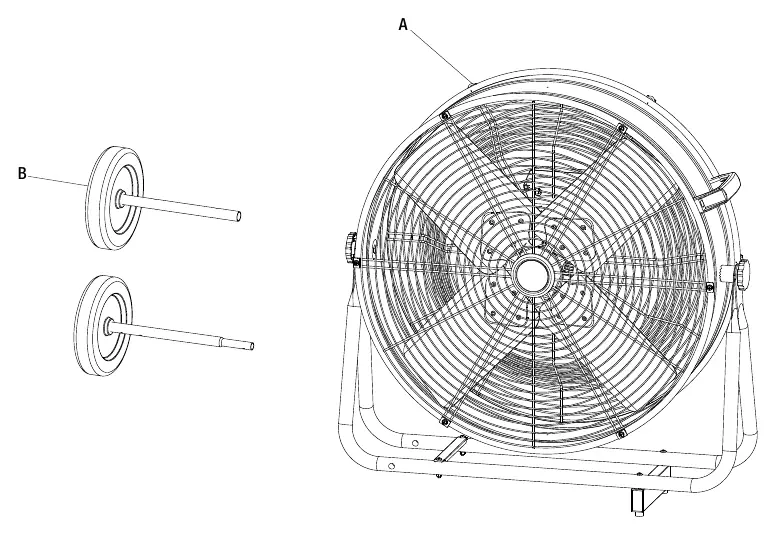
- Attach the wheels: Slide the wheels (B) onto the base (1).
- Secure the wheels: Insert the pin (AA) through the base to secure the wheels.
- Lock the pin: Split the pin (AA) and secure it using pliers.
Operation
To operate the fan:
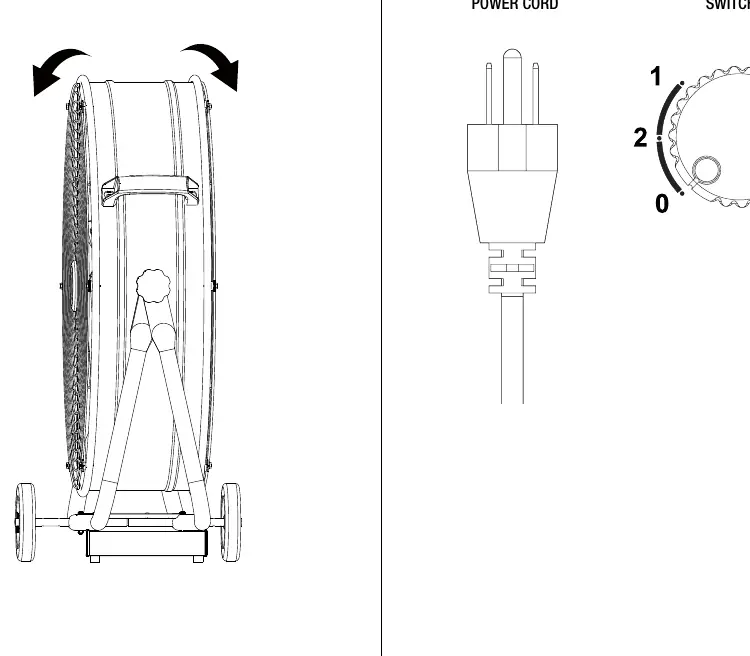
- Place the fan on a safe, flat surface where it cannot fall or be pulled by the cord.
- Adjusting tilt: Ensure the fan is unplugged, then tilt the fan head up or down to the desired angle.
- Turning on/off: Plug the power cord into an outlet. Turn the switch to the desired speed: 0 = Off, 1 = Low, 2 = High.
Maintenance and Cleaning
- Thermal Protector: This fan includes a resettable thermal protector. If the fan stops due to overheating, wait several minutes for the motor to cool down, then restart.
- Cleaning: Unplug the fan before cleaning. Do not immerse in water. Wipe surfaces with a slightly moistened cloth.
- Grill Cleaning: Use a vacuum cleaner to remove dust from the grill, or remove the front grill by releasing the securing clip on the edge. Remount the grill and clip after cleaning.
Manufacturer information
Commercial Electric
Practical help
Common problems
Fan stops working
The thermal protector may have tripped due to overheating. Wait several minutes for the motor to cool down, then restart the fan.
Missing parts
Do not assemble or use the product. Contact Customer Service at 1-877-527-0313 or visit HOMEDEPOT.COM.
Before use
- Ensure the fan is unplugged before assembly or maintenance.
- Check that all parts are present and undamaged.
- Place the fan on a safe, flat surface.
- Do not use an extension cord.
- Ensure the guard is properly fitted before starting.
Images and diagrams
- Assembly requires attaching wheels to the base and securing them with a pin.
- The fan head can be tilted manually for directional airflow.
- The switch is located on the fan and controls the speed settings.
Model compatibility
- Indoor use only.
- Do not use with solid-state speed control devices.

Manual page author
Emily Carter
User documentation editor
Prepares concise manual descriptions and highlights the most useful setup, operation, and maintenance information for readers.