Home Appliances / Small Kitchen Appliances
User Manual for Cuisinart 12-Cup Programmable Coffeemaker DCC-4000
Quick guide for the Cuisinart 12-Cup Programmable Coffeemaker DCC-4000. Includes setup, programming, brewing instructions, cleaning, and maintenance tips.
Table of contents
Quick Guide from the Manual
The Cuisinart 12-Cup Programmable Coffeemaker (DCC-4000) is designed for household use. Before first use, it is essential to rinse the system by running a brew cycle with water only (no coffee). Always ensure the water reservoir is filled before plugging in the unit. The machine features a 60-second reset to hold programmed settings in case of power failure.
Unpacking and Setup
- Place the box on a large, sturdy, flat surface.
- Remove all packaging materials, including the pearl cotton bag and stickers from the water tank and brewing basket covers.
- Soak the charcoal water filter in cold tap water for 15 minutes before inserting it into the holder.
- Flush the system by running a full reservoir of water through the machine without coffee.
The Quest for the Perfect Cup
To achieve the best flavor, consider these four elements:
- Water: Use filtered water to remove chlorine and odors.
- Coffee: Use fresh, whole beans and grind them just before brewing.
- Grind: A medium-fine grind is recommended. Too fine can clog the filter; too coarse results in weak coffee.
- Proportion: Use 1 level scoop of ground coffee per cup. Adjust to taste, but do not exceed 15 tablespoons total.
Control Panel Overview
The control panel allows you to manage all brewing functions:
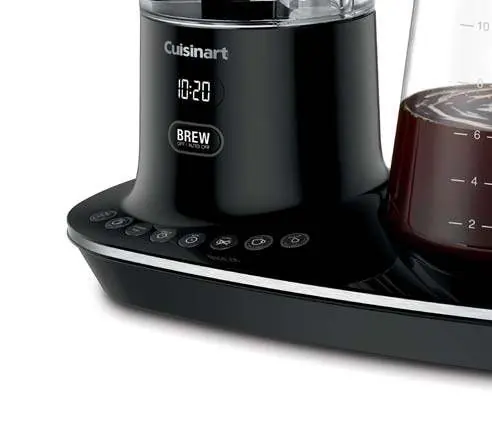
- Brew/Off & Auto Off: Turns the unit on/off and programs the auto-shutoff time (0 to 4 hours).
- Prog/Auto On: Programs the machine to start brewing up to 24 hours in advance.
- Bold Flavor Strength: Selects a stronger coffee flavor.
- Carafe Temp: Adjusts the warming plate temperature (Low, Medium, High).
- 1-4 Cup Button: Optimizes the brew process for smaller batches.
- Clean Button: Indicates when it is time to decalcify the unit.
Making Coffee
- Lift the lid and pour the desired amount of water into the reservoir.
- Insert the filter basket holder into the brew head.
- Insert a #4 paper filter or the gold-tone filter. Add ground coffee.
- Place the carafe on the heating plate and ensure the lid is closed.
- Select preferences (Bold, 1-4 cups, Carafe Temp) if desired.
- Press the Brew/Off button to start.
Cleaning and Maintenance
Regular cleaning ensures optimal performance:
- Daily: Discard used grounds and paper filter. Wash the filter basket and carafe in warm, soapy water or the top rack of the dishwasher. Wipe the area under the filter basket with a damp cloth.
- Decalcification: When the Clean indicator lights up, remove the charcoal water filter. Fill the reservoir with a mixture of 1/3 white vinegar and 2/3 water. Press and hold the Clean button until the indicator flashes. Run the cycle, then run a fresh water cycle to rinse.
Safety Warnings
- Never open the filter basket during the brewing cycle, even if water is not draining.
- Do not place the unit on or near hot burners or in a heated oven.
- Always unplug the unit when not in use or before cleaning.
- Do not use a cracked carafe or one with a loose handle.
Manufacturer information
Cuisinart
Practical help
Common problems
Coffee not brewing or overflowing
Check if the filter basket is clogged due to too finely ground coffee, using multiple filters, or improper cleaning of the gold-tone filter. Do not exceed 15 tablespoons of coffee.
Ready Tone beeping
The machine beeps 5 times when brewing is finished. This can be turned off by pressing the Tone button.
Water/coffee not draining
Unplug the unit and wait 10 minutes before opening the filter basket to avoid scalding.
Before use
- Remove all packaging and stickers.
- Soak the charcoal water filter in cold water for 15 minutes.
- Flush the system with a water-only brew cycle.
- Set the clock and desired Auto On/Off times.
- Ensure the carafe is properly positioned on the heating plate.
Specs in practice
- 12-Cup Capacity
- Maximum brewing capacity of 1.75 liters.
Images and diagrams
- Control Panel: Features buttons for Brew/Off, Auto On, Bold, Carafe Temp, Hour/Minute, Tone, 1-4 cups, and Clean.
- Water Reservoir: Includes a charcoal water filter holder.
Model compatibility
- Use only Cuisinart Gold-Tone Commercial-Style Filter or standard #4 cone-shaped paper filters.
- Do not use a converter with this unit; it is designed for 120-volt outlets only.

Manual page author
Emily Carter
User documentation editor
Prepares concise manual descriptions and highlights the most useful setup, operation, and maintenance information for readers.