Home Appliances / Small Kitchen Appliances
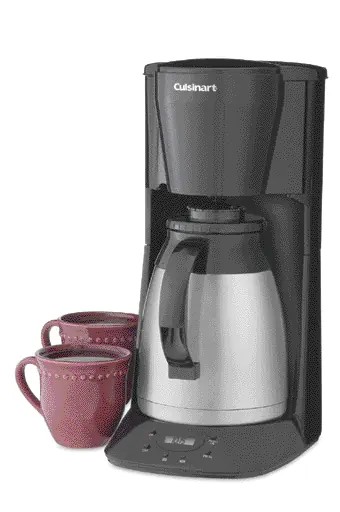
User Manual for Cuisinart 12-Cup Programmable Thermal Coffeemaker DTC-975 Series
Quick guide for the Cuisinart 12-Cup Programmable Thermal Coffeemaker DTC-975 Series. Learn how to program the brew time, make coffee, clean the unit, and use the thermal carafe safely.
Table of contents
Manual images
Click an image to enlargeQuick guide from the manual
Before using your Cuisinart coffeemaker for the first time, you must perform a cleaning cycle. Fill the thermal carafe with water, pour it into the reservoir, and run a full brew cycle without coffee or a filter. This removes any manufacturing residue from the system.
Important usage notes:
- Brew Pause: You can remove the carafe during the brewing cycle to pour a cup. You must return the carafe to the platform within 30 seconds to prevent the filter basket from overflowing.
- Thermal Carafe: The carafe is designed for this appliance only. Do not use it on a stove or in a microwave. Always keep the lid in the "CLOSED" position when pouring.
- Safety: The bottom of the thermal carafe remains hot for several minutes after brewing.
Description and Features
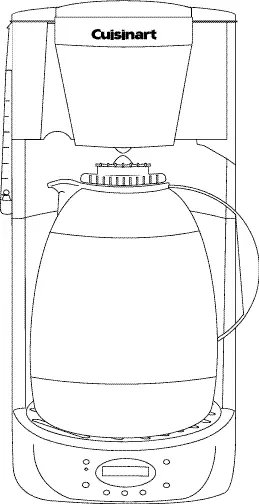
The Cuisinart Thermal Carafe Coffeemaker features a programmable auto-brew cycle, a stainless steel double-wall insulated carafe, and a patented lid that allows brewing and pouring without opening the lid. The unit includes a water window for easy filling and a filter basket that swings open for access.
Programming
To Set the Clock
- Press and hold the hour or minute button for two seconds until "Time set" flashes on the LCD.
- Use the hour button to set the time (note the PM indicator).
- Use the minute button to set the minutes.
- Press the hour button again or wait 15 seconds to save.
To Program Brew Time
- Press and hold the program button for two seconds until the "prog" symbol flashes.
- Set the desired time using the hour and minute buttons.
- Press the "prog" button or wait 15 seconds to save.
- Press the "auto on" button to activate the cycle; the "auto" symbol will appear on the LCD.
Making Coffee
- Place the coffeemaker on a flat surface and plug it in.
- Fill the thermal carafe with cold water and pour it into the reservoir. Do not exceed the 12-cup mark.
- Prewarm the carafe with warm water to help keep coffee hot longer.
- Ensure the carafe lid is in the "CLOSED" position and the "POUR" arrow is aligned with the spout.
- Open the filter basket, insert a filter, and add 2 level tablespoons of ground coffee per cup.
- Close the basket securely and press the "ON" button.
- When the brewing cycle is complete, an audible beep will sound.
Cleaning and Maintenance
Daily: Unplug the unit and allow it to cool. Wash the filter basket in hot, soapy water. Wipe the base and resting plate with a clean, damp cloth. Do not use abrasive cleansers.
Monthly: To remove mineral deposits, fill the carafe with 2 cups of vinegar and the rest with water. Pour into the reservoir and run a brew cycle. Follow this with 2 or 3 cycles of plain cold water to rinse.
Manufacturer information
Cuisinart
Practical help
Common problems
Coffee overflows from the filter basket
Ensure the carafe is returned to the platform within 30 seconds when using the Brew Pause feature, and ensure the basket is closed securely.
Coffee is not hot enough
Prewarm the thermal carafe by rinsing it with warm water before brewing.
Unit is brewing slowly or inefficiently
Perform a monthly cleaning cycle using a vinegar and water mixture to remove mineral buildup.
Before use
- Remove all packaging materials, foam, and cardboard inserts.
- Wash the thermal carafe and filter basket in warm, soapy water.
- Run a full brew cycle with water only (no coffee or filter) to clean the internal system.
- Ensure the unit is placed on a solid, flat surface.
Specs in practice
- 12-Cup Capacity
- The maximum amount of water the reservoir can hold for brewing.
Images and diagrams
- The unit features a water window (4) to check water levels.
- The filter basket (3) swings outward for easy access.
- The control panel (8, 9) includes buttons for setting the clock, programming, and turning the unit on/off.
Model compatibility
- The thermal carafe is designed exclusively for this coffeemaker.
- Do not use the thermal carafe on a range top or in a microwave oven.

Manual page author
Michael Turner
Technical manual editor
Reviews PDF manuals for structure, safety notes, and practical product details so readers can find the right information quickly.