Industrial / Communication Modules
Operating Guide for Danfoss TechCase iC7
Comprehensive operating guide for the Danfoss TechCase iC7. Includes installation, safety procedures, startup instructions, troubleshooting, and technical specifications for this encased table test system.
Quick answers from the manual
Quick answer
- The TechCase iC7 is an encased table test system for frequency converters. It requires a 230V AC supply and is used for training, demonstrations, and technical support. p. 10, 11
Key actions
- Startup procedure p. 17
- Factory reset procedure p. 18
First start
- Connect 230V supply, pull up Emergency Stop, push ON button. p. 15, 17
Problems and fixes
Case does not power up
Check Emergency Stop, 230V cable, and input fuses.
p. 19Maintenance and reset
- Factory reset requires specific parameter changes before applying mains power. p. 18
Technical specifications
| Parameter | Value | Meaning | Pages |
|---|---|---|---|
| Supply voltage | 230 V AC +10%/-5% | 1-phase input voltage | p. 21 |
| Input frequency | 50/60 Hz | Operating frequency | p. 21 |
Where to find it in the PDF
- Installation p. 15, 16
- Specifications p. 21, 22
Table of contents
Manual images
Click an image to enlargeImportant Information
The TechCase iC7 is an encased table test system designed for sales demonstrations, training, and technical support. This guide provides essential information for safe installation and commissioning. Qualified personnel only should perform installation, operation, and maintenance. Always observe safety warnings, particularly regarding electric shock and discharge times.
Product Overview
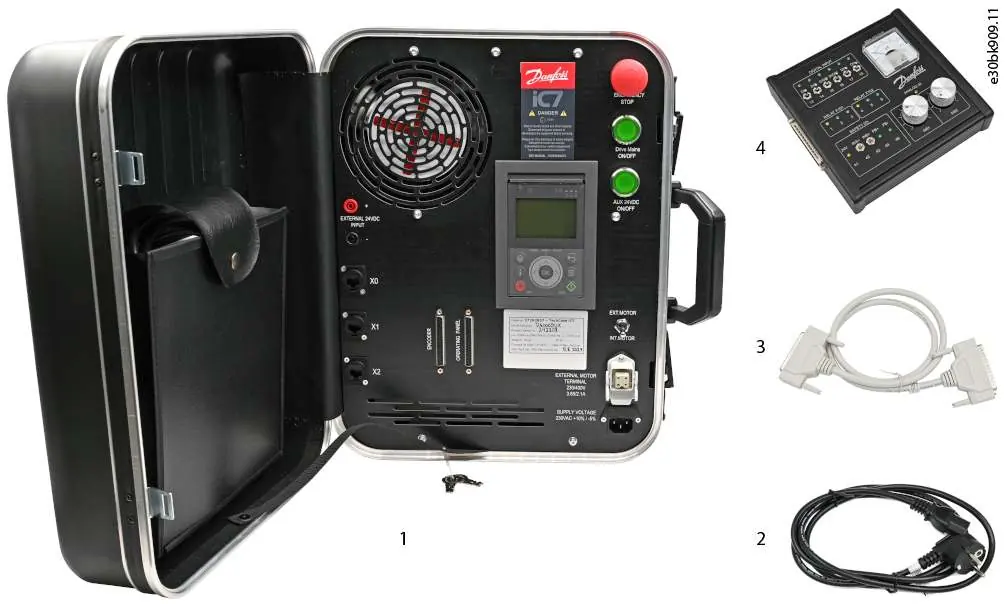
The TechCase iC7 includes an iC7-Automation Frequency Converter and an integrated induction motor. It features an Emergency Stop function, Ethernet ports for fieldbus and PC connection, and terminals for external motors and 24V DC supply.
Installation
Before installation, ensure the case is on a level surface and the Emergency Stop is in the ON position. Complete all electrical installations before supplying power.

- 230V Supply: Connect the provided supply cable to the C14 connector on the case and a 230V power source.
- External 24V DC: Connect using 4mm safety sockets on the front panel. Requires 24V ±10% and minimum 2A.
- External Motor: Connect via the HAN 3A type connector.
- I/O Panel: Connect the standard I/O panel to the OPERATING PANEL terminal using the provided D-type cable.
- Ethernet: Ports X1 and X2 are for fieldbus systems; port X0 is for PC/service tools.
Operation
Starting Up:
- Finish all cabling.
- Switch the EMERGENCY STOP button to the OFF position (pulled up).
- Check the internal/external motor selection switch.
- Push the ON button to switch on the mains supply.
- Wait for the drive to reach the Ready state.
Stopping the Device: Push the OFF button to switch off the mains supply and wait for the drive to power down.
Reset to Factory Default Settings: If the drive is reset, do not turn on the mains supply immediately. Power up with 24V DC, set parameter 2.2.1.5 (Supply Mode) to DC, and parameter 1.2.2 (RFI Filter Mode) to Filter Inactive. Only then can mains be switched on.
Troubleshooting
If the device does not power up, check the Emergency Stop button, the 230V supply cable, and the input fuses. If the drive does not start, verify parameter settings and ensure the control panel is properly connected. If an RCD trips upon startup, follow the factory reset procedure.
Technical Specifications
The TechCase iC7 operates on a 230V AC, 1-phase supply at 50/60 Hz. It has an IP00 protection rating and weighs 12.3 kg. Always allow a 5-minute discharge time for capacitors before performing service.
Manufacturer information
Danfoss A/S
Practical help
Common problems
Case does not power up
Check that the Emergency Stop button is in the OFF position, the 230V supply cable is connected, and the input fuses are intact.
Drive does not start
Verify motor parameter settings, check wiring, and ensure the control panel is securely connected.
RCD trips when switching mains ON
This may occur after a factory reset. Follow the specific reset procedure in section 5.4 to configure parameters before applying mains power.
Before use
- Visually inspect the case and contents for damage.
- Ensure ambient conditions meet technical specifications.
- Place the case on a level, even surface.
- Ensure the Emergency Stop button is in the OFF (pulled up) position.
- Verify cabling is routed to prevent tripping hazards.
Specs in practice
- Supply Voltage
- 230V AC +10%/-5%, 1-phase.
- Discharge Time
- 5 minutes. Wait this long after power removal before performing service.
- Protection Rating
- IP00.
Images and diagrams
- Figure 1: Items included in the delivery (Case, cables, I/O panel).
- Figure 2: Interface layout showing ports, buttons, and terminals.
- Figure 3: Standard I/O panel interface layout.
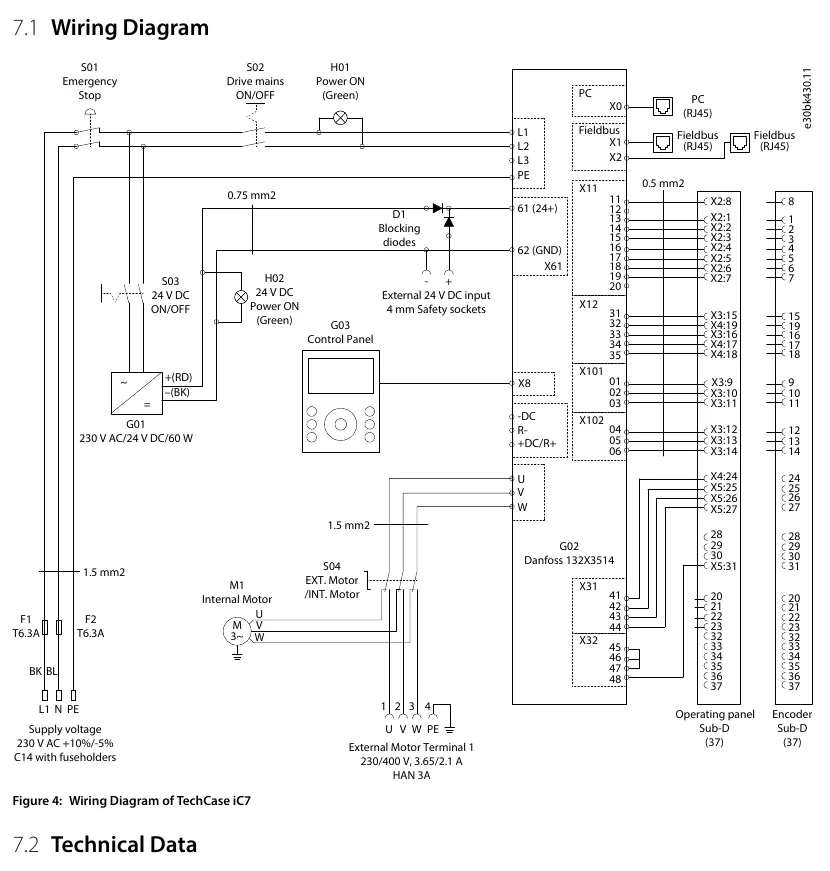
- Figure 4: Wiring diagram for the TechCase iC7.
Model compatibility
- Requires 230V AC supply.
- External motor must be compatible with 230/400V, 3.65/2.1A specifications.
- External 24V DC supply must provide 24V ±10% and minimum 2A.

Manual page author
Michael Turner
Technical manual editor
Reviews PDF manuals for structure, safety notes, and practical product details so readers can find the right information quickly.