Electronics / Microphones
User Manual for dBTechnologies RW 16MSBS UHF PLL System
Quick guide for the dBTechnologies RW 16MSBS wireless system. Learn how to set up, synchronize the handheld or bodypack transmitters with the receiver, and view technical specifications.
Quick answers from the manual
Quick answer
- The RW 16MSBS is a wireless diversity system. To synchronize, turn on the receiver and transmitter, align the IR ports, and press the ASC button on the receiver. p. 2
Key actions
- Synchronizing transmitters p. 2
First start
- Powering on and battery installation p. 2
Problems and fixes
Synchronization failure
Ensure IR ports are aligned and within range.
p. 2Technical specifications
| Parameter | Value | Meaning | Pages |
|---|---|---|---|
| Frequency Range | 823-832 MHz / 863-865 MHz | Operating UHF bands | p. 1 |
| RF Power | 10 mW | Transmitter output power | p. 1 |
Where to find it in the PDF
- Technical Specifications p. 1
- Synchronization and Controls p. 2
Table of contents
Manual images
Click an image to enlargeQuick guide from the manual
This document serves as a quickstart guide for the dBTechnologies RW 16MSBS wireless diversity system. It covers the basic setup, synchronization procedures for both handheld and bodypack transmitters, and essential technical specifications. Please note that this document should be used in conjunction with the full User Manual (Section 2) for complete safety and operational details.
Package Content
- RW 16R receiver
- RW 16M handheld wireless microphone or RW 16B bodypack wireless transmitter with headset
- Power adapter
- Unbalanced audio cable
- Batteries
- Warranty/documentation
Receiver Overview
The RW 16R receiver features the following controls and indicators:
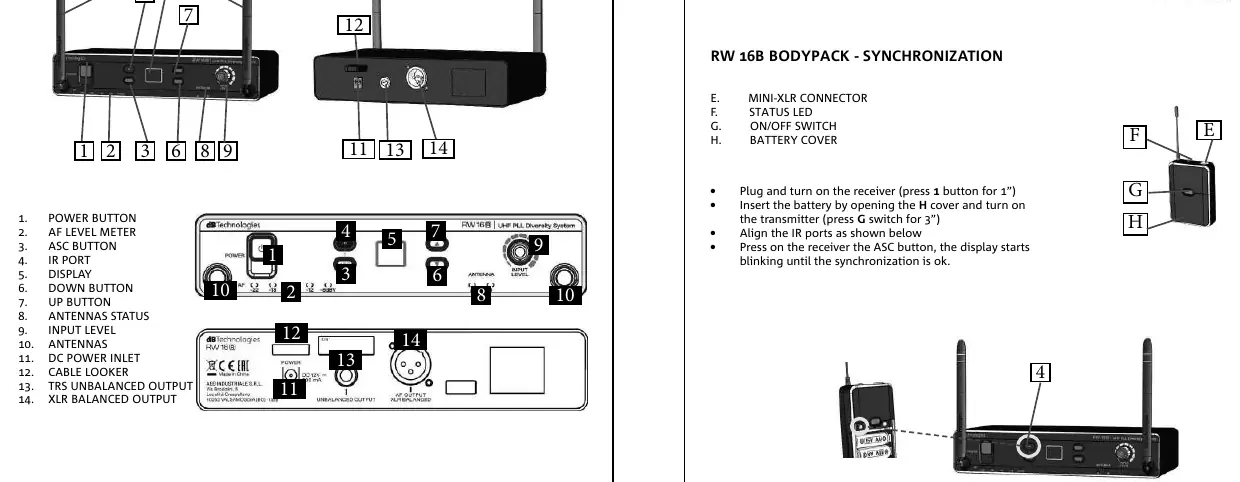
- Power Button: Turns the unit on/off.
- AF Level Meter: Indicates audio signal level.
- ASC Button: Used for synchronization.
- IR Port: Infrared port for transmitter synchronization.
- Display: Shows channel and status information.
- Up/Down Buttons: Used for channel selection and settings.
- Antenna Status: Indicates signal reception.
- Input Level: Adjusts input sensitivity.
- Outputs: Includes TRS unbalanced output and XLR balanced output.
Synchronization
To ensure the transmitter communicates with the receiver, follow these steps:
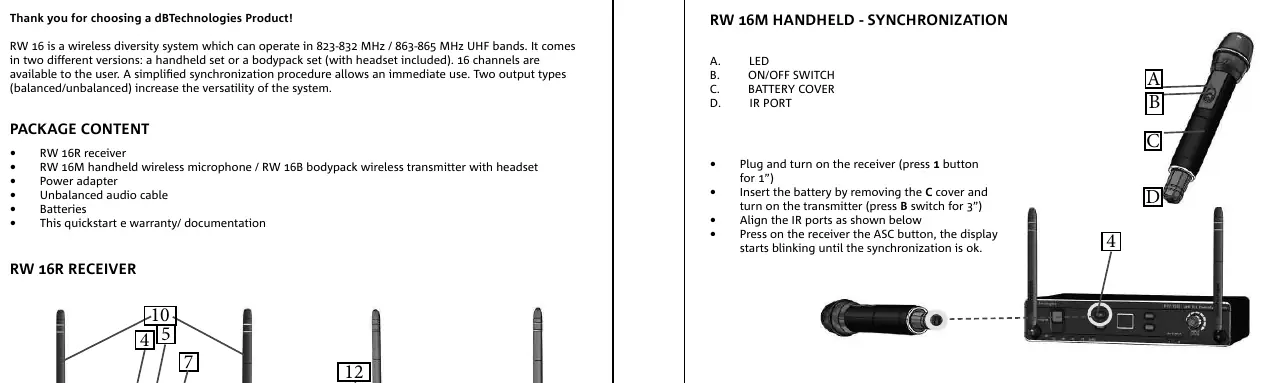
Handheld Transmitter (RW 16M)
- Plug in and turn on the receiver (press the power button for 1 second).
- Insert the battery into the transmitter and turn it on (press the power switch for 3 seconds).
- Align the IR ports of the receiver and transmitter.
- Press the ASC button on the receiver; the display will blink until synchronization is complete.
Bodypack Transmitter (RW 16B)
- Plug in and turn on the receiver (press the power button for 1 second).
- Insert the battery into the transmitter and turn it on (press the power switch for 3 seconds).
- Align the IR ports of the receiver and transmitter.
- Press the ASC button on the receiver; the display will blink until synchronization is complete.
Technical Specifications
The system operates in the 823-832 MHz / 863-865 MHz UHF bands.
- Frequency Response: 60 Hz - 15 kHz (± 3 dB)
- THD: <1%
- RF Power: 10 mW
- Power Supply: 2x AA LR6 1.5V batteries (for transmitters)
Practical help
Common problems
Synchronization fails
Ensure the IR ports on both the receiver and transmitter are clean and properly aligned during the synchronization process.
No audio output
Check that the receiver is powered on, the transmitter is synchronized, and the audio cables are securely connected to the correct output (balanced or unbalanced).
Before use
- Verify all package contents are present.
- Install fresh AA batteries in the transmitter.
- Connect the power adapter to the receiver.
- Ensure the receiver and transmitter are within range for synchronization.
- Check that the frequency band matches local regulations.
Specs in practice
- Frequency Range
- 823-832 MHz / 863-865 MHz UHF bands for wireless transmission.
- Power Supply
- Requires 2x AA LR6 1.5V batteries per transmitter.
Images and diagrams
- The receiver front panel contains the power button, IR port, display, and navigation buttons.
- The receiver rear panel provides connections for DC power, unbalanced audio output, and balanced XLR output.
Model compatibility
- System operates in 823-832 MHz / 863-865 MHz UHF bands.

Manual page author
Emily Carter
User documentation editor
Prepares concise manual descriptions and highlights the most useful setup, operation, and maintenance information for readers.