Documents / Warranty Safety
Owner's Manual for DigiTech Dirty Robot Stereo Synth Effect Pedal
Quick guide for the DigiTech Dirty Robot stereo synth pedal, covering interface controls, connection diagrams, synth voice selection, and performance accessory installation.
Table of contents
Manual images
Jump to the sectionQuick guide from the manual
The DigiTech Dirty Robot is a stereo synthesizer emulation pedal for guitar and bass. It features two synth voices (V1 envelope-style and V2 vocal formant), adjustable sweep frequency, trigger sensitivity, and chorus modulation. The pedal requires an external 9V DC power supply.
Operating the pedal
To begin using the effect, connect your instrument to Input 1 (Mono) and your amplifier to Output 1 (Mono). Enable the effect using the footswitch; the LED will light red when active. Use the MIX knob to blend the synth effect with your dry signal. You can select between V1 and V2 synth voices using the toggle switch. The START and STOP knobs define the frequency sweep range, while SENS and TIME knobs control trigger sensitivity and sweep duration. Press and hold the footswitch while the effect is active to trigger a momentary vibrato effect.
User interface
The pedal features several concentric knobs for precise control: DRIFT controls morphing between Sub, Octave, and Square waveforms. SENS/TIME adjusts trigger sensitivity and sweep speed. START/STOP sets the frequency range or vocal formant direction. MIX/MOD controls the wet/dry balance and adds chorus modulation.

Connections
For mono operation, use Input 1 and Output 1. For stereo operation, connect both inputs and outputs to separate amplifiers. Always use unbalanced TS instrument cables. For optimal performance, place the Dirty Robot at the beginning of your signal chain and bypass preceding effects.

Performance accessories
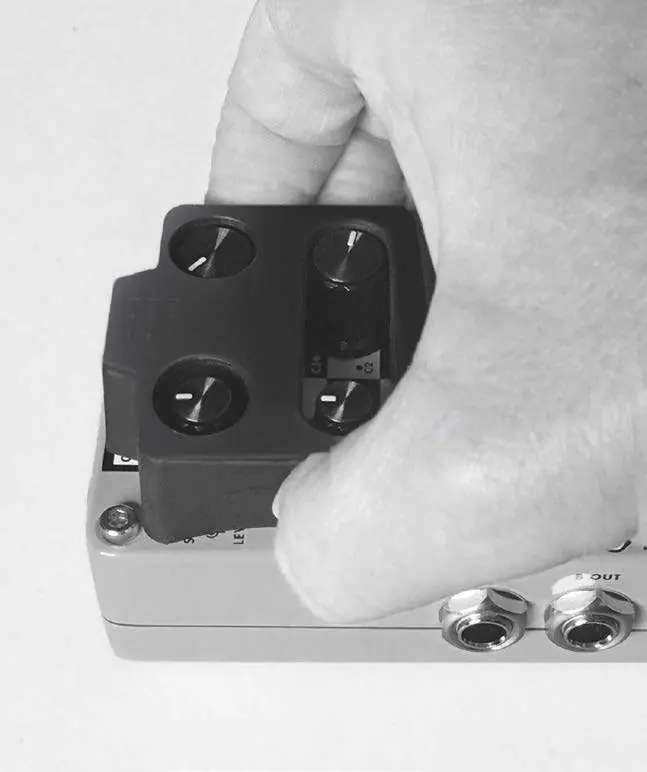
The pedal includes a StompLock to secure your knob settings and a hook-and-loop pad for pedalboard mounting. To install the pad, remove the existing rubber skid pad from the bottom of the pedal, peel the adhesive protector, and apply the new pad.
Technical specifications
- Power Requirements: 9V DC external power supply (1.2 W, 125 mA typical).
- Input Impedance: >1 MΩ (stereo), >500 kΩ (mono).
- Output Impedance: 1 kΩ.
- Dimensions: 4.40 inches (L) x 2.65 inches (W) x 2.0 inches (H).
- Weight: 1.0 lb.
Practical help
Common problems
No vibrato effect heard
Ensure the MIX knob is not set to full dry (fully counter-clockwise), as vibrato is only audible on the synth signal.
Effect not powering on
Verify you are using a compatible 9V DC external power supply. The pedal cannot be powered by batteries.
Signal issues in stereo setup
Ensure you are using unbalanced TS instrument cables for all connections.
Before use
- Ensure you have a compatible 9V DC power supply.
- Turn down your amplifier's master volume before making connections.
- Check that the pedal is placed at the front of your signal chain for best performance.
- Verify the serial number on the chassis for support purposes.
Specs in practice
- Input Impedance
- Determines how the pedal interacts with your instrument's pickups; higher values preserve high-frequency detail.
- Current Draw
- The amount of power the pedal requires; ensure your power supply provides at least 125 mA.
Images and diagrams
- The connection diagram shows a standard mono/stereo setup using two amplifiers.
- The diagram illustrates the signal flow from the guitar into Input 1 and out to two separate amplifiers via Output 1 and Output 2.
Model compatibility
- Designed for use with guitar and bass.
- Requires external HARMAN power supply (PS0913DC series).
- Only for use within the United States for warranty purposes.

Manual page author
Emily Carter
User documentation editor
Prepares concise manual descriptions and highlights the most useful setup, operation, and maintenance information for readers.