Electronics / Networking
User Manual for Digitus 10/100M Network USB Adapter DN-10050-1
Quick installation guide for the Digitus 10/100M Network USB Adapter (DN-10050-1). Learn how to connect the device, system requirements, and key features for Windows and macOS.
Table of contents
Quick guide from the manual
The Digitus 10/100M Network USB Adapter (DN-10050-1) is a plug-and-play device designed to provide Ethernet connectivity to computers via a USB 2.0 port. Ensure your system meets the minimum requirements (Windows 7/8/10/11 or macOS 10.4+) before installation. The device supports full-duplex operation and remote wakeup features.
Product Introduction
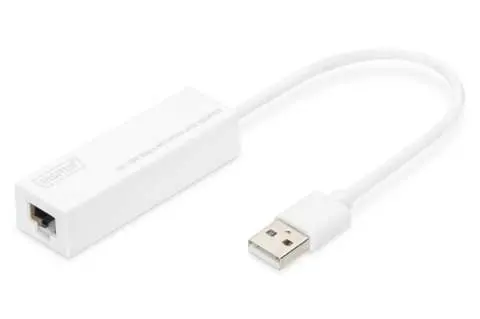
The DN-10050-1 is an USB 2.0 to Fast Ethernet Adapter that provides computer systems with Ethernet link speeds up to 100Mbps. It is backward compatible with USB 1.x and serves as a compact, portable solution for desktop or laptop network connectivity.
Features
- Compliant with USB 1.1 and 2.0 specifications.
- Integrates 10/100Mbps Fast Ethernet MAC/PHY.
- IEEE 802.3 10BASE-T/100BASE-TX compatible.
- Supports full-duplex operation at 10/100Mbps.
- Supports USB Full and High Speed modes with bus power capacity.
- Supports Suspend mode and Remote Wakeup via Link-up.
- Upstream port: USB type A.
- Downstream port: RJ45.
- Compatible with Windows 7/8/10/11 (32/64 bit) and macOS 10.4 or later.
System Requirements
- Operating System: Windows 7/8/10/11 (32/64 bit) or macOS 10.4 or later.
- Hardware: An available USB port.
Hardware Installation
- Plug the DN-10050-1 adapter directly into an available USB port on your computer.
- Connect a network cable into the RJ45 port of the adapter.
- Connect the other end of the network cable into an available Ethernet port on your router, switch, or other network device.
Compliance and Support
The Declaration of Conformity is included with the shipping content. For inquiries, contact Assmann Electronic GmbH at Auf dem Schüffel 3, 58513 Lüdenscheid, Germany, or visit www.assmann.com.
Official resources from the manual
Practical help
Before use
- Ensure your computer has an available USB port.
- Verify your operating system is Windows 7/8/10/11 or macOS 10.4 or later.
- Have a standard Ethernet network cable ready.
Model compatibility
- Compatible with Windows 7, 8, 10, and 11 (32/64 bit).
- Compatible with macOS 10.4 or later.

Manual page author
Emily Carter
User documentation editor
Prepares concise manual descriptions and highlights the most useful setup, operation, and maintenance information for readers.