Electronics / Networking
User Manual for Digitus USB GaN Charger 100W
Quick installation guide for the Digitus USB GaN Charger 100W (DA-10304). Learn about power distribution, safety instructions, and technical specifications for this 2x USB-C and 1x USB-A charger.
Table of contents
Quick Guide from the Manual
The Digitus USB GaN Charger 100W (DA-10304) is designed for efficient charging of smartphones, tablets, and laptops. For the best charging experience and to achieve flash charging speeds, it is recommended to use an official 5A charging cable that supports the power delivery protocol. Please note that output power may fluctuate as a safety mechanism when the ambient temperature is between 26-35°C (78.8-95°F) during high output loads.
Power Distribution
The charger features intelligent power distribution depending on the number of devices connected:
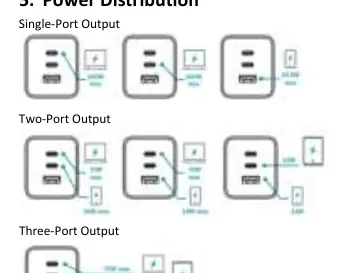
- Single-Port Output: USB-C1 or USB-C2 up to 100W; USB-A up to 22.5W.
- Two-Port Output: USB-C1 + USB-C2 (70W + 30W); USB-C1 + USB-A (70W + 18W); USB-C2 + USB-A (12W + 12W).
- Three-Port Output: USB-C1 + USB-C2 + USB-A (70W + 12W + 12W).
Specifications
- Input: 100-240V / 2.0A / 50/60Hz
- Charging Technology: GaN II (Gallium Nitride)
- Protection: Overcurrent, overcharging, short circuits, and overheating
- Average Active Efficiency: 85.77%
- Standby Power Consumption: 0.29W
- Dimensions: 4.6 x 9.27 x 4.0 cm
- Weight: 184 g
Safety Instructions
To ensure safe operation, please adhere to the following guidelines:
- The product is for indoor use only.
- Keep away from rain, moisture, and liquid containers.
- Do not disassemble or attempt to open the protective casing.
- Do not cover the product during use; ensure it is placed in an open space with adequate air circulation.
- Do not expose the product to extreme heat.
- Pull the charger straight out from the wall; do not pull by the cable.
- Stop using the product immediately if the protective cover or cable is damaged.
- Do not overload the power supply.
Practical help
Common problems
Output power fluctuation
This is a normal safety mechanism when the ambient temperature is between 26-35°C (78.8-95°F) with a high output load.
Slow charging speed
Ensure you are using an official 5A charging cable that supports the power delivery protocol.
Charger gets warm
Do not cover the charger. Ensure it is placed in an open space with proper air circulation.
Before use
- Check that the protective cover and cable are free from damage.
- Ensure the wall outlet is easily accessible.
- Verify the device is being used indoors.
- Confirm the input voltage matches your local power supply (100-240V).
Specs in practice
- GaN II Technology
- Gallium Nitride technology allows for a compact design, high efficiency, and low heat generation.
- 100W Max Output
- The maximum power available when using a single USB-C port.
- 85.77% Efficiency
- The average active efficiency of the power conversion process.
Images and diagrams
- The manual provides visual diagrams illustrating how the 100W total power is distributed across the three ports (USB-C1, USB-C2, USB-A) when one, two, or three devices are connected simultaneously.
Model compatibility
- Universally compatible with notebooks, tablets, smartphones, and other USB devices.
- Requires 5A charging cable for optimal flash charging performance.

Manual page author
David Miller
Documentation analyst
Organizes user manual content into clear summaries, with attention to model details, product context, and everyday usability.