Electronics / Networking
Digitus 15-W-PoE-Injektor DN-95102-2
Quick installation and operation guide for the Digitus 15-W-PoE-Injektor (DN-95102-2). Includes mounting instructions, connection diagrams, and technical specifications for IEEE 802.3af compatible devices.
Table of contents
Manual images
Click an image to enlargeQuick Guide
The Digitus 15-W-PoE-Injektor is designed to extend your network to areas without power outlets by providing power and data over a single Ethernet cable. It is fully compliant with the IEEE 802.3af standard. Ensure your powered device (PD) is also IEEE 802.3af compatible before installation.
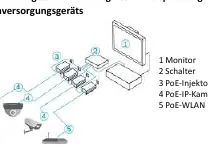
Product Overview
The device features three main connection points:
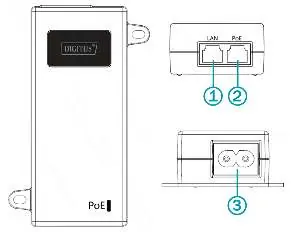
- 1. LAN Port: Connects to your network switch or router.
- 2. PoE Port: Connects to the powered device (e.g., IP camera, wireless access point).
- 3. AC Input: Connects to the power supply.
The device includes a PoE LED indicator. If the LED is green and lit, the device is receiving power.
Installation
Follow these precautions to ensure safe operation:
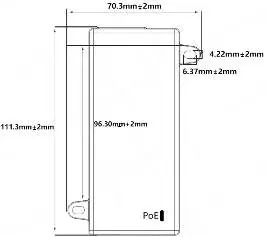
- Do not install the device near water or in damp areas.
- Ensure the device is placed on a stable surface or securely mounted.
- Maintain adequate ventilation around the device; do not block air vents.
- Verify that the power supply voltage matches the device requirements (100-240V AC).
- Do not open the device housing while it is in operation.
Mounting Options
- Desktop: Place the device upright on a stable workbench.
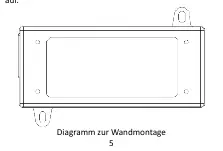
- Wall Mounting: Use the mounting holes on the device to hang it securely on two screws fixed to the wall.
Operation
To set up the injector:
- Connect the power cable to the AC input.
- Connect your network source (switch/router) to the LAN port using an Ethernet cable.
- Connect your powered device (e.g., IP camera) to the PoE port using an Ethernet cable.
- The device will initialize automatically upon receiving power.
Technical Specifications
- PoE Standard: IEEE 802.3af
- Max Power Output: 15.4 W
- Data Rate: 10/100/1000 Mbps
- Operating Temperature: 0 °C to 40 °C
- Operating Humidity: 5% to 90% (non-condensing)
- Cable Requirements: UTP Category 3, 5, 5e, or 6 (max 100m)
Practical help
Common problems
PoE LED is off
Ensure the power cable is securely connected to the AC input and the power source is active.
Device not powering the connected equipment
Verify that the connected device is IEEE 802.3af compatible and that the Ethernet cable length does not exceed 100 meters.
Before use
- Verify the powered device is IEEE 802.3af compatible.
- Ensure the power source is 100-240V AC.
- Check that the operating environment is between 0°C and 40°C.
- Use a high-quality Ethernet cable (Cat 5 or higher recommended).
- Ensure the cable run is less than 100 meters.
Specs in practice
- IEEE 802.3af
- The standard protocol for Power over Ethernet, ensuring safe power delivery to compatible devices.
- 10/100/1000 Mbps
- Supports Gigabit Ethernet speeds for data transmission.
Images and diagrams
- The LAN port is for data input from your network.
- The PoE port combines data and power for the output device.
- The AC input is for the power cable connection.
Model compatibility
- Compatible with IEEE 802.3af PoE devices.
- Requires UTP cable Category 3, 5, 5e, or 6.
- Maximum cable length is 100 meters.

Manual page author
David Miller
Documentation analyst
Organizes user manual content into clear summaries, with attention to model details, product context, and everyday usability.