Power / Batteries & Chargers
User Manual for Draper 58318 20V Brushless 125mm Random Orbit Polisher
Quick guide for the Draper 58318 20V Brushless 125mm Random Orbit Polisher. Includes setup, speed control, battery charging, maintenance, and troubleshooting steps.
Quick answers from the manual
Quick answer
- The Draper 58318 is a 20V cordless random orbit polisher with a 125mm backing pad. It features 6 variable speed settings (1600-4710 o/min) and is part of the Draper D20 battery system. p. 1, 2, 7
Key actions
- Turning the polisher on p. 6
- Changing speed settings p. 7
- Charging the battery p. 7
First start
- Ensure the battery is charged and the backing pad is fitted correctly before use. p. 6, 7
Problems and fixes
Polisher does not operate
Re-charge battery pack or replace if faulty.
p. 9Maintenance and reset
- Regular cleaning and inspection of the pad/bonnet. p. 9
Technical specifications
| Parameter | Value | Meaning | Pages |
|---|---|---|---|
| Disc diameter | 125mm | Size of the backing pad | p. 2 |
| Orbit | 15mm | Throw distance | p. 2 |
| Speed (no load) | 1600-4710 o/min | Variable speed range | p. 2, 7 |
Where to find it in the PDF
- Product Identification p. 6
- Operations p. 6, 7
- Troubleshooting p. 9
Table of contents
Manual images
Click an image to enlargeQuick guide from the manual
The Draper 58318 is a 20V cordless random orbit polisher designed for automotive and surface polishing. Before use, ensure the battery is charged and the backing pad is securely attached. Always test the polisher on an inconspicuous area before applying it to the entire surface. Do not apply excessive pressure, as this can damage the internal mechanics.
Product identification
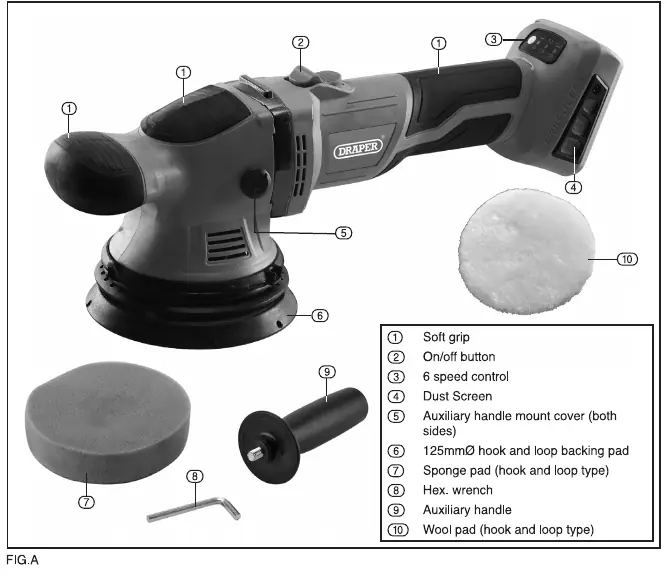
The polisher features a soft grip, an on/off button, a 6-speed control dial, a dust screen, and an auxiliary handle mount. It uses a 125mm hook and loop backing pad compatible with various sponge and wool pads.
Basic operations
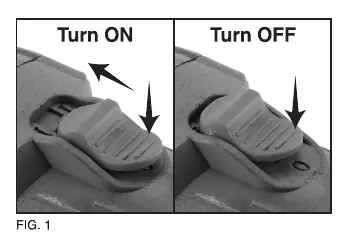
On/Off Switch: To turn on, press the back of the switch down and push forward; the switch will lock in the forward position. To turn off, press the back of the switch down, and it will spring back.
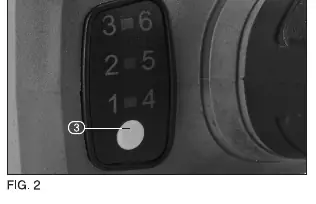
Variable Speed Control: Use the speed control button to select between 6 speed settings, ranging from 1,600 to 4,710 o/min. The speed is indicated by the light color (Green for 1-3, Red for 4-6).
Battery charging
This product is supplied "bare" without a battery or charger. Use only Draper D20 battery packs and chargers. To charge, slide the battery into the charger. The red LED indicates power, flashing red indicates charging, and solid green indicates a full charge. Always allow the battery to cool down after use before recharging.
Maintenance and troubleshooting
Regular cleaning keeps the tool in good working condition. Do not use solvents or fuels for cleaning. If the polisher does not operate or loses power, check the battery charge level or replace the battery if faulty. If the machine vibrates, check if the pad or bonnet is damaged or out of balance.
Safety information
Always wear appropriate personal protective equipment, including safety glasses, ear defenders, and gloves. Keep the work area clean and well-lit. Do not operate in explosive atmospheres. Ensure the tool is switched off before connecting the battery. Do not expose the tool or battery to rain or extreme temperatures.
Manufacturer information
Draper Tools
Practical help
Common problems
Polisher does not operate
Check if the battery pack is charged or if it is faulty/damaged.
Motor runs but slowly or loses power
Check if the battery pack is charged or if it is faulty/damaged.
Machine vibrates
The pad or bonnet may be damaged or out of balance; replace the pad/bonnet.
Battery pack does not charge
Check if the fuse in the charger plug is blown or if the charger is faulty.
Before use
- Ensure the battery pack is fully charged.
- Check that the backing pad is securely attached.
- Verify the switch is in the OFF position before inserting the battery.
- Inspect the tool and battery for any signs of damage.
- Ensure the work area is clean and free of flammable materials.
Specs in practice
- Disc diameter
- 125mm, the size of the compatible backing pad and accessories.
- Speed (no load)
- 1600-4710 o/min, adjustable via 6 settings.
Images and diagrams
- Fig A identifies the main components: soft grip, on/off button, speed control, dust screen, and backing pad.
- Fig 1 illustrates the operation of the on/off switch.
- Fig 2 shows the speed control button and settings.
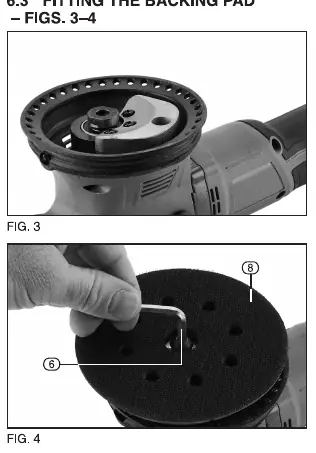
- Fig 3-4 demonstrate how to fit the backing pad using the hex wrench.
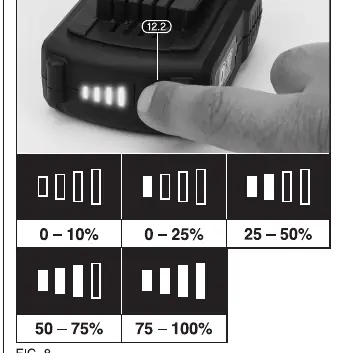
- Fig 8 explains the battery charge level indicator.
Model compatibility
- Compatible with all 125mm hook and loop accessories.
- Use only Draper D20 battery packs and chargers.

Manual page author
Emily Carter
User documentation editor
Prepares concise manual descriptions and highlights the most useful setup, operation, and maintenance information for readers.