Tools / Polishing Tools
User Manual for Draper 20V USB Adaptor 69249
Quick guide for the Draper 20V USB Adaptor 69249. Learn how to operate the USB charging ports, use the LED worklight, and understand battery compatibility and safety instructions.
Quick answers from the manual
Quick answer
- The Draper 69249 is a 20V USB adaptor for D20 Multi-Tool batteries. It provides two USB charging ports and an integrated LED worklight. To charge, slide it onto the battery and press the switch once. p. 5
Key actions
- Charging devices p. 5
- Using worklight p. 5
First start
- Slide the adaptor onto a D20 Multi-Tool battery until it clicks into place. p. 5
Problems and fixes
Adaptor enters hibernation mode
Wake the product by switching the worklight on.
p. 5Maintenance and reset
- Regular inspection and cleaning. Do not use solvents or fuels. p. 6
Technical specifications
| Parameter | Value | Meaning | Pages |
|---|---|---|---|
| Input Voltage | 13.0V - 25.0V | P+/P-Input voltage | p. 2 |
| USB Output | 5.0V / 2A | USB output voltage | p. 2 |
| Weight | 0.108kg | Machine only | p. 2 |
Where to find it in the PDF
- Product Identification p. 5
- Basic Operations p. 5
Table of contents
Quick guide from the manual
The Draper 20V USB Adaptor (69249) is designed to convert D20 Multi-Tool batteries into a portable power source for USB devices. It features two USB charging ports and an integrated LED worklight. The device includes a hibernation mode to conserve battery power when not in use.
Product identification
The adaptor consists of the following key components:
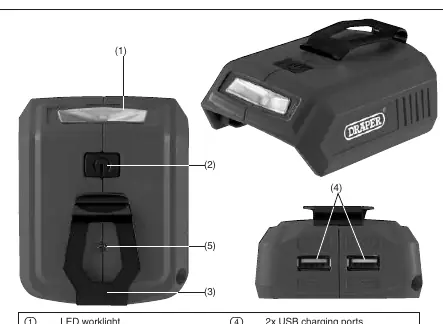
- LED worklight: Integrated light for illumination.
- 3-function switch: Controls charging, light, and off functions.
- Belt clip: For convenient carrying.
- 2x USB charging ports: For connecting devices.
- Charging light: Indicates status.
Basic operations
Charging devices:
- Slide the adaptor onto a compatible D20 Multi-Tool battery until it clicks into place.
- Connect your device(s) to the USB ports using a USB cable.
- Press the switch once. The charging light will flash 3 times and then remain lit, indicating charging is active.
Using the worklight:
- To use the worklight while charging, press the switch again.
- To use the worklight when not charging, press the switch twice.
- To turn off the light, press the switch again.
Hibernation mode:
If no products are charging and the worklight is not in use, the adaptor enters hibernation mode. If the load discharge current is >2.0A or <40mA, the unit will self-protect and enter hibernation. To wake the product, switch the worklight on.
Maintenance and disposal
Regularly inspect and clean the unit. Do not use solvents or fuels. When disposing of the unit, do not place it in domestic waste; follow local WEEE regulations. Battery packs must be removed from the appliance before disposal and should not be incinerated or short-circuited.
Manufacturer information
Draper Tools
Practical help
Common problems
Adaptor enters hibernation mode
Wake the product by switching the worklight on.
Charging light flashes 3 times
This indicates that charging has successfully started.
Product stops charging unexpectedly
Check if the load current is >2.0A or <40mA, which triggers self-protection mode.
Before use
- Ensure you are using a compatible D20 Multi-Tool battery.
- Inspect the adaptor for any signs of damage before use.
- Ensure the battery is fully charged.
- Verify that the USB cable is securely connected to the port.
Specs in practice
- Input Voltage
- 13.0V - 25.0V (Compatible with D20 battery range)
Images and diagrams
- (1) LED worklight
- (2) 3-function switch (charge/light/off)
- (4) 2x USB charging ports
- (5) Charging light

Manual page author
Michael Turner
Technical manual editor
Reviews PDF manuals for structure, safety notes, and practical product details so readers can find the right information quickly.