Toys / RC Models & Drones
User Manual for Eachine Lizard 105S
Comprehensive user manual for the Eachine Lizard 105S FPV racing drone. Includes detailed connection diagrams, binding procedures for Frsky, Flysky, and DSM2/DSMX receivers, Betaflight configuration steps, and firmware update instructions.
Table of contents
Manual images
Click an image to enlargeQuick guide from the manual
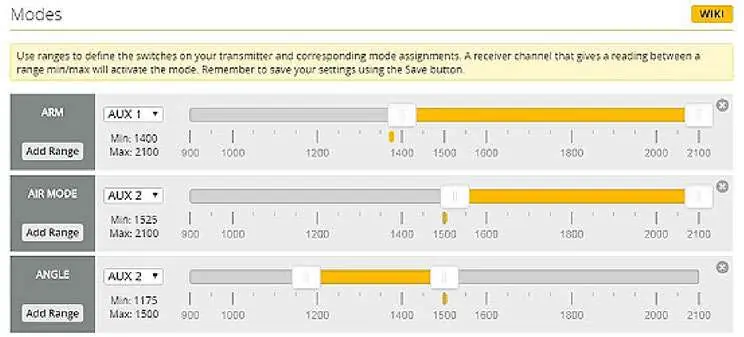
The Eachine Lizard 105S is a micro FPV racing drone. Before your first flight, ensure the propellers are installed correctly (CW/CCW) and the transmitter channel map is set to match the receiver version (TAER1234 or AETR1234). The drone must be kept level before arming. If the drone fails to arm, check that the minimum throttle on your transmitter is lower than the 'Stick Low' threshold in Betaflight.
Components
The package includes the Lizard 105S frame, Omnibus F4 PRO Corner NANO flight controller, BS-28A 4-in-1 ESC, 1104 KV6000 motors, 720P HD camera with DVR, and a 5.8G VTX. Specific receiver modules (Frsky, Flysky, or DSM2/DSMX) are included based on the version purchased.
Flight controller connection
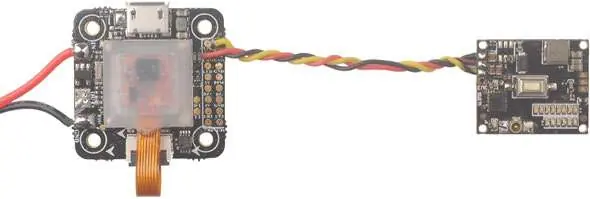
The flight controller features an OSD chip, current sensor, and barometer. The connection diagram highlights the layout for Lipo input, motor outputs (M1-M4), and peripheral connections like the camera (CAM) and serial-based receivers (UR3).
Binding procedures
Frsky BNF Version: Connect the battery while holding the bind button on the receiver. Once the green and red LEDs are solid, it is ready to bind. Use D16 mode on your transmitter.
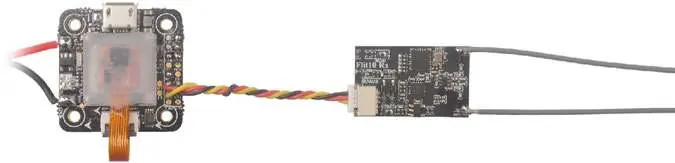
Flysky BNF Version: Connect the battery while holding the bind button on the receiver. The green LED will blink fast, indicating it is ready to bind. Ensure the transmitter is in AFHDS 2A mode.
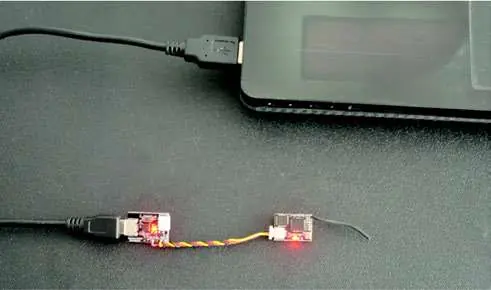
DSM2/DSMX BNF Version: Use the provided BM01 binding module. Connect the receiver to the module and plug the USB into a power source. The orange LED will blink fast, indicating bind mode.
Receiver configuration
If you flash new firmware, you must reconfigure the receiver in Betaflight Configurator. Enable Serial RX for UART3, select 'Serial-based receiver' in the Receiver Mode tab, and set the appropriate Serial Receiver Provider (SBUS for Frsky, IBUS for Flysky, or SPEKTRUM2048/1024 for DSMX).
OSD configuration
Connect the drone to a computer and open Betaflight Configurator. Navigate to the OSD tab to customize the layout, including battery voltage, timer, and flight mode display. You can also change the font layout in the OSD Font Manager.
Firmware update
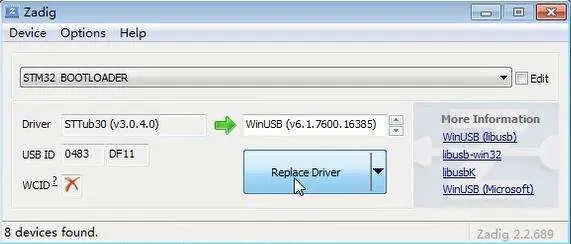
To update the flight controller firmware: 1. Install STM32 Virtual COM Port and Bootload drivers. 2. Open Betaflight and select 'OMNIBUS F4SD' as the target. 3. Enter DFU mode by soldering the boot pad or using the 'flash' command. 4. Use Zadig tools to replace the driver with WinUSB. 5. Reconnect and flash the firmware.
Manufacturer information
Eachine
Practical help
Common problems
Drone will not arm
Ensure the transmitter's minimum throttle is lower than the 'Stick Low' threshold (e.g., 987 < 1050). Ensure the drone is level.
Receiver not binding
Verify the correct binding procedure for your specific receiver type (Frsky, Flysky, or DSM). Ensure the transmitter is in the correct mode (D16, AFHDS 2A, etc.).
Video format incorrect
Hold the Start/Stop button on the DVR while powering on the drone to toggle between NTSC and PAL formats.
Before use
- Verify propellers are installed correctly (CW/CCW).
- Check transmitter channel map (TAER1234 or AETR1234).
- Ensure battery is fully charged and securely connected.
- Keep the drone level before arming.
- Verify receiver binding status via LED indicators.
Specs in practice
- Flight Controller
- Omnibus F4 PRO Corner NANO with built-in OSD and Damping box IMU.
Images and diagrams
- Connection diagrams illustrate wiring for the flight controller, ESC, VTX, and DVR.
- Binding diagrams show the location of the bind button and LED status meanings for different receiver types.
Model compatibility
- Supports Frsky, Flysky, and DSM2/DSMX receivers depending on the specific BNF version.
- Requires Betaflight Configurator for setup and configuration.

Manual page author
Michael Turner
Technical manual editor
Reviews PDF manuals for structure, safety notes, and practical product details so readers can find the right information quickly.