Power / EV Chargers
User Manual for Maverick QBit 4WD RTR Brushed Monster Truck 1-MVK151000
Quick start guide and user manual for the Maverick QBit 4WD RTR Brushed Monster Truck (1-MVK151000). Includes setup, binding, transmitter controls, maintenance, and troubleshooting.
Table of contents
Manual images
Click an image to enlargeQuick Start Guide
The Maverick QBit is a hobby-grade radio-controlled vehicle. Before operating, ensure you have read all safety precautions. The model requires regular maintenance and is not a toy.
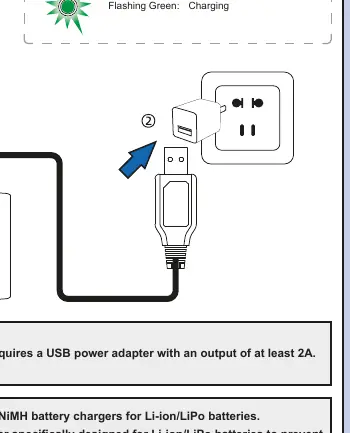
- Charging: Use only the supplied charger for the 2S Li-ion battery. The charger requires a USB power adapter with at least 2A output. A solid green LED indicates a full charge, while flashing green indicates charging.
- Transmitter Setup: Install four 1.5V AA batteries into the transmitter. Use high-quality alkaline or rechargeable NiMH batteries.
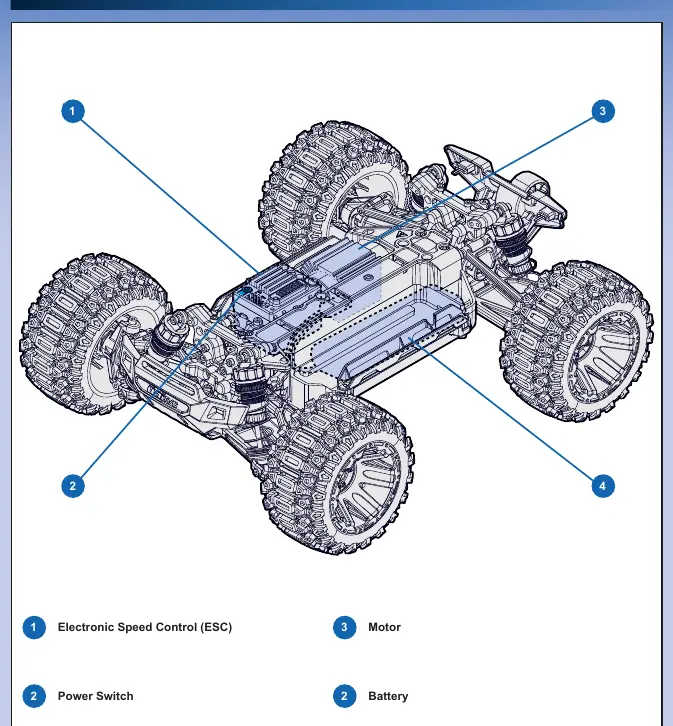
- Chassis Preparation: Access the battery compartment by releasing the rear body lock and lifting the shell. Secure the battery with the Velcro strap and connect it to the ESC/Receiver.
Transmitter and Controls
The transmitter provides control over steering and throttle, with several adjustment options:
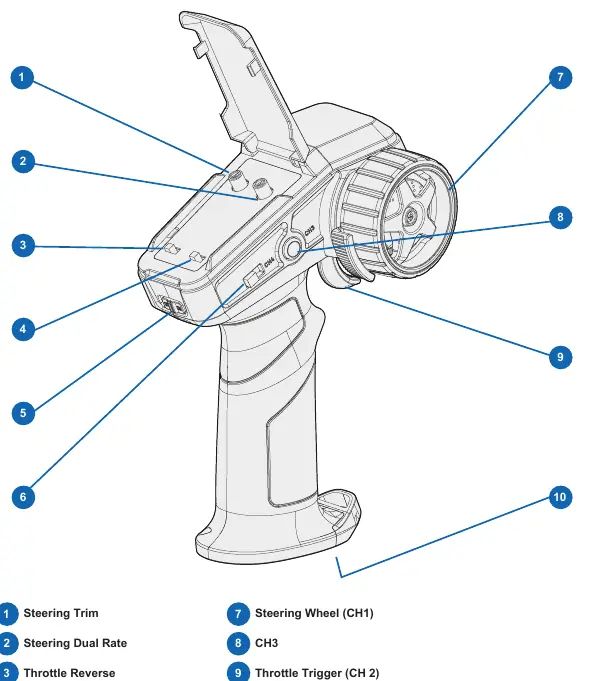
- Steering Trim: Fine-tunes the steering center point to ensure the car drives straight.
- Steering Dual Rate (ST D/R): Adjusts the steering throw. Increase for tighter turns, decrease for better stability at high speeds.
- Throttle Speed Limiter: Allows setting the maximum throttle output to 50% (L), 75% (N), or 100% (H).
- Throttle/Steering Reverse: Switches the direction of the controls if necessary.
Binding and Fail Safe
Binding creates a secure connection between the transmitter and the ESC/Receiver. It usually happens automatically. If it fails, manually bind by turning on the transmitter, then pressing and holding the bind button on the receiver for about 3 seconds until the LED flashes.
The Fail Safe system automatically applies brakes if the signal is lost. To set it: turn on the transmitter and car, press the setup button on the receiver, set the throttle to neutral, and hold the setup button until the LED stays solid.
Maintenance and Troubleshooting
Regular maintenance is essential for performance:
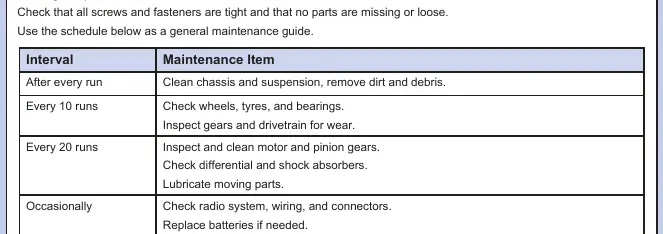
- After every run: Clean the chassis and suspension; remove dirt and debris.
- Every 10 runs: Check wheels, tires, bearings, gears, and drivetrain.
- Every 20 runs: Inspect and clean motor/pinion gears, check differential/shocks, and lubricate moving parts.
Driving in Wet Conditions
The model has water protection for radio components but is not waterproof. Avoid full submersion. After driving in wet conditions, dry the model completely, check for trapped water in tires and suspension, and reapply bearing oil or grease to maintain performance.
Practical help
Common problems
Car does not move
Check battery connection, ensure battery is charged, or verify binding setup.
Vehicle does not follow driving inputs
Check servo reverse switch settings, ensure wires from ESC to motor are connected, or adjust steering trim.
Signal loss or weak signal
Check transmitter batteries or rebind the system.
Before use
- Charge the drive battery fully.
- Install 4x AA batteries in the transmitter.
- Ensure the transmitter is switched on first, then the car.
- Verify the throttle and steering are in neutral positions.
- Check that the body shell is securely attached.
Specs in practice
- Steering Dual Rate (ST D/R)
- Adjusts the steering throw; increase for tighter turns, decrease for stability.
- Throttle Speed Limiter
- Sets max speed: 50% (Beginner), 75% (General), 100% (Expert).
Images and diagrams
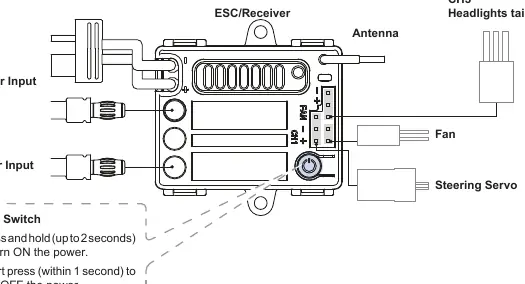
- ESC/Receiver: Shows power input, motor output, and servo connections.
- Transmitter: Identifies trim dials, dual rate, and throttle/steering controls.
Model compatibility
- Not waterproof; avoid full submersion.
- Use only Li-ion/LiPo compatible chargers.
- 2.4GHz radio system works best within a clear line of sight.

Manual page author
Emily Carter
User documentation editor
Prepares concise manual descriptions and highlights the most useful setup, operation, and maintenance information for readers.