Power / Batteries & Chargers
User Manual for EBL S120 120W Flexible Solar Panel
Quick guide for the EBL S120 120W Flexible Solar Panel. Includes installation steps, wiring diagrams for series and parallel connections, technical specifications, and maintenance tips.
Table of contents
Manual images
Click an image to enlargeQuick Guide
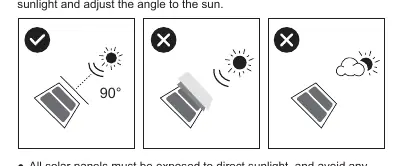
The EBL S120 is a 120W flexible solar panel designed for emergency charging and portable power needs. For optimal performance, place the panel in an area with direct sunlight, avoiding shade from buildings or trees. The panel operates most efficiently when angled at 30-60 degrees toward the sun, typically between 9:00 am and 5:00 pm.
Package Contents
- 1x 120W Flexible Solar Panel
- 1x MC4 Cable
- 1x User Manual
- 8x Carabiner
- 10x Velcro Strap
Specifications
Max Power (Pmax): 120W
Max Load Voltage (Vmp): 21.7V
Max Load Current (Imp): 5.8A
Open-circuit Voltage (Voc): 27V
Short-circuit Current (Isc): 7.25A
Output Interface: MC4
Operating Temperature: -20°C to 60°C
Cell Type: Monocrystalline Silicon Cell
Installation
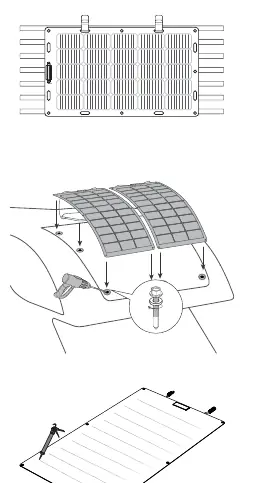
The panel can be installed on various surfaces. Ensure the surface is clean and dry. Use the provided carabiners or straps for temporary mounting, or secure the panel using appropriate hardware through the mounting holes. Avoid installing on damp or irregular surfaces to prevent distortion over time.
Wiring Connections
The panel is equipped with MC4 connectors. Always connect the cable to your device first, then to the solar panel. Protect the panel with a cloth before plugging in a device to prevent sparking.
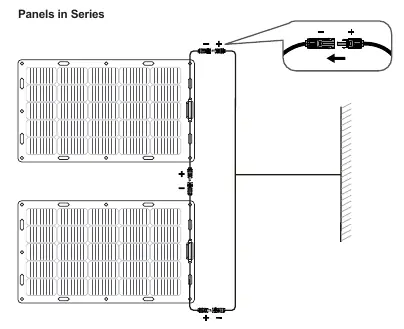
Series Connection: Connect the positive connector of one panel to the negative connector of the next. This increases the total voltage.
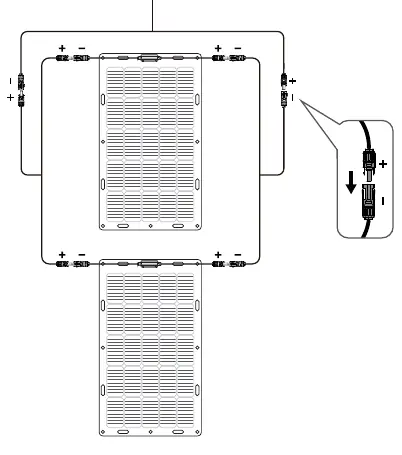
Parallel Connection: Use MC4 Y-connectors to connect positive to positive and negative to negative. This increases the total current. Only connect panels with similar electrical output in the same string.
Maintenance
Keep connectors dry, clean, and fully locked. Check all electrical connections at least once every 6 months. Clean the panel surface periodically with a mild, non-abrasive cleaning agent to remove dirt and dust, which can reduce power output. Store the panel in its box after it has cooled down. Contact [email protected] for warranty inquiries.
Practical help
Common problems
No charging sign on device
Check all connections, ensure the cable is secure, or try replacing the charging cable.
Low power output
Clean the panel surface of dirt and dust, ensure it is in direct sunlight, and check for shading from trees or buildings.
Panel distortion
Avoid mounting on damp or irregular surfaces, as long-term sunlight exposure may cause warping.
Before use
- Ensure all connectors are dry and clean.
- Verify that connector caps are hand-tight before connecting.
- Check that the device is compatible with 12V/24V input.
- Choose a location with direct sunlight (9:00 am - 5:00 pm).
- Protect the panel with a cloth before connecting to a device.
Specs in practice
- Max Power (Pmax)
- 120W - The maximum power output the panel can generate under ideal conditions.
- Open-circuit Voltage (Voc)
- 27V - The voltage of the panel when no load is connected.
- Operating Temperature
- -20°C to 60°C - The safe environmental temperature range for the panel.
Images and diagrams
- Series Connection: Connects panels in a chain (positive to negative) to increase total voltage.
- Parallel Connection: Uses Y-connectors to link panels (positive to positive, negative to negative) to increase total current.
Model compatibility
- Designed for charging 12V/24V Lead-Acid and Lithium batteries.
- Requires a solar regulator to protect the battery system from overcharging.

Manual page author
Emily Carter
User documentation editor
Prepares concise manual descriptions and highlights the most useful setup, operation, and maintenance information for readers.